

Problem posting
-
Why when I post a new entry to my blog does it NOT appear in the proper order? This is NOT a new problem. It HAS happened to me before but I didn’t ask why. I thought I may have made an error. Today I posted a new blog post and it is NOT in the proper order, nor are the rest of my posts.
Another problem I am having is adding links to my posts.
Can anybody please help me with these problems?
Please, I do pay for this blog space and this has only begun since I renewed my blog space.
Please contact me by email at ; (email visible only to moderators and staff)
Thank you in advance. I do hope this can be fixed and solved, else I may move my blog to a different hosting site. That is not a threat, just the truth.
charlie ehlen
owner “The old soapbox”
WordPress login name davidambrose66.comThe blog I need help with is: (visible only to logged in users)
-
Hi there,
I see that currently the two posts: And now………for something compltetly different and Only in Louisiana are at the top because you set those as sticky posts. Sticky means that no matter what you publish after, that post will be at the top. Then after those two Sticky posts, your most recent post: Catching up…………sort of is third.
If you no longer want those posts at the top, please go in an edit those posts and remove the check next to Stick this Post to the front page in the Publish module:
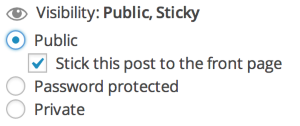
As for adding links, you can do that selecting the text and clicking on the link button at the top as seen here:
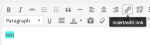
Then you can enter the link you want. You can find more information about this here:
Let me know if you have any questions with this!
-
Thank you very much for this. I will try this. It figures that it was my error.
Again, thanks for this reply. -


- The topic ‘Problem posting’ is closed to new replies.
 WordPress.com Forums