Problem with font in "Button" theme
-
Hello all,
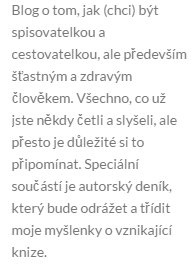
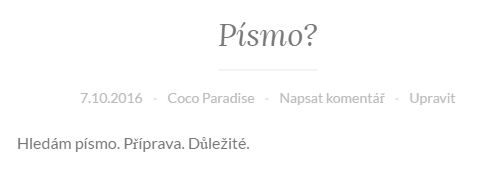
I am dealing with a problem concerning font that is used on a theme I installed – “Button”. I think that the font is probably Open Sans which should be available in all different alphabets (according to Google). I will use Czech the most on my blog but it seems to be a problem for some letters to be shown correctly. You can see it in the 1st blogpost (sample) and also in the sidebar. I am wondering how to get help with this. Is it really Open Sans? Who do I contact to let the font be also correct while using Czech language? Can anyone just change the setting in the “Button” theme?
Thank you for any help, I couldn’t find any solution myself, only how to add custom fonts…
Have a great weekend!
Lucie
The blog I need help with is: (visible only to logged in users)
-
Hi Lucie,
Button uses the Lato font by default. If you’d like to switch to Opens Sans, or an alternative font, then you can do so via the Fonts panel of the WordPress.com Customizer.
If you’re still seeing an issue with the way some of your letters appear, then please upload a screenshot to your Media Library or point me to the specific letters that aren’t appearing correctly.
You can find a screenshot of what I’m seeing when viewing your site here:

The problematic letters aren’t immediately obvious to me and, so, it’d be really helpful if you could explicitly point them out to me in your next reply (if changing fonts doesn’t resolve the issue).
Thanks!
-
Hello,
thanks so much for your answer! :)
I tried changing the font to Open Sans and it works well. However, I kinda like the Lato font better (at least in the menu!) so I decided to send you one picture of the sidebar menu (when set to use the Default font settings) and one picture of the post itself when changing the font to Lato manually. Hope this helps! It is weird because in your screenshot everything is alright.
Looking forward to your reply,
Lucie -
Hi Lucie,
Can you check to see if the font renders correctly in a different browser or if it’s only Chrome that you notice the problem on?
-
Hey,
I tried Internet Explorer and it is broken as well. In Safari, it looks fine at the first sight but when I zoom it, some of the letters still look they don’t fit the rest…
Thx :)
-
Hi Lucie,
Thank you for clarifying! I’m going to do some digging into this and will get back to you with what I find.
-
Hi Lucie,
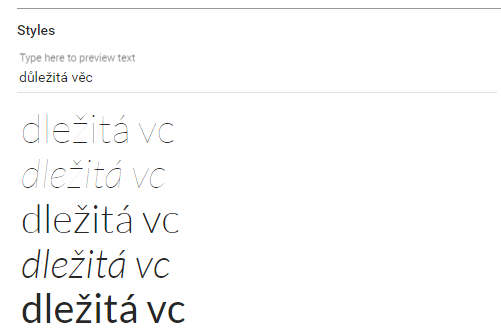
So that we can determine whether the issue is with the font itself, can you please enter text into Lato’s font page and let me know if it renders correctly there? You can access the page here:
-
Hello,
so I believe it’s a problem with the font itself. You can see it properly here. Is there any chance to change it, or do I have to choose another font? In that case, I would use Open Sans for the main text but I would really appreciate if the names of categories in the menu could stay in Lato (they’re in English). Is there any way to do so?
Thanks a lot!
-
Hi Lucie,
Thank you for confirming! I’ve reported back to the team to see if there’s anything that can be done on our end to fix this issue.
If you do change the font of your site, then you’d need the following custom CSS to keep Lato on your menu’s titles:
.main-navigation a {
    font-family: Lato,Helvetica,sans-serif;
}
It’s worth noting that the option of adding custom CSS is included as part of the WordPress.com Premium or Business plans.
Let me know if you have extra questions on that and I’ll let you know when I hear back from the team.
-
Hi Lucie,
I’ve heard back from the team, who have confirmed that the issue is with the Lato font itself and there is little that can be done on our end. Mac has a better fallback option than Windows, which is why I was able to view your text correctly on my end.
The best option here is for you to choose a font that supports Czech characters by default.


- The topic ‘Problem with font in "Button" theme’ is closed to new replies.
 WordPress.com Forums