

Problem with Music Player Widget
-
Music Player Widget has gone insane. It is now white and cannot be adjusted… the tracks are not i the same order… it is now a washed out WHITE color. THE sound element is essential to my page. I have written to you now every day for a few days. Can someone please respond Thank you.
The blog I need help with is: (visible only to logged in users)
-
Hi there,
First, I noticed you have submitted multiple requests for support. To keep our conversation organized, I’m going to respond to your questions here and close the other requests. Please keep all further correspondence in this thread.
Regarding the color of the widget, it looks like this is indeed a small bug of sorts causing the colors to be off. I’ve alerted our theme developers and will let you know as soon as I know more. In the meantime, a quick fix would be to set the Music Player widget to use the dark color scheme instead of the light one. That can be adjusted from the playlist settings as shown here:
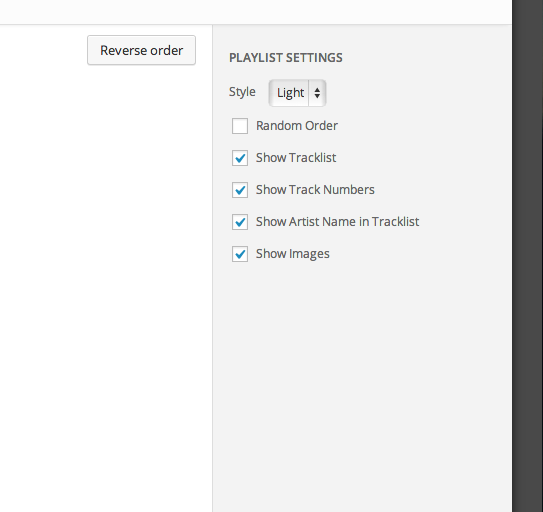
Regarding the track order, this issue should have been resolved. Can you try removing and then re-adding the tracks and see if you still experiencing trouble?
-
-
Yes, the ordering issue was fixed recently. The color issue (with the light background) is something we’re actively working on. I’ll let you know as soon as I know more!
-
Thanks… keep at it… it is astounding what your work is making possible for us in the modern world! You are participating in Human Evolution… (don’t let it go to your head!)… – smiley face –
-
We’re just happy to give individuals a place to publish online! I’ll keep you posted on the light color scheme for the widget.
-
Hello,
The washed out text has been fixed; feel free to use either the light or dark color scheme for playlists now. I’ve also added a custom CSS rule to remove the text shadow (just from playlists) that was being inherited from the theme.
Thanks for your patience!
Regards,
Kirk -


- The topic ‘Problem with Music Player Widget’ is closed to new replies.
 WordPress.com Forums