

Problem with pictures exhibition in pages
-
After a few days, but this is not constant in all the pages, when reading the page, the pictures inside these pages change their size, appearing much larger than I edited in the page. This not occur in all my pages. So, I try to fix it editing the page and resizing all the pictures again.
-
Hi Carlos!
Can you point me to a page on your site where this is occurring at the moment so I can take a closer look?
-
Jeremy, in this page below, several pictures is not in the same size that I confugured in the edit page; i.e. right below an Alfred Nobel portrait, there is a picture from a powder can, when I open this page in WordPress edit page, this picture appears much smaller. I realized that after published a new page, for example, during a certain time the pictures remain in their correct size. After a few weeks, several pictures change the size. This problem only occurs when the picture I attached in the pages are originally larger then the size I adjust in the page.
-
Hi Carlos!
right below an Alfred Nobel portrait, there is a picture from a powder can, when I open this page in WordPress edit page, this picture appears much smaller.
I believe you’re referring to this image (Screenshot):
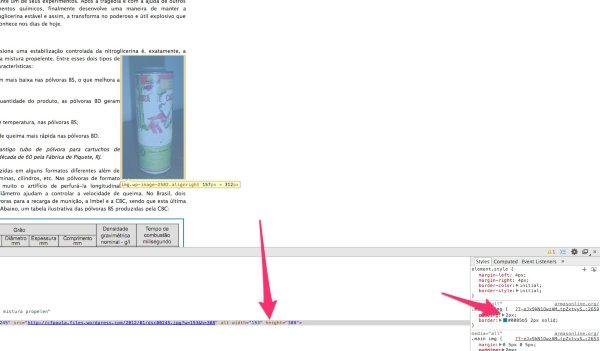
Is that correct? If so, that image is appearing as the custom size you have set in the editor (153 x 308). You can see this custom size when you click on the pencil icon from the Visual Editor here:
https://cfpaula.wordpress.com/wp-admin/post.php?post=2519&action=edit
I wanted to also point out the padding on the right-hand side that is added to the images. That adds 2px to each side, which is why the sizes don’t match up exactly.
Can you point me to another image that is appearing a different size than you originally specified?
-
Dear Jeremy, tranks a lot for your unvaluable help. Let me tell you what I discovered. When I upload a picture to Media Library, with a size of, for example, 200X500, and in the page I left it and use it in its original size, this image never changes its appearance when I open this page in the browser. But, if I upload to Media an image with 1000X1500 but, when I put it the page I choose a custom size, during a certain amount of time the browsers show this image in the choosen size. So, after thsi time, sometimes, and this is not a rule, this image begins to be shown in a much larger size. When I noted that, I edit the size of this image again and always returns to normal.
-
Hey Carlos,
Thanks for the additional details! The effect you described shouldn’t be happening. If you set a custom size for an image, it should stick to that custom size (not grow over time). I’m unable to recreate this on my side at the moment. Is this happening every time you add an image with a custom size?
-
Jeremy, unfortunately it is a random problem. There are other pages, with large pictures that I customized its size and this problem does not occurs. I think that maybe this is a WordPress bug.
-
Hey Carlos,
I understand. In order to troubleshoot further, I need to be able to see this happening. If possible, could you take a screenshot of the original upload size and then the size of the photo after it has changed? That could help me to narrow this down.
Instructions for taking a screenshot can be found here:
If you could upload the screenshots to your Media Library so I can take a look, I would appreciate it!
-
Jeremy, good idea. I will go to locate a page with this problem and make a screen-shot to my library. I will advise you soon. Thanks.
-
-
Jeremy, look at my Media Library. The first screen shot is how the picture is shown right now, in the Google Chrome or I.E. browsers. The second picture is from the Edit Page; look for a great difference in the size of the pistol picture. I did not correct this page until you can examine it.
-
Awesome! I appreciate you taking these screenshots. Could you now point me to the page on your site where this picture is uploaded? I couldn’t tell from the screenshot.
-
Jeremy, this link, is it useful? https://cfpaula.wordpress.com/wp-admin/post.php?post=636&action=edit
-
Perfect Carlos! So, that image is set to display in full size, meaning it will display as close as possible to the original dimensions (1193 x 747). However, the content width of your blog isn’t large enough to accommodate that size. So, it scales the image down to 708 x 446 to fit within the content but still retain the original dimensions of the image.
If you would like to have the image display as a smaller size, you can change the dimensions as described here:
http://en.support.wordpress.com/images/image-settings/#attachment-display-settings
Does that help to clarify?
-
Jeremey, I think that the things are more clarified now. I understand the correct way to configure image sizes and how to display them. What is my intention? I like to post some images in my pages which occupies the same width of the text, or near the textt width. Now, when the reader clicks on them, I want that image opens in a much more larger size, like a zoom buttom. So, to do this I update a larger image in the media library but when I put it in the page, I choose to customize the size. So, am I doing this in the correct way?
-
Hey Carlos!
I understand. In order to achieve what you’re looking for, you will want to link the image to the media file as explained here:
http://en.support.wordpress.com/images/image-settings/#attachment-display-settings
Then, when readers click the image, it will open up in a new tab at full height and width. The size of the image within your text is automatically cut down to the width of the content so if you upload an image that is 1000px wide, it will display at 700 px wide due to the width of your content. Does that make sense?
Linking the image to the media file or attachment page (described in the link above) will give you the effect you’re looking for!
-
Jeremy, now I understand how it works correctly. I will revise my pages and use this settings. Thanks a lot ans one more time, I am very grateful with your kind and very useful help. Big hugs.
-
-
Ok, let me try some modifications here and, if necessary, I will contact you. Regards, my friend.
-


- The topic ‘Problem with pictures exhibition in pages’ is closed to new replies.
 WordPress.com Forums