

PROBLEM WITH SHARE BUTTON
-
Hi!, i’ve notice that the button that gives me the possibility to share a post by sending an email to someone, doesn’t work. It seems to work, because it says: “you have sent an email”, but actually it doesn’t arrive.
what can be the problem?
I’ve tried with different email adresses ….
thank youThe blog I need help with is: (visible only to logged in users)
-
Hi there,
I tested the sharing button on your post titled “Benvenuti all’Inaugurazione del nuovo Blog COCO’!”. When I entered the email address and filled out the CAPTCHA form, the email was delivered immediately. Can you make sure the email was not caught in your spam filters?
-
hi jeremy,
thank you for your answer, yes i can also say that when i fill the CAPTCHA form ,the email is delivered immediately, but unfourtunatly it doesn’t arrive to destination, and i’ve seen in my spam filters, but there is nothing. I’ve tried different emails…always the same… -
Hi there,
Can you explain a bit more by what you mean? When you say “the email is delivered immediately”, do you mean that you receive the post through email to the address you specified? If so, can you clarify “unfourtunatly it doesn’t arrive to destination”?
-
hi, I mean that wordpress tells me:” You have shared this post with …(and the email adress)”, so it seems that the email was delivered succesfully.
But actually no email is arrived to the email adress I specified… -
Hi there,
I understand. Can you let me know the email address you’re trying to share the post with? Just a note, the email will appear [redacted] in the forum post. However, it will be visible to staff members.
-
Yes no problem,
you can try with (email visible only to moderators and staff) or (email visible only to moderators and staff) or (email visible only to moderators and staff)thank you
-
Hi!
I sent your most recent post to the Gmail address you mention. Can you check your inbox to see if it is there? I also sent it at the same time to my personal email address and the post appeared immediately. Please also check your spam filter and Social tab.
-
hi,unfortunatly nothing is there …i’ve seen everywhere, but nothing is arrived … i just dont’ know how it can be possible.
For me is not a problem, i can chose to delete the button,and hope that people share with social network, however if would be great if there’s the possibility to use also the email share button ! :-) -
That’s puzzling! We’ll get this working for you. I just tried two additional Gmail addresses, and the email arrived each time. However, in both cases, it was placed in the Spam folder. Can you try loading the URL below when logged into your Gmail account?
https://mail.google.com/mail/u/2/#spam
Let me know if you find the article there!
-
Hi, i’ve tried to load up the link you gave me, but gmail shut the page down, and log me out from my account. :-(
but i’m sure that no email from wordpress is in the spam, because nothing is arrived…
however, thank you for your work! -
Hi!
That’s odd! The email is working on my side every time I enter it into the sharing button. I just resent the post again to (email visible only to moderators and staff). Regarding Gmail shutting down and logging you out of your account, instead of clicking the link, can you try the following steps from Gmail?
- On the left-hand side of the screen, hover over the “More” option
- Click “Spam” from that list
That should take you to your Spam folder.
-
yes,i know, i’ve tried it also last time but there are only 6 spams, and they aren’t emails from wordpress.
-
Hi,
I’m sorry you’re still having trouble! Can you also check your trash folder for emails from WordPress.com? This is still working immediately on my side so I believe there might be a filter or setting on your inbox preventing the arrival of the post emails.
-
Hi, is not a problem for me that’s ok:-) I can’t find trash folder on gmail, where is it?and i’ve control the filter and there is nothing that prevents the arrive of any emails.
-
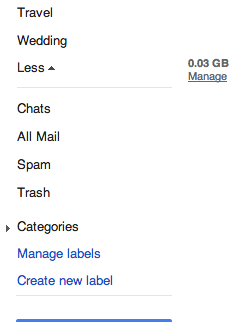
On the bottom left-hand corner of the Gmail tab, you should see an option for Trash. You may need to hover over a link for “More” before you see it:
-
-
Hi there,
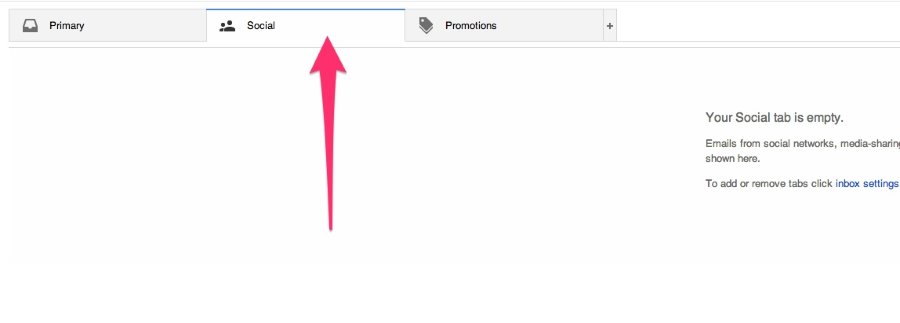
I just want to be sure, you’re checking the “maddalenafilipponi” address correct? Nothing is appearing under the Social tab shown here?
-
-
Hi there,
I didn’t want you to think I forgot about you! I’m still investigating. I’ll let you know as soon as I have more info.


- The topic ‘PROBLEM WITH SHARE BUTTON’ is closed to new replies.
 WordPress.com Forums