

Problem with Tlk.io Widget
-
It looks like I’m discovering a few problems today! I’ve now discovered that the Tlk.io widget has stopped working on our sidebar. Does anyone know how I can try and fix this?
Thanks,
TomThe blog I need help with is: (visible only to logged in users)
-
I’ve realised that the widget appears sometimes but sometimes it doesn’t. This seems very weird.
-
Come and go display is usually an indication of connectivity issues.
1. If you are not running one of the browsers and versions listed at http://browsehappy.com/ please try upgrading or switching first.2. If you are using an IE browser in compatibility mode please disable that mode. http://www.sevenforums.com/tutorials/1196-internet-explorer-compatibility-view-turn-off.html
3. If you are running one of the browsers and versions listed at http://browsehappy.com/
(a) Try clearing your browser’s cache http://www.google.com/support/accounts/bin/answer.py?hl=en&answer=32050
If applicable see here for instructions on how to clear the cache for Chrome and Safari on the iPad:
http://browsers.about.com/od/howtousemobilebrowser1/ss/safari-ipad-clear-cache.htm
http://browsers.about.com/od/howtousemobilebrowser1/ss/How-To-Clear-Browsing-Data-In-Chrome-For-Ipad_6.htm(b) Make sure that you have both third-party cookies enabled and JavaScript enabled
http://en.support.wordpress.com/third-party-cookies/
http://www.google.com/adsense/support/bin/answer.py?answer=12654(c) Disable all browser extensions or add-ons temporarily.
(d) Try enabling HTTPS: http://en.support.wordpress.com/https/
Add both *.wordpress.com and *.wp.com to your list of trusted sites under the Security tab. Make sure to uncheck the box for “Require server verification (https:) for all sites in this zone.” http://en.support.wordpress.com/https/#frequently-asked-questions
4. You can use this link to see if your flash is up to date. http://www.adobe.com/software/flash/about/ If it’s not then go to http://www.adobe.com/products/flashplayer/ and download and install the latest version of flash.
5. Try using another browser.
6. If you are not successful let us know:
(a) Exactly what kind of device you are using to connect to the internet and to WordPress.com.
(b) Exactly which browser (and version of it) you’re using by checking here if necessary http://www.whatbrowser.org/
(c) Exactly what you experience including what any error reports you receive state.I’ll tag this thread for a Staff follow-up. Please subscribe to the thread so you are notified when they respond and please be patient while waiting.
-
I followed all of them steps and it’s still not displaying. One thing I’ve noticed is that it works fine on the homepage but not on this page: http://technoteamblog.wordpress.com/what-do-you-think/ for example.
Here’s the necessary information you mentioned in that last post:
a) I’m using a PC that’s running Windows 8.1.
b) Google Chrome version 32.0.1700.107 m
c) The Tlk.io Widget (titled “The TechnoTeamBlog Live Chat”) is not displaying on some pages of my blog (technoteamblog.wordpress.com).If you require any more information just let me know.
Thanks,
Tom -
I see the widget on your post at http://technoteamblog.wordpress.com/what-do-you-think/:
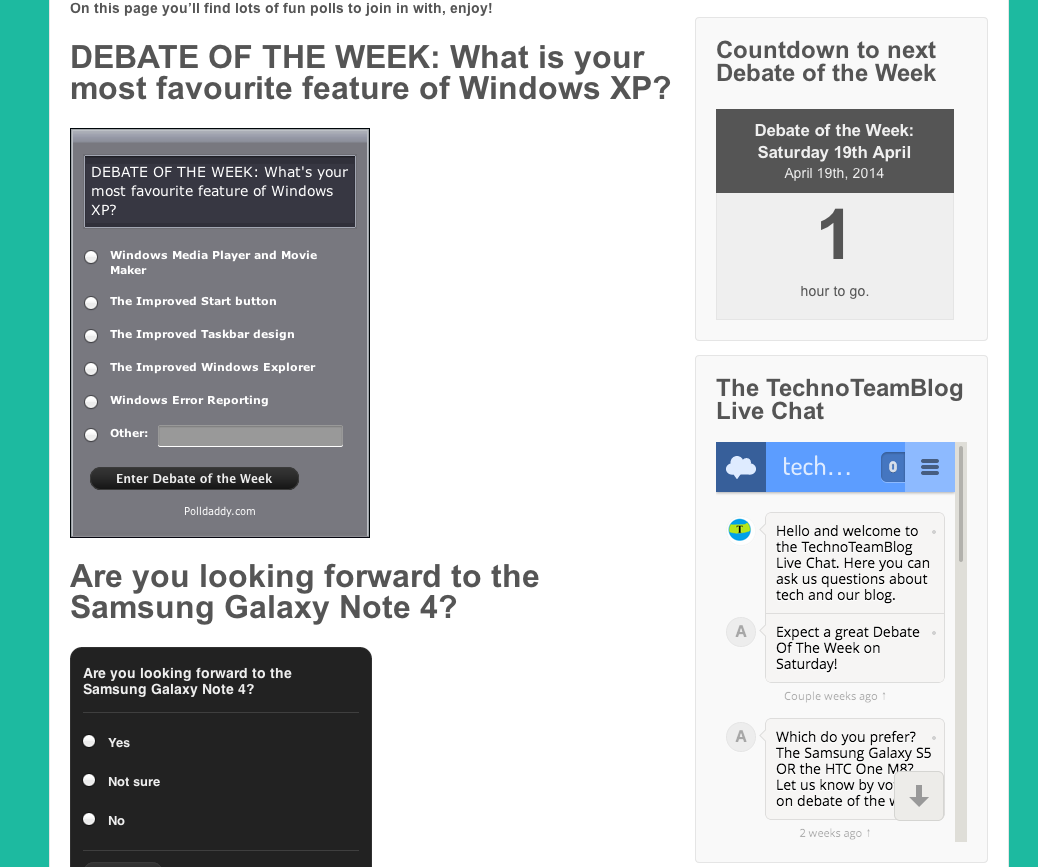
Were you able to resolve this issue since you posted your question?
For more information, you might find the documentaion on the tlk.io widget useful: http://en.support.wordpress.com/widgets/tlk-io-widget/
-
Well it’s weird because sometimes it works and sometimes it doesn’t even appear. When I went onto the post yesterday it was fine but earlier today it wasn’t appearing again.
Do you know what the problem could be?
-
I’m not sure, unless maybe it’s a connection issue? It’s a pretty new widget so there could be some traffic issues connecting with their service.
If you could keep an eye on it and take a screenshot the next time it doesn’t show up, and upload it to your media library, that would be awesome.
-
Ok, thanks. I’ll keep an eye on it over the next few days and take a screenshot if and when it stops working properly. Should I just upload it to my media library and then let you know when it’s uploaded here on the forums?
-
That would be perfect. Thanks!
You might also check this from different computers/locations as well as in different browsers to see if that makes any difference, and let me know that as well.
-
I’ve uploaded a screenshot of the widget not appearing onto technoteamblog.wordpress.com’s media library. Its title is “TechnoTeamBlog Live Chat not appearing”. Do you need a link to it or can you find it anyway?
Here’s information about device and browser:
Web Browser: Google Chrome
Device: Windows PCIf you need any more information just let me know. I’ll check to see if I experience the same problem on another web browser and post my results here.
Thanks,
Tom -
The widget seems to work fine on Firefox. I refreshed the page about 5 times and the widget eventually appeared every time. This was also the case with Internet Explorer.
Any ideas what the problem could be?
-
I’m not sure. I’ve checked your site in Chrome on a PC as well as a Mac, and the widget is loading on my end, so it doesn’t seem to be an issue with Chrome itself.
This makes me think that it could be a connection issue between your computer/browser and Tlk.io. Have you been able to check on any other computers or at different locations? Have you heard any reports from users?
You might also check your security settings in Chrome and try disabling pop up blockers to see if that makes a difference.
-
@jackiedana I’ve tried on my iPad and the widget appeared then all the time.
I think I have the security settings on Chrome disabled anyway so I don’t think that’s the problem.
What can I do to try and solve a connection issue?
Thanks,
Tom -
It’s good to know that it works on the iPad, so it’s not your internet connection. It sounds like there could be some issue with your computer. Have you tried checking your site in Chrome on a Windows computer at a different location? If you use a laptop, have you tried logging in at a different location on the same machine? That would be good to know.
At this time, I’m not sure what else to suggest, since I cannot reproduce the issue on my end and there’s not yet enough data to narrow it down to computer/browser/connection. I’ll need to keep an eye out for others who may be experiencing this issue to see if I can narrow down what could be causing it.


- The topic ‘Problem with Tlk.io Widget’ is closed to new replies.
 WordPress.com Forums