

Problems customizing Freshy
-
Hi there, Im experiencing some problems when I try to customize Fresy’s menu. So far I have just changed the image’s url but the menu gets screwed in IE6 and IE7, here is a screencap:
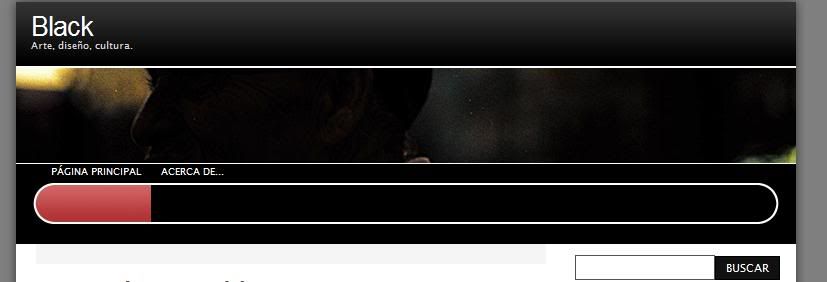
As you see the text in the menu gets displaced.
The modifications are working fine with Safari and FireFox but not with Internet Explorer 7 and IE6 looks even worse.
Here is my modified CSS code:
.description {
color:#d9d7d7;
}.menu {
list-style-type:none;
background:url(‘http://img.photobucket.com/albums/v505/Lacrimology/menu_bg.gif’) 50% 0 #515151 repeat-x;
height:80px;
width:780px;
border-top:1px solid #FFFFFF;
overflow:hidden;
margin:0;
padding:0;
}.menu li {
background:none;
display:table-row;
vertical-align:middle;
float:left;
height:80px;
padding:0;
}.menu li.last_menu,.menu li.right_menu {
float:right;
}.menu li a {
font-size:.8em;
text-transform:uppercase;
line-height:normal !important;
display:table-cell;
vertical-align:middle;
height:80px;
background:url(‘http://img.photobucket.com/albums/v505/Lacrimology/menu_triple.gif’) top left transparent repeat-x;
color:white;
text-decoration:none;
padding:0 10px;
}.menu li a:hover,.menu li a:active {
background-position:center left;
color:#FFFFFF;
}.menu li.current_page_item a {
background-position:bottom left !important;
color:#FFFFFF !important;
}.menu li a.first_menu {
padding-left:35px;
background-repeat:no-repeat;
background-image:url(‘http://img.photobucket.com/albums/v505/Lacrimology/menu_start_triple.gif’);
}.menu li a.last_menu,.menu li a.last_menu_off {
padding-right:35px;
background-repeat:no-repeat;
background-image:url(‘http://img.photobucket.com/albums/v505/Lacrimology/menu_end_triple.gif’);
background-position:top right;
}.menu li a.last_menu:hover,.menu li a.last_menu:active {
background-position:center right;
}.menu li.current_page_item a.last_menu {
background-position:bottom right !important;
}.menu li.lang_menu {
float:right;
}.menu li.lang_menu a span {
width:19px;
height:80px;
overflow:hidden;
text-indent:100px;
display:block;
}.menu li.lang_menu a {
display:block;
width:19px;
cursor:pointer;
}Help please and thanks in advance.
-
-
-
-
That’s tricky. I’m not so familiar with IE and have none at hand, what happens when you add
line-height: height 80px;to.menu li a? -
Is see a smilar behavior when float is defined to left for that class, so you may want to give
float: none;a shot -
-
-
Seems I fixed it. I removed the 80px height value from .menu li a and added a center padding value. Now time to test it to see if I didnt broke other browsers.
-
Great! Seems to be working on IE7 and FireFox on Windows and Safari and Opera on Leopard.
It seems I covered the principal browsers.
-
-
Damn, it was too good to be true. It seems its working on all the browsers I listed but its broken in the yet most used browser in the world, IE6 :/ The problem its the same, the menu its distorted.
Im pretty sure the problem happens because the blog its loading https://s-ssl.wordpress.com/wp-content/themes/pub/freshy/ie6.css when detects an IE6 browser.
There is any way to prevent this stylesheet to be called or there is a way to write specific changes in the css editor to be applied just to this file?
-
You can’t prevent the stylesheet from being loaded, but you can override (hopefully) the IE settings by declaring each definition more important in such a manner:
div.menu li a { display: block !important; float: left !important; height: 48px !important; } -
You lost me there, should I add the “important” declaration to my modified code? Im asking because your example comes from the ie6.css
This will be slow since I dont have at hand a computer with Windows since I am at home. I understand the reasons for not allow us to edit the original stylesheet directly but at least a little more control over our content will be very welcomed by the people who paid for the CSS editing features :/
-
I just took the example from the ie6 sheet, that’s right. I think you should copy the exact definition from into the custom css, override the ie6 sheet with this and work your way towards perfection.
As for your headaches with the little control you have. I’m with you. It’s a pain to do this with only one heavily filtered file.


- The topic ‘Problems customizing Freshy’ is closed to new replies.
 WordPress.com Forums