

Problems with Harmonic theme – tagline, hyperlinking and full width template
-
I have come across a few problems with Harmonic, which I would appreciate help with fixing please.
Firstly, the tagline is not visible.
Secondly, hyperlinks I had previously created within pages and which worked with my last theme are not working in Harmonic. This is an issue on a couple of pages, one of which can be seen here: http://soul-destruction.com/media.
Thirdly, when the full width page template is selected the images on the page do not show. I have changed the pages I want to be full width back to default template and removed all widgets, but I would like to be able to use widgets so would rather the full width template works.
Many thanks
Ruth
The blog I need help with is: (visible only to logged in users)
-
Hi Ruth!
Firstly, the tagline is not visible.
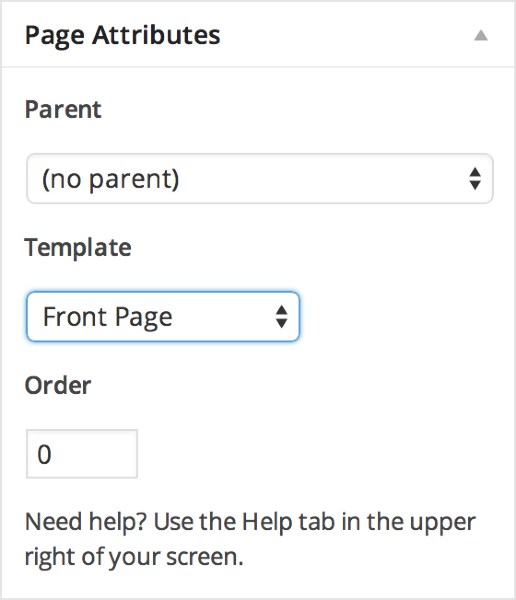
You can make the tagline visible by editing your Home page and setting the template to Front Page as seen here:
Secondly, hyperlinks I had previously created within pages and which worked with my last theme are not working in Harmonic. This is an issue on a couple of pages, one of which can be seen here: http://soul-destruction.com/media.
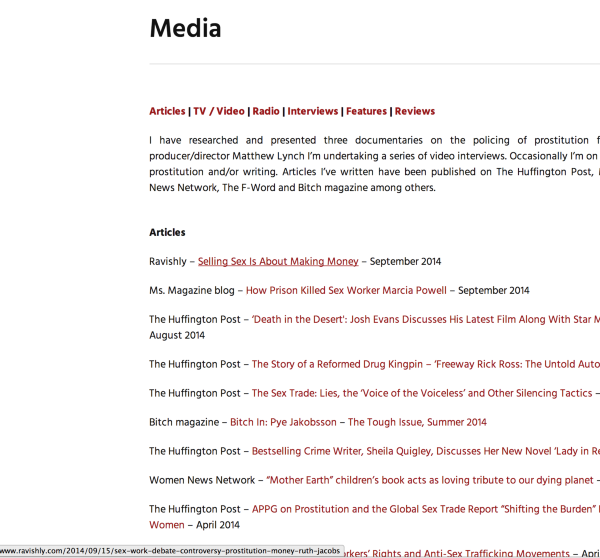
Can you tell me which ones aren’t working? I went through the links and I was able to click through the links. If you see in my screenshot below when I hover over a link you’ll see the site that it’s hyperlinked to at the bottom left hand corner of the page:
Thirdly, when the full width page template is selected the images on the page do not show. I have changed the pages I want to be full width back to default template and removed all widgets, but I would like to be able to use widgets so would rather the full width template works.
I was able to reproduce this so I have brought this back to our team for review. Once I hear back I will get back to you as soon as possible.
Thank you!
-
Hi Grace,
Thank you for your quick reply.
Does the tagline only show on the front page or does it show on other pages and posts as well when the front home page is activated please?
I don’t think I explained the hyperlink issue correctly as I meant links within the page aren’t working, not links to external sites. So on the top of this page http://soul-destruction.com/media there are links within the page: Articles, TV/Video, Radio etc., and they do not work to jump to the section. But when they are hovered over they appear to be hyperlinked. The only links within the page that work are Return to Top of Page.
I look forward to hearing from you on the other issue with the full width template too.
Many thanks
Ruth
-
Hi Ruth,
Does the tagline only show on the front page or does it show on other pages and posts as well when the front home page is activated please?
It’d be on any page that you designate as the Front Page template.
I don’t think I explained the hyperlink issue correctly as I meant links within the page aren’t working, not links to external sites. So on the top of this page http://soul-destruction.com/media there are links within the page: Articles, TV/Video, Radio etc., and they do not work to jump to the section. But when they are hovered over they appear to be hyperlinked. The only links within the page that work are Return to Top of Page.
It looks like the Page Jumps were not created correctly. Take a look at the guide below for further information:
http://en.support.wordpress.com/splitting-content/page-jumps/
I look forward to hearing from you on the other issue with the full width template too.
This has now been fixed.
Cheers!
-
-
-
Hi Grace,
I changed the page jumps as per the instructions on the page you suggested, but when clicked they jump to a few lines lower than they should when the page is viewed on a computer. I checked the Responsinator and on smaller devices the jumps work okay so I am wondering if the issue is to do with the menu which doesn’t show on smaller devices but is visible on larger screens where the issue is present.
The previous page I gave for jumps is now set up as a portfolio page, but there are jumps on this page http://soul-destruction.com/voices-of-prostitution-survivors/.
Many thanks
Ruth
-
I changed the page jumps as per the instructions on the page you suggested, but when clicked they jump to a few lines lower than they should when the page is viewed on a computer
Please note this is expected when you are logged in because of the admin bar at the top. When you are logged out, it shouldn’t happen.
Cheers!


- The topic ‘Problems with Harmonic theme – tagline, hyperlinking and full width template’ is closed to new replies.
 WordPress.com Forums