Problems With Welcome Page Theme Set Up
-
By default the home page is the URL of the site like this https://daisymae2017.wordpress.com/
-
Is LinkedIn in the Social Links Menu too or just twitter and Facebook? How do you set this menu up? It’s for the Blask theme. I see the Blask theme also has a blog set up. Does this mean I can still blog even though it is set up for portfolio. What does it mean by Parent Page? What’s a Social Link Menu and do I need it? I’m only on LinkedIn.
-
-
Featured Images
What happens if the picture is less than 924 pixels?
The image can still be used, but it will appear smaller next to some of the other images, so it will look less uniform.
Along those lines, I need to make a correction to what I said earlier about this example. The image on the right is added as content in the portfolio item. It is not a featured image, though the featured image is identical to the one in the content area.
As for images in the content area, the theme will limit those to a maximum width of 924 pixels.
As for the sidebar, can you put a picture in the side if I wanted as long as it is 276 pixels?
Yep, you can use even smaller images too. The Image Widget might be a good option for you.
I haven’t had time to watch the video or look at any of the links you sent but will look at them.
Ok, definitely have a look soon when you can. Reading/watching those will help you with getting a good grasp of the basics. We also have a series of video tutorials:
https://en.support.wordpress.com/video-tutorials/
Home Page
How do I know if I have a Home Page?…How do I set a Home Page up if I don’t have one?…So I have a home page-right?
All sites have a home page. Think of it as another way of referring to the front page of your site. As @timethief mentioned, you’ll find it at https://daisymae2017.wordpress.com. Right now you are showing blog posts on the home page.
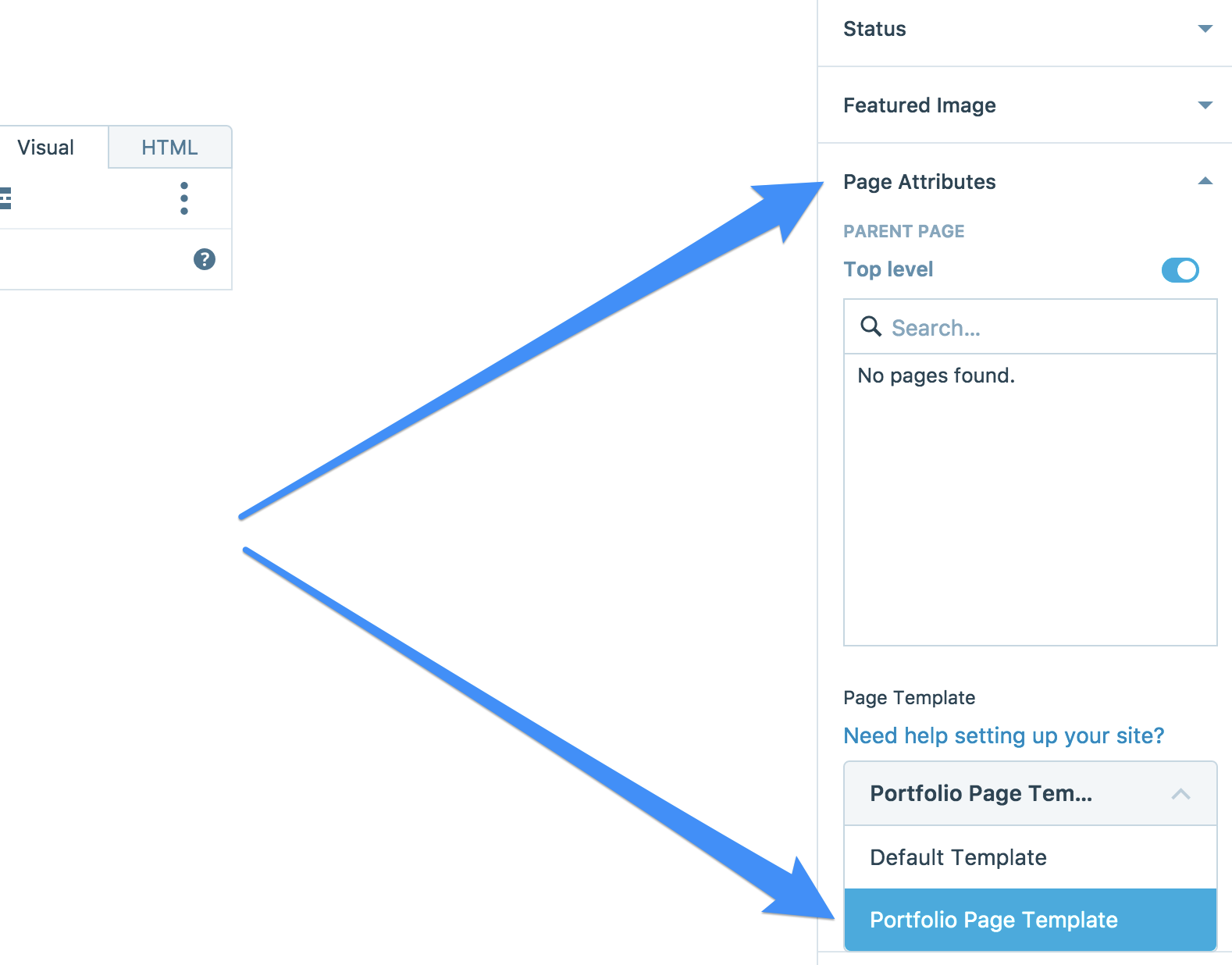
After you activate Orvis, you’ll also want to create a static front page, where you’ll display your portfolio items.You’ll be able to do that from My Site > Pages > Add. At the top of that screen, you can enter Home as the title of the page. On the right, look for Page Attributes. You’ll find a Page Template section there. Change the template to Portfolio Page Template.
Here’s a screenshot to show you what that looks like:
https://cldup.com/fvzm-L0feB.pngWhat goes in a Home Page?
It varies by theme, but for Orvis, the text you add to your Home page will appear where Orvis says things like “Hello I’m Orvis. I love food. I take photos” and all of the text beneath it.
In the editor of your new page called Home, you can enter any text you’d like to show there, and press the blue Publish button at the top right to save the changes.
Social Links Menu
What’s a Social Link Menu and do I need it?…Is LinkedIn in the Social Links Menu too or just twitter and Facebook? How do you set this menu up?
It can be used in Orvis to show links to the social networks at the bottom of the site.
It suports LinkedIn, and you can add as many social networks as you like.To get started:
- Open the Customizer
- Click Menus.
- Click Add a Menu and call it Social Links.
- Click the Create Menu buttton.
- Click the Add Items button, and choose Custom Links from the left.
- Enter the link to your social network profile in the URL field.
- Enter the title of the network in the Link Text field.
Continue to add items until you’ve added all of the networks you’d like. Then, use the blue save button at the top left of the customizer.
Blogs vs. Portfolios
I see the Blask theme also has a blog set up. Does this mean I can still blog even though it is set up for portfolio.
Definitely. A nice benefit of a portfolio theme like Blask is that it allows you to separate your blog from your portfolio projects.
If you decide you’d like to make your posts display on a separate page, let me know and I’ll help you do that.
Parent/Child Pages
What does it mean by Parent Page?
Parent and child pages are used to create a hierarchy within your pages.
So if you had a page called “Colors” and another page called “Green” you could set “Colors” as the parent page of “Green”. In this example, the URL would look something like:
http://example.com/colors/greenIf we made “Green” the parent, and “Colors” the child, the URL would look like:
http://example.com/green/colorsYou can specify a parent page for any other page within the editor in the Page Attributes section.
-
What are your thoughts on the theme Pictorio. Do I have to blog after each picture or just give a brief description? I’m leaning toward that one.
-
-
What are your thoughts on the theme Pictorio. Do I have to blog after each picture or just give a brief description? I’m leaning toward that one.
It’s a nice theme. It doesn’t use portfolio projects, but instead uses blog posts on the front page.
You can simply enter a title and a featured image without any other blog content, if you like.
Do I have to set parent and child pages?
No, that isn’t necessary to set up the Pictorio theme. In case you haven’t seen it here’s a link to the setup guide:
https://wordpress.com/theme/pictorico
If you have any questions about working through that guide, feel free to start a new thread.


- The topic ‘Problems With Welcome Page Theme Set Up’ is closed to new replies.
 WordPress.com Forums