

Publicity link not working on Facebook mobile
-
When I publicize my blog on Facebook, the mobile version (iOS for iPhone) is no longer showing a link to my site. It worked properly up until a few days ago. I have not changed any of my settings. On my latest post, it doesn’t give a link to the blog post, and it is showing several of the photos I used in a gallery, but those photos don’t link to my blog post; instead, they just open the photos themselves.
This is making it difficult to publicize the site on Facebook.
The blog I need help with is: (visible only to logged in users)
-
Hey Mark!
Just to make sure I understand correctly, when you Publicize the post to Facebook, the link on a normal browser works correctly. However, the link from your Facebook mobile app does not work. Is that correct?
-
That is correct.
On the desktop version, the title of the post is blue and clickable.
On the mobile version, there is no title, no link. The photos show, but they aren’t linking back to WordPress.
-
If you want, I could add you as a FB friend, so you can see firsthand. — Mark Smidt, Keokuk, Iowa
-
Hey Mark,
I’m assuming you’re referring to the post titled “Rhubarb a tart, fun ingredient for drinks, as well as pies”. Is that correct? If so, it looks like this appeared originally as a gallery type post on Facebook as shown here:
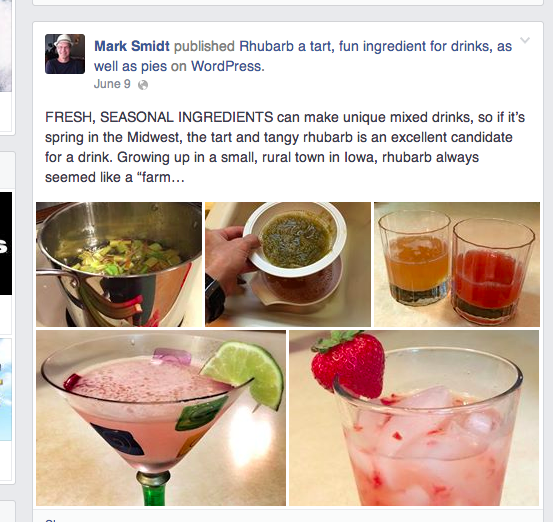
Because the post triggered a gallery format, the link to the post was hidden. I experienced this myself when I did a test with a post including a gallery. This appears to be more of an issue with how Facebook is currently displaying the information so I’m not sure how much we’ll be able to change. Either way, I’ve alerted our developers about the issue, and I’ll let you know what I’m able to find out!
I’m guessing you may have unpublished the post and then published it again and manually shared it to Facebook 17 hours ago. Is that correct? That changed the URL of the post from:
http://inthedeed.wordpress.com/2014/06/09/rhubarb-a-tart-fun-ingredient-for-drinks-as-well-as-pies/
to:
Since the date in the URL changed, the previous Facebook post will not work (the link goes to a dead page). I just wanted to let you know!
-
Yes, you are correct, I publicized it again 17 hours later. I probably did re-publish at that time. I’m not sure how all of that works, so somehow it may have inadvertently made the first into a dead link.
Thanks for passing along the problem to the developers. I use a lot of galleries in my blog in order to get lot of photos into it. I would think others might, too. And FYI, I’ve always used galleries and never had this problem before, so I don’t know if it’s a WordPress problem or a FB problem.
Thanks for the help!
-
Hey Mark,
I understand. I’ll pass along what I find out regarding galleries and publicizing to Facebook!


- The topic ‘Publicity link not working on Facebook mobile’ is closed to new replies.
 WordPress.com Forums