

Publicize settings in new posting experience
-
The reason why I don’t use the “improved posting experience” is because I have to do things manually to have it push the updates to Twitter and LinkedIn when I post an article. This is done automatically in the older posting window. If there is a way to fix this, then I’ll switch to the “improved posting experience.”
The blog I need help with is: (visible only to logged in users)
-
Hi Bill,
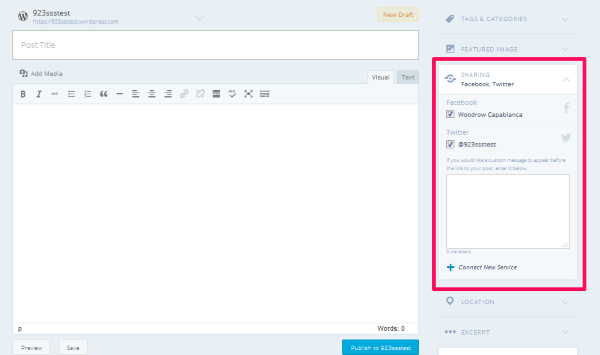
Publicize is still available in the new posting editor, but it’s be re-labeled as “Sharing.”
You can find it in the sidebar between Featured Image and Location:
Best,
-Alex G.
-
Thanks, but I know that. The problem is, it doesn’t work. The pushes don’t appear in Twitter or LinkedIn, despite that they are listed under Sharing. I have to push them manually. It works fine from the older posting window.
-
Hi Bill,
Sorry, I misunderstood.
I tried testing out Publicize just now and it pushed correctly from the new editor:
https://cloudup.com/cGH9gUoYSr3
https://cloudup.com/csO2S7-G1uSWould you mind describing a bit of your workflow for creating a new post so I can try to replicate the issue?
When we first launched the new editor we had several bugs related to Scheduling Posts and using Publicize causing errors, but I believe we’ve cleared up all our reports of that now. If this is a new bug we’d definitely like to work it out.
If you haven’t disconnected and reconnected your feeds since the new editor launched, that might help as well. Would you mind giving that a try and then running a test with the new editor?
Best,
-Alex G.
-
Hi Alex,
Thanks for following up. I just tried posting from the new editor again, and both Twitter and LinkedIn feeds worked correctly. So apparently you guys did fix the bugs since I had last tried it, which was a while back.
Best,
– bill.
-
Hi Bill,
Glad that worked out!
Thanks for experimenting, and apologies for the bugs earlier on. Let me know if anything else comes up. :)
Best,
-Alex G.


- The topic ‘Publicize settings in new posting experience’ is closed to new replies.
 WordPress.com Forums