

Publishing my website for the first time
-
https://madeit40s.wordpress.com/
for the above website, has it been published yet? why i can’t see any post under my profile?
WP.com: Yes
Jetpack: No
Correct account: YesThe blog I need help with is: (visible only to moderators and staff)
-
I chose the comment button, but why it wasn’t displayed on the website?
and how to categorize my website content so to get more search?
-
Hi there!
https://madeit40s.wordpress.com/
for the above website, has it been published yet? why i can’t see any post under my profile?
I visited https://madeit40s.wordpress.com/, and I can see your site just fine. It is now published, so anyone with the link can view the site.
I also don’t see any posts published on your site. If you click My Site → Posts, you’ll see that you are yet to publish any post. You can learn more about publishing and managing posts here:
 Posts are individual pieces of content on a blog. This guide will show you how to create and manage the posts on your site. Video Tutorial Video Transcript Welcome. In this video, we’ll take a look at posts, which are individual articles or other pieces of content that usually appear on the blog page of your site. To create a new post, click the “Right” button in the top toolbar,
I chose the comment button, but why it wasn’t displayed on the website?
Comments option will only appear on Posts and Pages (depending on the individual post/page’s discussion settings). Here’s how to enable them site-wide and on posts/pages.
As of now, your site doesn’t have any posts or pages published. Your homepage content comes from the homepage template, which you added directly via the site editor. Do you want to display a comment section on the homepage? If yes, you’ll need to create a page, move the content to that page, and make it the homepage of your site.
We can share the specific steps with you once you confirm if you want the homepage to have a comment section.
If you publish posts, they will have a comment section (again, depending on your site’s discussion and post settings).
and how to categorize my website content so to get more search?
You can start adding tags and categories to your posts by following these guides:
Tags provide a useful way to group related posts together, quickly tell readers what a post is about, and help new readers discover your content. This guide will show you how to optimize your blog with tags. About Tags Tagging brings traffic to your blog via the WordPress.com Reader. It connects you to people who are passionate about the same topics as you and might belong to online communCategories provide a helpful way to group related blog posts together. Follow the steps in this guide to create and categorize your posts and display them on your website. About Categories Categories keep your posts organized and easy for your readers to navigate. You might want to create categories for different topics you cover on your blog. For example: A food blog may use categorieNote that you can add tags and categories to Posts only. For better chances of showing up on search results, it’s a good idea to start publishing posts on a regular basis. We have some suggestions for optimizing your site for search engines (SEO) getting more traffic and views here:
One of the most frequent questions our community members ask us — and themselves — is how to get more people to visit their site. There’s no magic formula, but there are ways to increase your website traffic with a few WordPress.com tools and best practices. Promote your Content with Blaze With a few clicks, you can use Blaze to advertise on WordPress.com and Tumblr. With Blaze, we can runYour WordPress.com website is optimized for search engines by default. However, there’s more that you can do as a website owner to influence how people find you through search engines like Google. Appear in Search Engines SEO stands for Search Engine Optimization. It refers to techniques you can use to help ensure that your site ranks high in the results of search engines such as Google anWith that said, a custom domain will give you a higher chance of showing up on search results. You can get a custom domain with a WordPress.com plan. If you upgrade to a yearly plan, you’ll get a free domain for the first year. The WordPress.com Personal plan is a great starting point, and you can always upgrade to a higher plan if you need more features.
Feel free to let us know if you have more questions.
-
Many thanks for your reply.
I just want the existing template layout for the page I created. So does this layout available both in blog and website?
-
Hey there,
Many thanks for reaching back out there.
I just want the existing template layout for the page I created.
What is the page you’ve created exactly? It’s possible to switch a page template in the page settings on the right hand side:
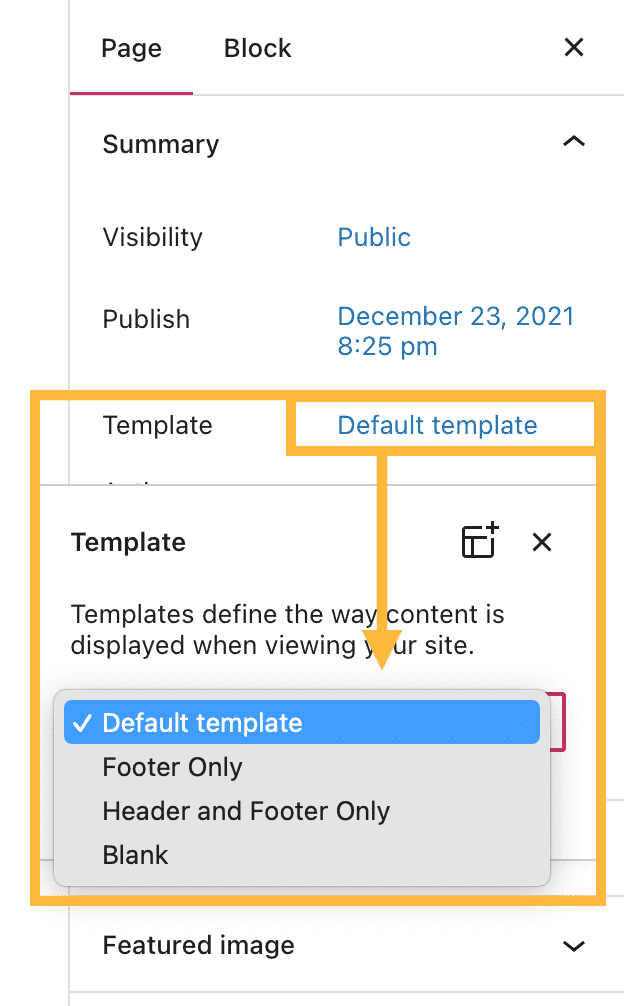
The layout would be present throughout the site, to be used as it needs to.
Are you looking to use this template for a page in particular?
-
please kindly refer to the above conversations before replying. I created this website, https://madeit40s.wordpress.com/. it was published, but I can’t see any post I posted nor can anyone search for my website so i can’t promote it nor categorise it. I like the layout of the page I created, so what shall I do to make it searchable? How to add more page using the same layout?
-
Hello
Thank you for getting back to us.
I have checked your site and can see that you have configured only your homepage to display content. You did not add any Pages nor Posts to your site yet.
Can you please tell us a bit more about your site? What’s the main purpose of it, and what kind of content would you like to publish on it? Are there any examples of sites you would like your site to look like? Can you share them with us?so what shall I do to make it searchable
By searchable, do you mean displayed in the Google Search Results?
Thanks in advance for your reply!


- The topic ‘Publishing my website for the first time’ is closed to new replies.
 WordPress.com Forums