

Publishing normally?
-
I want my post to look like a normal one with a heading and a few paragraphs but every paragraph has a scroll thing separating and splitting up my paragraphs from my story. I’ve tried changing themes but no luck. :(
The blog I need help with is: (visible only to logged in users)
-
There are no published posts on your blog, so it is impossible to see what you’re talking about.
-
-
-
No, your blog still shows no published posts. But let me try anyway:
Did you paste the text into the post editor or did you type it directly to the website?
If you typed directly into the post editor, were you using it in visual mode or in text mode? I’m thinking if you typed using text mode (which is actually meant for html) it might cause problems. You’ll see the tabs for visual and text in the top-right corner of the text window in the post editor. Make sure it’s set to visual.
-
My net dropped out and i just got notified that my post is public now so maybe check 1 more time? i did it in post editor and in visual mode.
-
I see it now. Never seen this happening before.
Try the following: In the post editor, highlight all the text and click the “clear formatting” icon in the toolbar (it looks like a 3d rectangle – supposed to be an eraser). Also deselect the blockquote button (looks like double quotation marks) if it is selected. Select Update Post and see what it does.
-
-
-
-
-
I’m stumped. No idea what could be causing this. I’ll tag this thread for staff support. Make sure you are subscribed so you’ll be notified when they respond and then please be patient while waiting. I’m eager to discover the solution myself :-)
-
-
Hi there!
It looks like you have some extra code in your post. You can see this if you go to the Text editor:
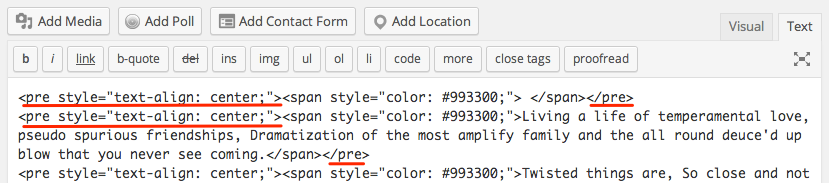
Basically all of these ‘pre’ tags should actually be ‘p’ tags in order for your text to align properly. The ‘pre’ tag is used for preformatted text so it is displayed in a fixed-width font, and preserves
both spaces and line breaks, causing the funny look.To fix this, just change everywhere you see ‘pre’ to say ‘p’. For example, change this:
<pre style="text-align: center;">to this:
<p style="text-align: center;">Let me know if I can help further!


- The topic ‘Publishing normally?’ is closed to new replies.
 WordPress.com Forums