

Publishing posts
-
Every time I publish my post, it automatically goes back to draft. The next time I open taburns25.wordpress.com it is not visible because wordpress will not let it stay publish and makes it a draft. I have published it 25 times in the last two hours, and it will not stay published. Please fix it!
http://taburns25.wordpress.com/2014/05/04/museum-of-antiquities-photo-diary/Sincerely,
Tracy A. Burns
Go to taburns25.wordpress.com and the post I gave you the link for above will not appear, even though I have published it many times today.
The blog I need help with is: (visible only to logged in users)
-
Thanks for the report of this weird switching. I think it’s possible that your blog may be caught up in the duplicate blogs issue so I’ll tag this thread for Staff. Please subscribe to the thread so you are notified when they respond and please be patient while waiting.
-
Thank you for your answer. This happens to me often when I use the New Post menu for writing a new post that is in the upper right-hand corner. I like to use this one because the pictures are bigger. If I use the add post under blogs on the dashboard, I do not have this problem, but the photos are much smaller and I do not like the type size or typeface.
-
Hi Tracy!
I took a look at your blog and was able to see the “Museum of Antiquities Photo Diary” post on your front page. Here’s a screenshot:
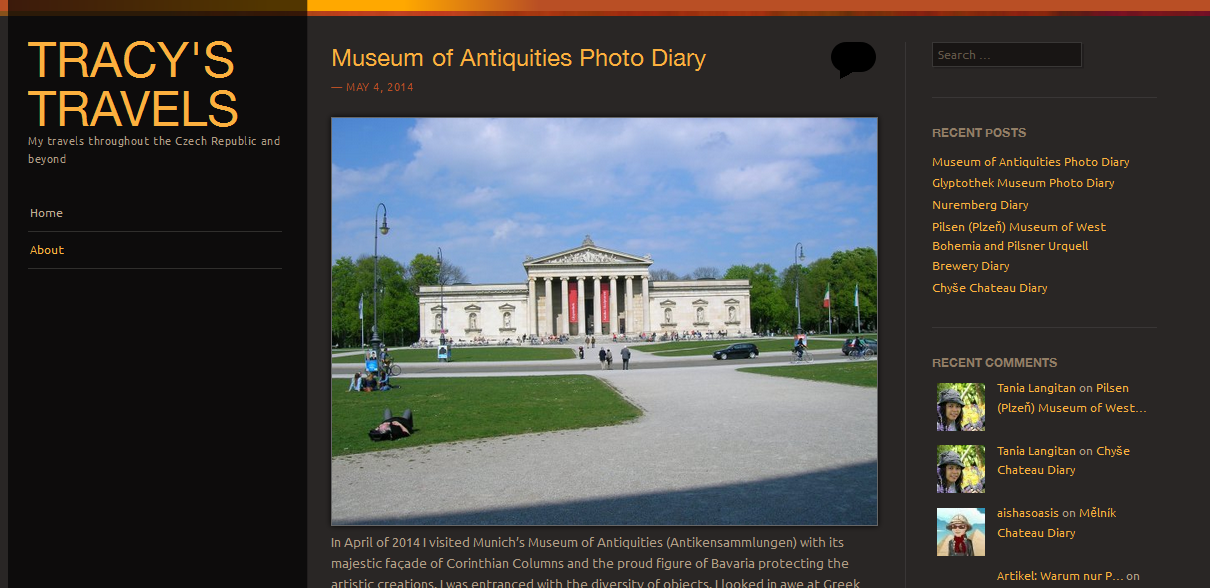
Were you able to sort this out? If not, your browser could be having some cache issues. Can you kindly clear your browser cache and check if you see an improvement?
In the meantime, keep a close eye on your future posts and let me know if you experience similar issues with those.
Thanks!


- The topic ‘Publishing posts’ is closed to new replies.
 WordPress.com Forums