

Punctuation Problem when typing
-
Having trouble with punctuation when typing in Arabic language. When i try to place a full stop at the end of the sentence that has started from right to left, the full stop is placed at the beginning of the sentence instead at the end. Even if i copy paste from word document the correct format, the full stop positions switches on the dashboard.
The blog I need help with is: (visible only to logged in users)
-
Having trouble with punctuation when typing in Arabic language. When i try to place a full stop at the end of the sentence that has started from right to left, the full stop is placed at the beginning of the sentence instead at the end, meaning on the right not left end. Even if i copy paste from word document the correct format, the full stop positions switches on the dashboard.
-
Hi there,
I noticed that your Language settings under Settings -> General is set to English. Can you try setting this to Arabic and see if the problem still persists?
-
Hi Jeremey,
I did that and still didn’t work.
The website is in both languages English and Arabic. But the problem is just when dealing with right to left writing.
Thx. -
Hi there,
I just want to make sure I understand correct. I tested this out in the WordPress.com Visual editor. I changed the text direction from Left->Right to Right->Left. When I entered a period at the end of the sentence, it was originally placed on the left side. Then, when I pressed “Space” and began writing another sentence, the period adjusted correctly. I’ve created a screencast to demonstrate:
Can you let me know if this is the same issue you’re experiencing (the period is not moving from the left side of the sentence to the right side)?
-
Hi Jeremey,
Although the screen-cast you sent was cut short before i could actually see the end result.
Writing Arabic begins from right to left, just like you demonstrated. And when placing a full stop at the end of a sentence which should come on the left (Arabic sentences end on left side) and then press enter for a new paragraph, the full stop goes automatically to the right again. I’ve tried several things, the only thing that sometimes work is copy the post to a word document fixing it there and then pasting it back. But even this doesn’t always work, as soon as i paste it even corrected, the full stop is automatically moved to the right side of the sentence instead of staying at the left.
Thank you for following up, really appreciate it. -
Sorry about the screencast cutting short! I created one more just to make sure I’m on the same page:
In short, when you type one sentence per line, the period seems to hang out on the left-hand side of the sentence provided you hit “Enter” after the period. However, if you place more than one sentence on the line, the period moves to the right. The period needs to always sit on the left side of the sentence. Is that an accurate description of the problem?
-
Thank you once again Jeremey. I saw the screencast and when you are typing the stops ends on the left, even when you press enter.
From my end, if i press enter to start a new paragraph the full stop switches to the right side. If i place a full stop on the left and continue writing another sentence without pressing enter, the full stop stays in place.
So the problem is when starting a new paragraph, the full stop on the last sentence then automatically moves to the right side.
Hope this can help clarify. I wish i knew how to send a screencast, i would send you an example, but here is an example to my problem:This is the problem I’m having.
After pressing enter the full stop on the above sentence moves to the right instead of staying on the left, additionally if I place a full stop and end what I am writing, even if I don’t press enter, the very last sentence in my post, the full stop moves as well. -
Hi!
I’m currently investigating this a bit more. I’ll let you know as soon as I have more information!
-
-
Hi!
I had another Happiness Engineer test out the editor in Farsi, which is also written right to left, and the punctuation appeared to react correctly. Please note, in order for this to work correctly, you will need to be using an Arabic keyboard. The input language does change how the punctuation mark is used. Second, can you let me know a bit more about how you’re changing the text to right to left? If you’re in Google Chrome, the easiest way to do this is through right-clicking the line of text you’re currently on and change the writing direction as shown here:
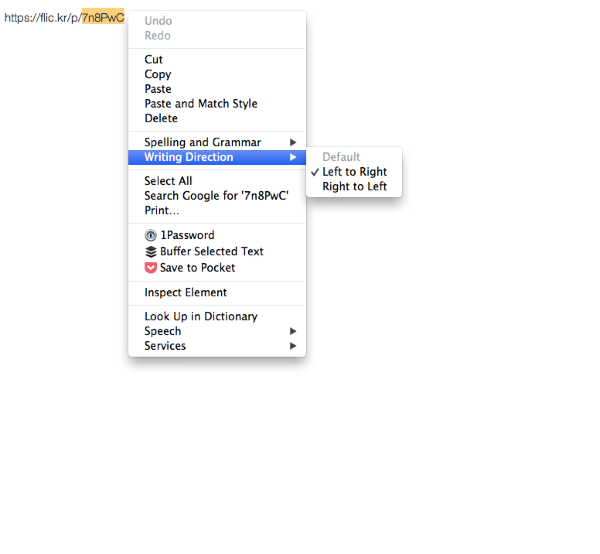
Can you please confirm that you have correctly flipped the text direction and that you have changed the keyboard language before typing into the editor?
-
Hi jeremy,
Of course i use an Arabic key board when typing in Arabic and the language is set on Arabic, When on my dashboard and write a new post i align right so text starts from the right. I tried highlighting the text and right click to change text direction as you advised, but still the full top remains on the right side instead of moving to the left where it should be.
Thank you for your help, but this matter is really frustrating, as it takes us hours to try and correct each post due to the incorrect placement of full stops. -
Hi!
There’s a bit of a difference between the “Right Align” option and the text direction Right to Left. You’ll want to use the latter, not the former.
This button at the top of the Editor that I have highlighted is the Align Right option:
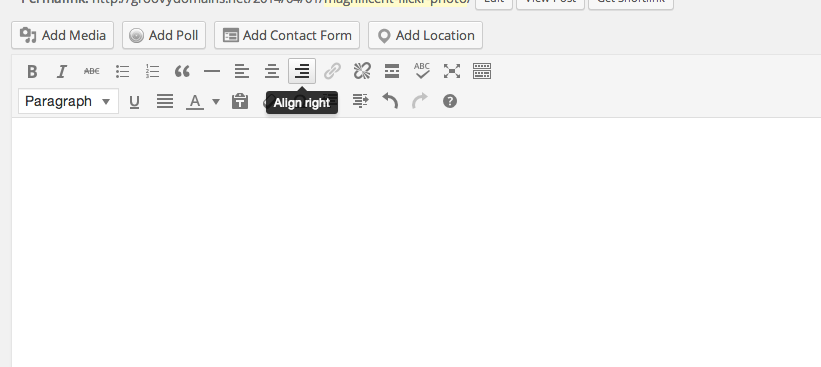
That just moves the text so that it is focused on the right-hand side of the screen like so:
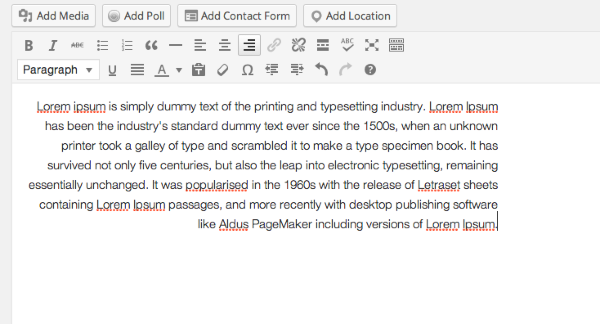
However, this will not change the direction of the text, nor will it reflect the punctuation changes that should occur when writing in Arabic.
You’ll want to use Right to Left text direction instead. To do that, open a new post. Before you type anything, click on the first line of the editor and change the direction of the text to Right to Left as shown here:
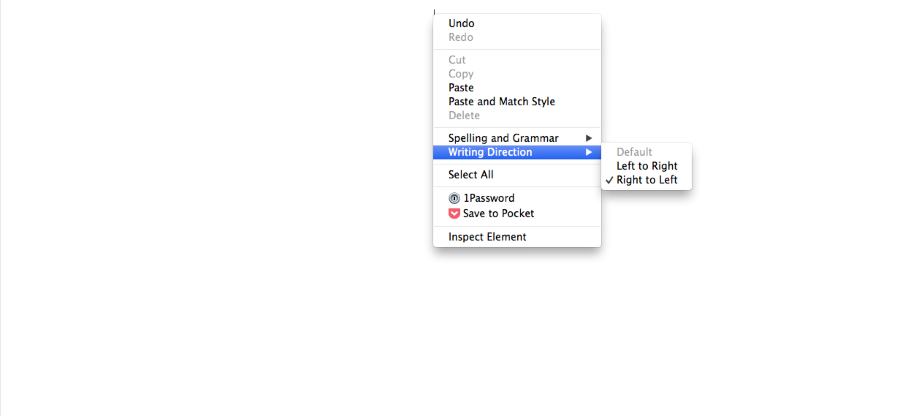
Please note, you’ll need to do this before you type anything. Then, the punctuation should operate correctly in Arabic.
Can you give that a try and see if it solves the issue?
-
Hi Jeremy,
I’ve tried your advice, but it seems every time i change the text direction, it goes back to original settings and nothing changes. The full stop remains on the right.
Is there a way to change the settings?
Thx. -
Jeremy,
I tried your suggestion on Explorer and it worked!! finally!! i don’t know why google chrome text direction isn’t changing. But on explorer it did and it worked. Thank you very much, you made my life much easier. -
Great! I’m glad this worked in Internet Explorer. Regarding Chrome, I’ve noticed that if I click over to something else before entering text, the text direction reverts back to left to right. It seems like you have to change the text direction then begin typing immediately for the changes to stick.


- The topic ‘Punctuation Problem when typing’ is closed to new replies.


 WordPress.com Forums