

Purchase of a new theme
-
When I purchase a new theme, can I choose when it goes live on my site? I currently have the Delicious theme and want to now use the MHThemes. I would like to take the time to set it up the way I want it to look, so I would like to know if the current theme will stay as is until the new them is ready to go.
The blog I need help with is: (visible only to logged in users)
-
Hi there!
You can do this by selecting the theme through your dashboard at Appearance > Themes. If you hover your mouse over the theme, you’ll see a Preview button at the bottom:
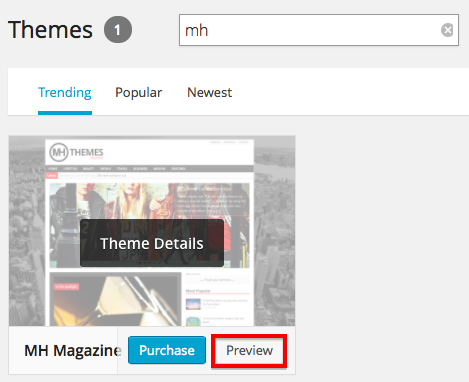
When you select that, your Customizer will open with the new theme. You can make your customizations there. And then click on Activate when you’re ready to go live!
Let me know if I can answer any other questions!
-
Thanks for this answer; and I had already done this, but still the customization area on the right doesn’t allow for all customizations, at least not that I can see. For instance, when you look at the demo for this theme, it has a nice feature area on top that changes images and titles; I don’t see where I can do that with this limited customization on the right as of yet. I guess what I will have to do is take my site off-line, do ALL customizations so that I get the site looking the way I want to, and then bring it back on-line. That’s unfortunate, because it may take me a day or so to get that all in, but hopefully it will go smoothly … hopefully.
-
Image sliders are usually dependent on a specific template being set on your Front Page, which you currently won’t be able to edit through the Customization panel.
We are working toward adding all of our theme options to the Customization panel, but we’re not quite there yet.
You could set up a second site and purchase the theme on that site. You can get everything set up the way you want, and then transfer the purchase to your current site and apply all of the new settings.
Let me know if you’d like to do it that way and I can help get you set up!
-
Oh yes….thank you so much! That sounds like it will solve my problem (I hope). A little help please?!? Thanks so much. ;-)
-
Great!
So, first you’ll need to create a temporary site. You can do that here:
https://signup.wordpress.com/signup/
It doesn’t really matter what you call it, in the end no one will see it!
You can go ahead and purchase the theme you want there, and get it all set up the way you want.
If you’d like the content from your current site copied to your new one for testing purposes, you can export from you current site and import to your new one. This won’t continually update, but you’ll have a copy of all your current content so you can see how things will look.
When you’re ready, you should create any new Pages or Menus that you’ll need in your current site, as well as record any special widgets and other settings that you’re using. (MH Magazine has a lot of them..) Unfortunately, none of these settings will transfer when you transfer the theme.
Then you can transfer the upgrade through the dashboard of your temporary site at Store > My Upgrades. Underneath the upgrade, you’ll see a link to ‘Transfer to another site.’
Let me know if I can help with any of these steps!
-
Thank you very much for this info. I’ll get right on it and hopefully can have the new site turned around and up and running by Sunday. Thanks again.
One more thing; when you say, “create any new Pages or Menus that you’ll need in your current site, as well as record any special widgets and other settings that you’re using. (MH Magazine has a lot of them..) Unfortunately, none of these settings will transfer when you transfer the theme,” I want to make sure I understand this. You’re saying NONE of those settings (pages, menus, widgets) will transfer from my current site to the new MH Magazine? If that’s the case, are you then saying that I should create all of those in the dummy site that I’ll create? Just a touch of confusion for me on that point.
-
Sorry for the confusion! Some of these things will transfer from your current site, but because each site is slightly different, you may find that you need to tweak things like menus, widgets and your front page.
Importing your current site to your temporary one could help you track these changes. You may not need to make any edits to your current menu, etc. I just want to make sure you’re checking those things before you activate the new theme.
Does that clarify things?
-
Yes, thank you; that does. I guess, though, the real test will be when I transfer the new theme from the dummy site into my real (current) site (the one with my personal domain name). Thanks once again!
-
-
I’m having trouble with a number of things.
1) I’m creating a custom post for my home page. Under “Select a Category” there’s only a list of 10, and that list doesn’t include the category which I use the most. Why is that? I want to feature this category in this section, and use other categories for other custom post sections, but not all of my categories are in the drop-down list.
2) The news ticker states “Custom Categories (use ID, e.g.: 3, 5, 9). Where do I find this ID? I have a label for my ticker, I’ve set the number to 5 and I’ve input the tags slug (foodisms) but nothing show up on the ticker.
-
Nevermind on those last two issues; through MUCH trial and error, I’ve figured it out. It would be nice if there were an all-inclusive tutorial guide for each theme so users aren’t consistently delayed in trying to get their sites up and running. I’ve seen this: http://theme.wordpress.com/themes/mh-magazine/support/ but it’s a scratch the surface type of guide.
-
I’m glad you were able to sort it out!
I’ll read through the directions on the support page for MH Magazine. Were there any specific portions that were difficult to follow? We try to only put theme-specific instructions on those pages, but this theme does have a TON of customization, as I’m sure you’re aware.
Let me know if I can help with anything else! :)
-
With my Delicious theme, I didn’t have to know ID numbers, so that gave me a world of trouble; I also didn’t know that the number of categories was limited when being listed as a drop-down. I also posed two additional question yesterday about 1) losing my current followers when I transfer the MH Magazine theme to my current site; “kathyrnwp” answered that it shouldn’t; and 2) the ability to place a personalized message on my current site because I would likely need to take it out of commission after the transfer of new theme upgrade; “kathyrnwp” answered that there’s only the generic message when I temporarily place site in private status. That’s unfortunate….
In my dummy site, the images under the Popular Posts widget don’t show up; will that be resolved when the theme is transferred?
-
Thanks for that feedback! I’ll look over our support document this afternoon.
In my dummy site, the images under the Popular Posts widget don’t show up; will that be resolved when the theme is transferred?
This should be resolved with the theme is transferred. It looks like its just an image syncing issue from the import.
Let me know if I can help with anything else!


- The topic ‘Purchase of a new theme’ is closed to new replies.
 WordPress.com Forums