

Read more for the Frontpage
-
Dear WordPress Team,
thanks so much for your great help. I finally announced my blog and made it official. Hope my Followers will love it as much i love it. WordPress is really perfect to create your own blog. But I got one more question. If you check my blog on the frontage, i’ve got short articles to show my blog entries. But I would love to have a read more link after the few words next to the picture. Because at the moment you need to click on the picture to read more, but it would be great if there will be a “read more”link to click on it. Is that possible ? If yes how can i do it? Please let me know. Thanks so much and this is my blog i’m talking about : http://www.jenniferbachdim.comThe blog I need help with is: (visible only to logged in users)
-
Hi Jennifer!
First, congrats on launching your blog. It looks great! Plus, it looks like your readers are loving it as well, which is awesome.
With regards to adding the “Read More” link, that’s definitely possible. To do so, you’ll need to add a custom excerpt to your posts as explained here:
http://en.support.wordpress.com/splitting-content/excerpts/
When you post a new blog post, the theme automatically pulls the first few sentences and creates an excerpt. However, you can override that excerpt by manually inputting one yourself. Then, you can add a “Read More” link wherever you would like in that excerpt. Just copy a few lines of your post, paste it in the excerpt box, and add a “Read More” link directing to your full post. For example, this would add the “Read More” link at the top of your excerpt:
<a href="http://groovydomains.net/2014/06/27/lorem-ipsum">Read the full post!</a>
Lorem Ipsum is simply dummy text of the printing and typesetting industry. Lorem Ipsum has been the industry's standard dummy text ever since the 1500s, when an unknown printer took a galley of type and scrambled it to make a type specimen book.
Here’s a screenshot of how it would look:
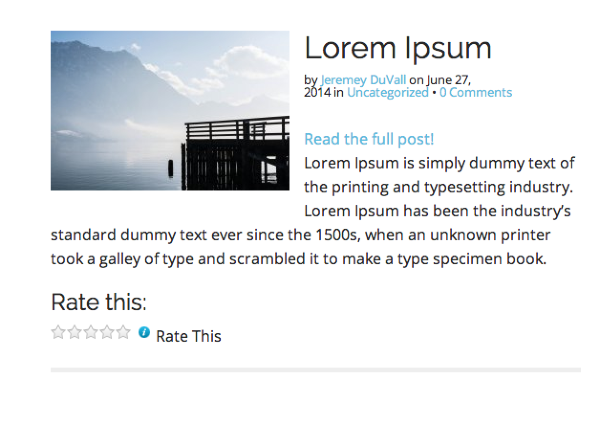
Is that what you’re looking for?
-
Thanks so much, worked out perfect, already changed it. Love your fast support, thanks again :)
-
Wonderful! I’m glad this worked for what you were looking for. Please let me know if you need anything else.
-
Yes i got one more question jeremey. I post it in a new support post magbe you can check it. Its again about my frontpage ☺️
-
Hi Jennifer,
It looks like Evan already answered your request there. Please keep all additional correspondence regarding that issue in that thread so the two threads do not get mixed up! If you need help regarding a different issue, you can just drop it in the thread here.


- The topic ‘Read more for the Frontpage’ is closed to new replies.
 WordPress.com Forums