

Read more function not working
-
Read more function not working
The blog I need help with is: (visible only to logged in users)
-
Oops, I accidently send a blank post.
In my portfolio section in page 1, I’m trying to put in a read more function between the word “Enjoy” and the word “Flyers” After the word “Enjoy,” I put in the “Read More” function but when I preview the change, what everything is still on one page. I don’t want to add a new page because I tried that and for some reason, a couple of my other pages in the portfolio section got out of wack. I just want to have the information before the “Flyers” section to lead into my portfolio pieces. Kind of like an introduction. Please help. Thank you.
Theme: Triton Lite Link: http://ebonymcfarland.wordpress.com/
-
-
-
Hi. I have another problem. It’s dealing with the same issue but I want to try something else. I have already posted this problem in the forums but since you contacted me, I want to post this to you.
I already had seven pages in my portfolio section and I wanted to add on another page. This page will be the new page 1 in my portfolio section. I put in the contents and I noticed that pages 3 and 4 are not looking as they should be (the captions are on top of the portfolio pieces and on some, the page numbers have disappeared). In all because I added on a new page. I was wondering how do I keep this new page without distorting the rest of the pages. Do you think you could help me? Thank you.
Theme: Triton Lite Link: http://ebonymcfarland.wordpress.com/
-
Hey Ebony,
I noticed you have a few threads open on that topic. I’m going to close them all with a link back to this page. Please keep all additional correspondence here to prevent confusion.
It looks like page 4 is now fixed as the captions are present on the bottom of the images and the numbers are present. Is that what you’re seeing on your side? Regarding page 3, I was able to fix the number issue with a few non-breaking spaces. Can you take a look and see if everything is working correctly now on your side?
-
On page 3, I see the page numbers but the captions on the images. Is that just a matter of doing a margin-top or margin-bottom to move the captions off of the images? On page 4, there’s a huge gap between the images and the captions. Would I just do the something (using margin-top or margin-bottom to move the captions up? Thank you for taking the time to help me.
-
Hi Ebony,
I believe this issue is a combination of the CSS you’re using to customize the look of the slideshow and the columns=# aspect of the shortcode. Currently, it looks like you’re displaying the images solely in a slideshow so you theoretically don’t need the columns part of the shortcode. Can you try removing that and see how it affects the layout?
Also, I wanted to let you know that we have a portfolio shortcode and custom post type that might be easier to setup. Is explained a bit here:
http://wordpress.com/portfolios/
Let me know if that’s something you’re interested in!
-
I’m not understanding. I don’t have columns in my portfolio section.
As far as the portfolio, thanks for the information, but I put in a lot of time and effort into this website that I really don’t want to start over.
-
Hi Ebony,
It looks like caption is set to display on top of the images by default as shown in my demo here:
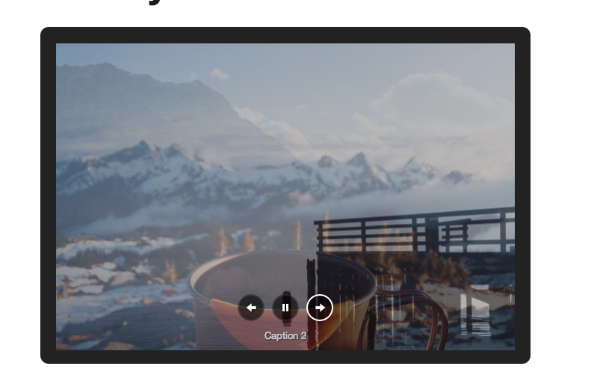
However, that can definitely be adjusted. You could use a CSS code like this:
div.slideshow-slide-caption {
	top: 450px;
}
You can manipulate the top pixels to position the caption where you would like. Just a note, you will want to check to see how your site displays on mobile devices after entering any CSS code. It may have a negative effect. In that case, I would recommend asking over on the CSS customizations forum here:
https://en.forums.wordpress.com/forum/css-customization
They’ll be able to help you better change the code to work on mobile devices.
WIth regards to the “columns” In your shortcode for your galleries, you’ll notice the following in the “Text Editor”:
[gallery columns="5" type="slideshow" ids="1241,1239,1238,1240,492,1242"]The “columns=5” part of that code is not necessary. However, after doing some testing, I don’t think that has an effect on the outcome. I just wanted to point out that it’s not absolutely necessary for the slideshow to function correctly.
Regarding the caption on page 4, this is a result of this line of CSS you’re using:
margin-bottom: -60px !important;Like the third page, you’ll need to adjust these values to achieve the right look. If you’re having trouble, I would recommend posting to the CSS forum for future guidance!
-
Thank you for your help. I used the codes that you provided (instead of div .slideshow-slide-caption, I used .page-paged-3 .slideshow-slide-caption) to adjust the values.
I clicked on the mobile icon in the customize section and I noticed that my site does seem a little off. So all I have to do is contact CSS customization and asked them to fix this? Will that affect the look of my site on the computer view?
Again, thank you very much for your help.
-
Yes, the volunteers and staff in the CSS Customization forums should be able to assist you further with fine-tuning your CSS custom code as well as helping make sure it works on mobile devices as well.
-
OK, so I can just ask someone in the CSS Customization forum if they can check to see if my site will be viewable and contained on mobile devices and they will do it?
-
The folks in that forum can assist you with the code needed in your custom CSS to achieve the goals that you have. Please post there with your specific needs and someone there should be able to help you out.


- The topic ‘Read more function not working’ is closed to new replies.
 WordPress.com Forums