

Read more on blog post isn't showing
-
I’ve added the read more insert in my blogpost but it’s not showing. What can I do?
The blog I need help with is: (visible only to logged in users)
-
Hi,
Which post are you referring to? The most recent one? Have you selected “Post excerpt” at Customize > Content Options > Blog Display?
-
I see the words “Continue reading” where you added the More tag. Here’s an example:
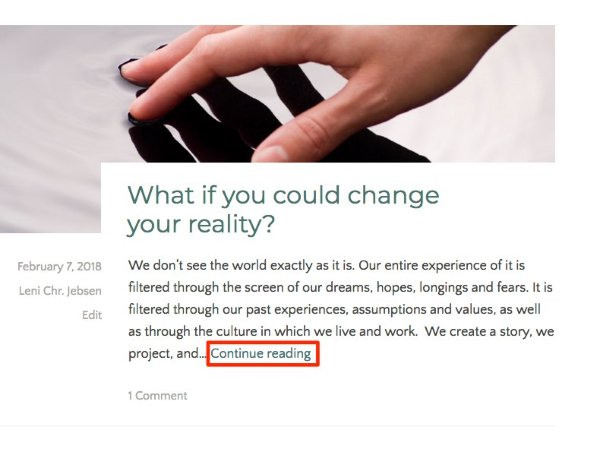
Let me know if you’re all set or need further help.
-
The most recent post doesn’t have “Continue reading” at the end of the excerpt.
-
hi, exactly… I could make it work on all other posts, but not on that one. Anyone know what could be happening? I tried deleting and reposting the text, but nothing changed…
-
“Continue reading” links are not shown when you add a custom excerpt to a post, which you’ve done for the post titled “How does your story shape your life?” If you’d like to see the link, you’ll need to remove the excerpt and it should appear.
-
Thanks, kathryn. : ) I should have guessed that that was the cause.
If you want an excerpt to be automatically created for every post on the blog page, you may do this with a setting at Customize, thereby making insertion of More tags unnecessary. This option isn’t available on all themes, but Dara has it. On Dara, selecting “Post excerpt” at Customize > Content Options > Blog Display will automatically produce an excerpt, on the blog and archive pages, for each post. Each post excerpt will contain the first 55 words in the corresponding post, followed by a “Continued reading” link to the full post.
-
Staff,
My latest post in this thread has evidently been marked spam. Please remove it and an other recent ones. Thanks : )
-
-
-
@kathrynwp I don’t know exactly why this one of my 3 posts has the different formatting. My set up is precisely the Post excerpt option, but it didn’t automatically do the Continue reading link that’s why I added it in the newer posts. But the first post I created (though it’s the last one dated) just doesn’t “take it” or make it work. I keep going back to it and why this one specifically has that problem, but can’t seem to figure it out.
-
I don’t know exactly why this one of my 3 posts has the different formatting.
Only that one post has a manual excerpt – the others don’t. That’s the difference. Posts with a manual excerpt do not display a “Continue reading” link.
If you open each post in the editor and go to the More Options box, you’ll only see text in the Excerpt box on the post titled “How does your story shape your life?” If you’re not sure where to find it, see the screenshot here:
If you remove your excerpt text there, that will force the “Continue reading” link to appear.
Please let me know if you get stuck.


- The topic ‘Read more on blog post isn't showing’ is closed to new replies.
 WordPress.com Forums