

Reblog button does not appear on my site
-
In the setting-sharing page the “show the reblog button on posts” is checked, however it does not show up on the site.
spiritualjourney17.wordpress.com
Thank you for time
The blog I need help with is: (visible only to logged in users)
-
I see a reblog button at the bottom of this post https://spiritualjourney17.wordpress.com/2015/11/30/make-your-own-alkaline-water-at-home/ below the sharing icons exactly where it ought to appear.
I’m on a PC running Windows10 and Firefox 42.
If you are not running one of the browsers and versions listed at http://browsehappy.com/ please try upgrading or switching first.
If you are not successful please provide this info:
(a) Exactly what kind of device you are using to connect to the internet and to WordPress.com.
(b) Exactly which browser (and version of it) you’re using by checking here if necessary http://supportdetails.com/
(c) Exactly what you experience including exactly what any error reports you receive state.
(d) Screenshots can be helpful. You can use http://snag.gy/ or http://cloudup.com to share screenshots and link to them here. If you use the WordPress.com guide for screenshots http://en.support.wordpress.com/make-a-screenshot/ you can and upload it to your Media Library, and return to this thread to provide the file name so Staff can examine it.Then type modlook into the sidebar tags on this thread for Staff help. How do I get a Moderator/Staff reply for my question? https://en.support.wordpress.com/getting-help-in-the-forums/#how-do-i-get-a-moderatorstaff-reply-for-my-question Then please subscribe to this thread so you are notified when they respond. To subscribe look in the sidebar of this thread, find the subscribe to topics link and click it.
-
I, too, am running on a PC running Windows10 and Firefox 42. It’s strange that I don’t see the reblog button. I also went on internet explorer.
-
That’s extremely weird. Have you disabled all your browser add-ons and extensions like adblockers, etc?
-
Yes. They are disabled. I went onto my husbands computer and it’s not visible as well.
As long as you say it’s visible to others I guess it will do. Can you send a snapshot please.
Thanks
-
-
Hi there,
I also see the reblog button – I’m in chrome and use a Macbook Pro. It appears that it is not a theme issue.
Here is the screenshot: https://cloudup.com/cMznqcTwxp6
So, you’re on a PC running Windows 10, and cannot see the reblog button in either Firefox or IE. What type of computer does your husband have?
This is unusual. Let me know if you’re still having issues viewing the icon.
Thanks!
-
Hi Darnell
We both have an HP. I also viewed it on my iphone (IOS 9.1) and I can’t see it. My son looked into it using his smartphone and he can’t see it either.
-
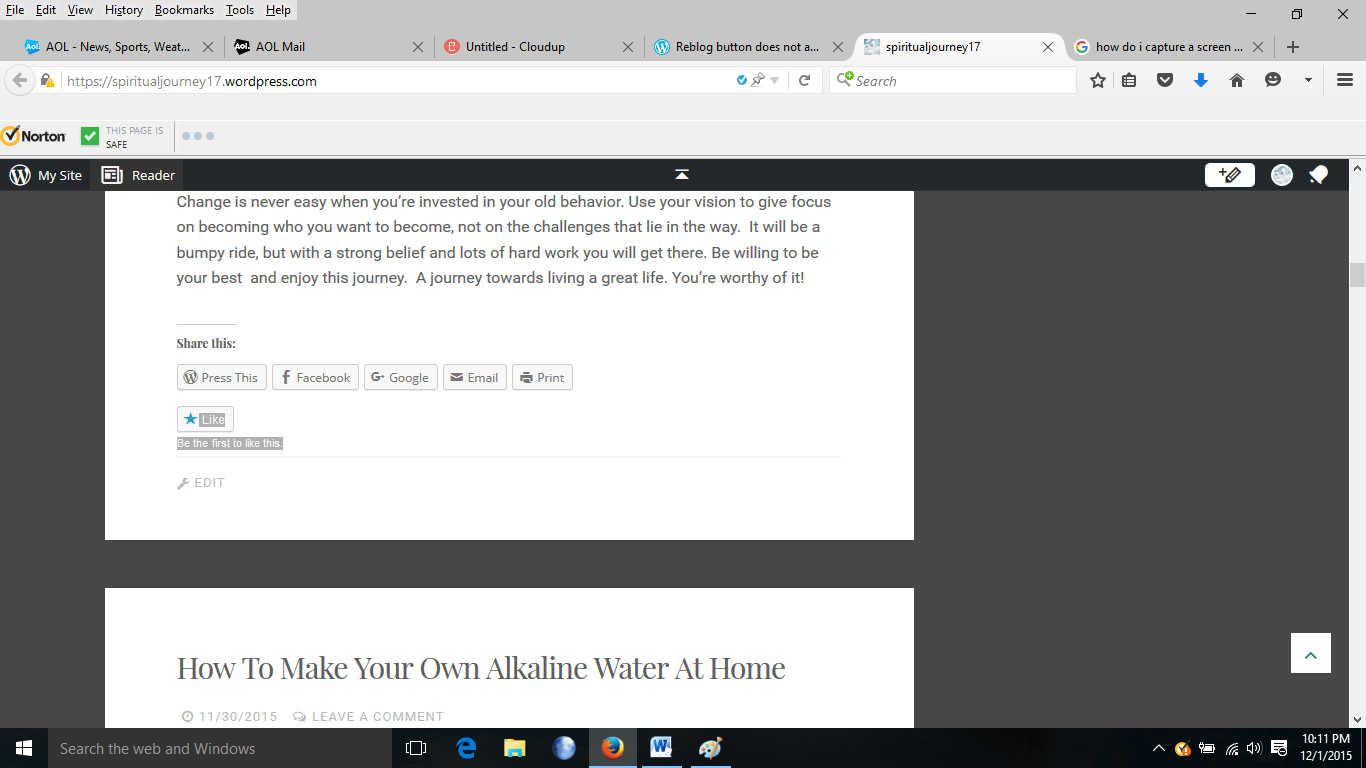
Can you provide a screenshot? I would like to see how it is looking from your end.
Thanks.
-
-
Aha – as I presumed.
You’re currently on your post page and not on an actual post. You won’t be able to see the reblog button on any pages, just on posts. So, you’ll need to click on the individual post in order to see the button.
Basically, you won’t see any reblog buttons as you scroll down your page here:
https://spiritualjourney17.wordpress.com/
But you’ll see the button if you are reading an individual post such as here:
https://spiritualjourney17.wordpress.com/2015/12/01/live-a-great-life/
Let me know if you see the button at the above link or if you have any questions.
Thanks!
-
Awesome! Yes, I can see the reblog button when I’m logged in to my account and reading an individual post.
Thanks for your assistance.
-


- The topic ‘Reblog button does not appear on my site’ is closed to new replies.
 WordPress.com Forums