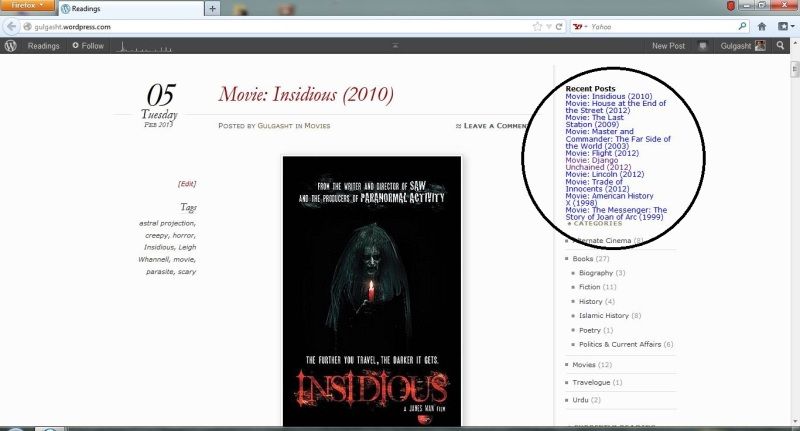
"Recent Posts" font and colour mess up
-
Hi everyone,
Please take a look at the following: http://i83.photobucket.com/albums/j320/sojhla/blog_zps654bd1e1.jpg
So I reviewed a lot of new themes but decided I’d like to stick to Chateau. When I reloaded my home page the font and colour under “Recent Posts” section were all messed up. I didn’t do anything to make them look so. Can anyone help with getting back the original way it looked?
Thanks
Blog address: gulgasht.wordpress.com
The blog I need help with is: (visible only to logged in users)
-
The font can’ t be changed unless you have the Custom Design upgrade.
Links have the default link color of Windows, and the previously visited links are purple as usual. As I don’ t use the Chateau theme, I don’ t know if the colors can be changed, but I suggest you to take a look at the Appereance menu, you may find something changes them.
-
Thanks for the reply
Actually I don’t want to change font and colour. I want them as they are by default. Something happened to make them look so (see the circle in my image). The font and colour should look like the links below “recent posts” menu (greyish instead of purple and different font)
I went through settings for appearance. There’s nothing there that changes font and colour of the “recent posts” menu. But it somehow got changed by itself and I can’t undo it!
I think those who use Chateau would understand the problem.
Me waits.
-
-
This widget was there by default. It was working fine a couple of hours ago. The problem only occurred when I ‘live previewed’ new themes with a view to switching from Chateau to one of them.
-
It’s fixed. All I did was refresh the widget and ‘saved’ the settings again. It worked.
Thanks.
Case closed.


- The topic ‘"Recent Posts" font and colour mess up’ is closed to new replies.
 WordPress.com Forums