

Reduce the height of the header image
-
Hi. I own this blog on wordpress called http://writers-bloc.org/. Now, the problem is that the height of the header image (where the name ‘Writer’s Bloc’ is written) is a lot more than I’d like to be. I understand that the height can be reduced through CSS. Can you please advise me on the process? I tried the ‘Help’ forum the last time and got a few answers, but I don’t think I implemented the steps right. I am not familiar with coding at all, so request you’ll to give me a step-by-step guidance on the same. Thanks!
The blog I need help with is: (visible only to logged in users)
-
Hi there!
You should be able to copy and paste this exact code replacing what is currently in the custom CSS field:
div#header-image {
width: 960px;
height: 200px;
}
That should produce an outcome that resembles this:
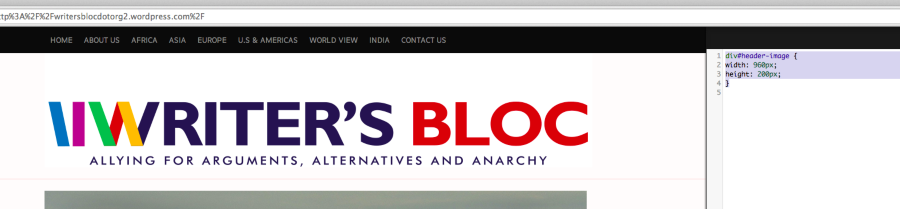
The height attribute is adjustable in the code above. Please note, you’ll need to make sure to remove the /* and */ notes in the CSS field.
Let me know if that works for what you’re looking for!
-
Thank you so much Jeremy. This really helped! The only problem is that the height of the header image is only reduced from the bottom half of the picture through this code. Is there any way wherein the image height can be reduced equally from both ends? Please let me know. Thanks again!
-
To do that, there are two main options:
- You could upload a header image that isn’t centered in the vertical middle of the white block to change the vertical alignment in a more manual fashion
- I’m sure there’s a method using CSS. The best place to ask would be the CSS forum here:
https://en.forums.wordpress.com/forum/css-customization
We have CSS gurus patrolling that forum that can give you the best code moving forward.
I tried multiple CSS codes, but it always forces the white header background to overlap with your black menu, which is not ideal. I believe this will be avoidable with the right CSS script, but I’m not entirely sure. One reason it takes from the bottom may be that the bottom background is also white so the overlap looks better. The folks in the CSS Customizations forum will be able to point you in the right direction!


- The topic ‘Reduce the height of the header image’ is closed to new replies.
 WordPress.com Forums