

"Related Posts" have disappeared
-
Doing a little housekeeping and have noticed that the “Related Posts” that used to appear under the LIKES and “posted in” have now disappeared. I have checked the Reading settings and nothing has been changed there – any ideas?
The blog I need help with is: (visible only to logged in users)
-
Hi there! It appears as if you may have discovered your own solution. When I visit your latest blog post and scroll down, I see your Related Posts:
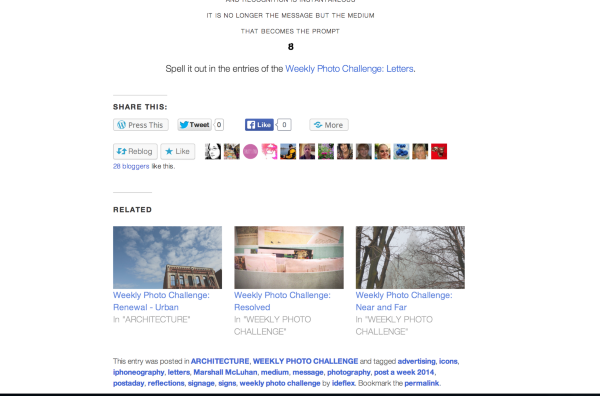
If you are seeing something different, send me a screenshot, so I can better understand the issue. You can upload the screenshot to your Media Library, like any other image, and I’ll be able to access it from there. Just let me know when I should take a look.
The page at the following link has some helpful tips for taking screenshots:
Thanks so much!
-
Hello thatrobyn,
Thank you for your reply. I did go back into the Reading settings and check off “Use a large and visually striking layout” and this feature is wonderful for those readers that actually take the time to click on the post that takes them away from the main page. “Related content” doesn’t appear anywhere on the main page of the site (see Screen Shot 2014-04-28 at 8.46.42 AM). As most people only view what is in the reader and are less than ready to be clicking 3 or more times to get (from there) to further content, my concern is more one of trying to draw the reader into viewing older posts: in other words, people are looking at the latest post and could just click on an image between the LIKES and “posted in” that would lead them to that related content (see Screen Shot 8.54.14 AM). As the site is primarily photography oriented, and generates a lot of graphic content, this would be in keeping with the overall design. Is there some sort of CSS that could be inserted into this theme to achieve this? Just as a note, siobhyb (another staffer) was fantastic in helping me achieve my vision for the header widgets… Thanks in advance for your help… -
Hi there!
That’s so nice to hear about siobhb! I’ll pass the kudos along :)
I wish I could give you equally good news, but I’m afraid there’s no simple way to edit your CSS to add the function you desire. Related Posts are grabbed utilizing another type of code than CSS, and they only function on individual Posts.
You might post the question on the CSS forum to see if any creative WordPress.com users have come up with a workaround solution.
Good luck! Wishing you the best.
-
-
Excellent! I hope the smart folks on that thread can help you attain the aesthetics you’d like for your site :)


- The topic ‘"Related Posts" have disappeared’ is closed to new replies.
 WordPress.com Forums