

Related Posts No Longer Working
-
I have enabled Related Posts. It was working for the last article that was published on my site, but has since stopped working.
I have enabled Zemanta on my Firefox browser. I have cleared the cache, I have deleted stored passwords, I have run a CCleaner on my computer. Nothing restores it.
Please help! http://www.ayannanahmias.com
The blog I need help with is: (visible only to logged in users)
-
I am also editing in ‘Visual’ versus ‘Text’ mode. Still no difference. I try to create a new post, but this doesn’t resolve the problem either. Prior to this problem I had to sign into my Zemanta account to the right of my post. The box had a green gear wheel and ‘Related Posts’. Now that is gone.
-
Hi there,
I am able to see Related Posts in your last couple of posts as seen here:
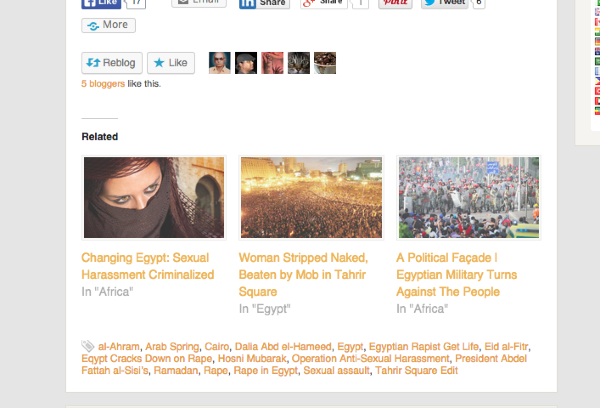
and

Are you still having issues with this? Let me know if you have any questions with this!
-
Apologize for the late response. As I mentioned before, I never had a problem with ‘Related Posts’ in my previous articles. The last post that I published had the Zemanta feature enabled. For some reason it is no longer enabled in my account and thus for the post that I am currently trying to publish the “Related Posts” is not available.
Do you need access to my dashboard so that you can view the ‘Draft’ post?
-
Zemanta was removed awhile ago as seen here:
https://en.forums.wordpress.com/topic/removing-zemanta-integration?replies=1
-
I have enabled ‘Related Articles’ by going to Settings > Reading and selected the radio button to enable ‘Show Related Content After Posts.’
I have selected, deselected, I have tried every combination of the options:
Show related content after posts
Show a “Related” header to more clearly separate the related section from posts
Use a large and visually striking layoutTo no avail. Despite all efforts related content and Wikipedia photos no longer show up as I am creating new posts. Appreciate your assistance.
-
Since I need to publish the post that I am currently working on, I am manually adding related content; however, my issue is still unresolved. It is infinitely more challenging and time consuming to manually add content versus the prior option.
-
I have enabled ‘Related Articles’ by going to Settings > Reading and selected the radio button to enable ‘Show Related Content After Posts.’
Yes, the related articles are the screenshots that I have provided you:
https://cloudup.com/cSE2BtFe1_x
and
https://cloudup.com/c7h8kjmyaTbThe three images/site titles are the related articles.
-
I only just realized that what I am having problems with are the “Related Articles.”
Previously, there would be a list of Wikipedia Photos and Related Articles on the right hand side just above Tags. This box is no longer there, but was there for the post I published on Jan 13th.
This is actually what I need assistance to restore.
Thank you.
-
I’m not quite sure what you mean. Can you give me a link to the post? If you have a screenshot that would be very helpful. If you can upload it to your Media > Library page I can take a further look.
-
I can’t provide you with a screenshot because it is no longer in any of my post. But, the app/plugin provided me with the option to pick articles that appeared from around the web and select them for inclusion in my posts.
For example, with the post that I just published @ http://wp.me/pBKZS-7jY, I had to source these articles myself, then format each link in HTML in order for them to appear as placed at the bottom of the post. (See Below)
Related articles
<h5 class=”zemanta-related-title”>Related articles</h5>
<ul class=”zemanta-article-ul”>
<li class=”zemanta-article-ul-li”>Modern Day Slavery Alive in Salt Farms on Small Islands off South Korea (nationalpost.com)
<li class=”zemanta-article-ul-li”>Slavery Still Thrives on South Korean Islands, Organized Exploitation of Disabled Shockingly Common (inquisitr.com)
<li class=”zemanta-article-ul-li”>AP Investigates Reports from South Korea of Slavery of People with Disabilities (disabilityrightsgalaxy.com)
<li class=”zemanta-article-ul-li”>South Korea Disabled Slaves Tell of Living Hell on Remote South Korean Salt Farms (business-humanrights.org)Does this help?
-
I’m sorry, but plugins are not allowed on WordPress.com for security reasons. I believe you were using Zemanta which is no longer allowed on WordPress.com. From this moment, it’d be best to add them manually as you posted above. I’m sorry I couldn’t be of more help.
-
No problem. I very much appreciated your efforts to resolve this. The deletion of this feature just came as a surprise to me since I used it just a few weeks ago.
Thank you.
-
I understand. If you are able to see the function again, can you please let me know and I’d be happy to take a further look!
-


- The topic ‘Related Posts No Longer Working’ is closed to new replies.
 WordPress.com Forums