

Remove author bio from posts
-
Hello, I’ve just noticed that each of my posts now has a ‘Published by’ at the end with my bio. I’m the sole author and don’t want this section, and have no idea how it got there. Can anyone tell me how to remove it?
Thanks
Martin
The blog I need help with is: (visible only to logged in users)
-
Hi there,
Very few themes have an author profile with a gravatar that displays below every post. The data is derived from here > Dashboard > Users > My Profile > About You (section) and anything you add there appears on your Gravatar profile page as well.
Go to http://hikecycleireland.wordpress.com/wp-admin/users.php?page=grofiles-editor and remove the About You section and save.
-
Thanks Timethief. That section was filled in from the start so am not sure why the full bio only appeared on posts today, but all sorted now.
-
-
Well… actually :)
Is there a way to have the bio appear on my Gravator but not in each post? I’m just confused why this only became an issue today and thought I might have accidentally changed a setting.
Thanks
-
Unless you switch themes the answer is: No there isn’t – sorry. A wordpress.com account and a gravatar account are one in the same thing. They are both owned by Automattic. Read all about that here: Why Does Gravatar Say I Already Have an Account? http://en.gravatar.com/support/existing-account/
-
Thanks, I get that they are the same thing but why would the full bio only pull appear in my posts today when I’ve been using the same theme since I started in September? Either I changed something or WordPress did?
-
-
As far as which ones they are and why your site wearing Karuna was impacted the way you describe I have no information. I will type modlook into the sidebar tags on this thread for a Staff follow-up. How do I get a Moderator/Staff reply for my question? https://en.support.wordpress.com/getting-help-in-the-forums/#how-do-i-get-a-moderatorstaff-reply-for-my-question Also subscribe to this thread so you are notified when they respond and be patient while waiting. To subscribe look in the sidebar of this thread, find the subscribe to topics link and click it.
-
-
I’ve unchecked the box next to “Display Author Bio” in the Customizer’s Content Options section to hide the bio. I’m not sure why it only started displaying today, but I’m going to ask one of our developers to have a look in case there’s a deeper issue we need to look at.
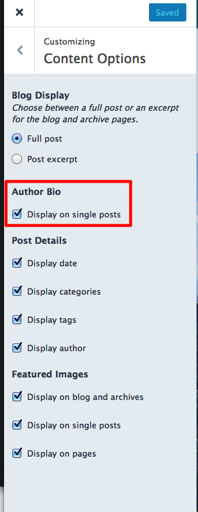
-
Looks like we did make some changes to Karuna today — to add support for Content Options — that may have inadvertently caused the author bio to show. Sorry about that! Our developer will dig a little deeper to see why that happened, but your site should be all set for now.
-
Thanks for the quick response Kathryn, much appreciated. I thought it was something I’d done. Also good to know about the Content Options section, I’ve now gone in and changed a couple of other settings there :)
-
-
Ok I’m probably becoming a real pain now but I just noticed something else that has changed :) Not sure if related to the changes to the theme today.
On the page called ‘Blog’ it used to include each of my posts in full but now I see it just says ‘This is the page where users will see your blog’. Under Content Options I’ve switched between the Summary and Full options for this page but it makes no difference. So once again I’m wondering if the change was my doing or WP’s? Thank you.
-
It looks like there’s no Posts Page selected in the Customizer’s Static Front Page panel:
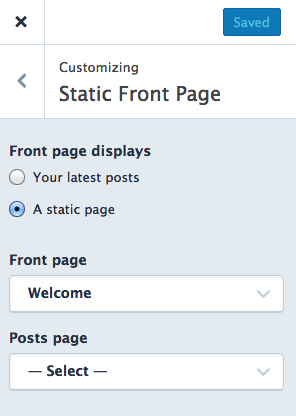
Once you select your Blog placeholder page there, your posts should appear. Not sure how this changed, but it shouldn’t be related to anything that was done within the theme. Let me know how it goes!
-
Ahh thanks, I really don’t recall changing that option but maybe I did!
To be honest, I’m not entirely sure of the purpose of this ‘Blog’ page, it’s just been there from the start. Is it to have a page where people can view every post in one place? Fixed now anyway.
-
Is it to have a page where people can view every post in one place?
That’s right. When you assign a static homepage, you also need a “placeholder” page for posts, if you’d like visitors to be able to access them somewhere in one stream.
-
Got it. Might try switching from static homepage to showing recent posts as it’s more visual. Thanks for all your help 👍
-


- The topic ‘Remove author bio from posts’ is closed to new replies.
 WordPress.com Forums