

Remove Connect Social Buttons from Newsworth Theme
-
Hello. There is another thread on this topic that was closed before a solution was provided.
I am having the same problem. The “CONNECT” widget on the sidebar is not configurable in the theme. All it does is give you a dropdown with what I guess is my gravatar account. If I select my name, it adds a linkedin icon with the wrong hyperlink. There is no discernable way to configure the FaceSuck and Twit icons. I want the entire widget to go away. I use the built in WP social widget.
Please fix this!
The blog I need help with is: (visible only to logged in users)
-
Hi there – I see what you mean! We’re looking into this and I’ll keep you posted here in this thread.
-
Newsworthy uses an older method for social icons — I spoke with our developers and it looks like a problem sometimes arises when social-media services are disconnected from a site before the related social menu is removed from the Customizer options.
The workaround is to reconnect your Twitter and Facebook accounts temporarily. Then head to your Customizer and see if there is an option to de-select the social menu. If there is, unselect the menu and save your changes.
You should then be able to disconnect your accounts again.
Let me know how it goes.
-
Dear Kathy,
I did as requested and the option / dropdown showed up for twit but still no way to remove the widget from the sidebar. See pic:
https://drive.google.com/file/d/0B7qDHdUy8PfWY01hZlp6aHB3Szg/view?usp=sharing
I am still stuck. :-( Thank you for the help.
-
Thanks for reconnecting. Could you please try re-saving your Customizer settings without making any changes?
-
And if that doesn’t work, first reselect each service again from the dropdown and save your settings — and then deselect them and save the Customizer settings a second time.
-
Thanks for reconnecting. Could you please try re-saving your Customizer settings without making any changes?
I don’t think that is possible. You have to change something to get it to show “save & publish” button.
I tried as you stated above with just a space in the tagline for a change. Same result, Face*&^^ still shows up.
-
Well, we’re getting somewhere! At least the Twitter icon is gone. :-)
Sorry I didn’t notice that the Facebook connection dropdown was missing from your screenshot, that might be a clue here.
When I go into your sharing settings at https://wordpress.com/sharing/blogagility.com it looks like there is a problem connecting to your Facebook account, as you can see in this screenshot:
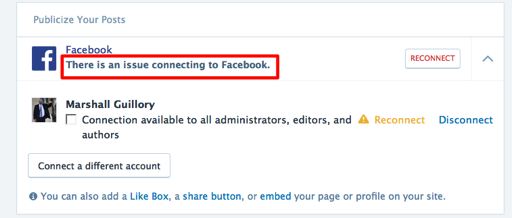
This could be why there is no Facebook option in the Connect panel in the Customizer. Could you try reconnecting from there using the “Reconnect” button, and see if that works? If it doesn’t, try the “Disconnect” button first, and the reconnect again.
-
Kathy,
I tried the steps you suggested and face*722 will not go away. Same result in the customizer, only twitt and linkedin show up.
-
Thanks for giving it another go.
As it turns out, there was a change to the way the Facebook API works since this older social icon system was created, and that was preventing the reconnection from working as expected.
Our developer made a manual change to your account and the FB icon should now be gone!
-
Kathy,
Thank you very much miss!
This is what excellent service looks and feels like! Great stuff!
Good day and God bless,
MG
-


- The topic ‘Remove Connect Social Buttons from Newsworth Theme’ is closed to new replies.
 WordPress.com Forums