

Remove featured page titles on front page in Edin
-
I’d like to use just an image for the featured pages on the front page, without the page’s title appearing below the image. Any ideas? I do not have the custom package purchased.
The blog I need help with is: (visible only to logged in users)
-
There is no way to remove or suppress display of any elements designed into any theme Edin or otherwise without a custom design upgrade. Please use this link https://en.forums.wordpress.com/forum/css-customization#postform so you can copy and paste your text into a thread that will appear in the CSS Forum where you will get a definitive answer to your question.
-
The only elements you can hide in Edin without custom CSS are the ones shown in the Theme Options panel: breadcrumb navigation on pages, the header search form, and the front-page title.
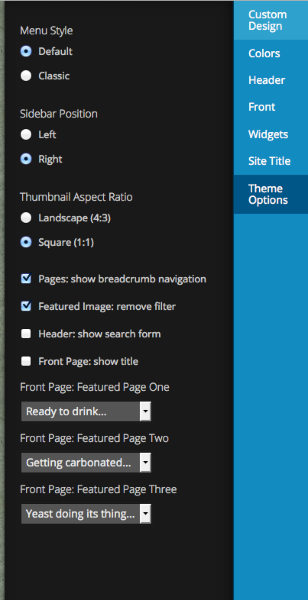
The only other way I can think of to remove the title on those three elements would be to leave the page title blank in the editor. That will have the effect of hiding the title on each page itself, as well.
If you go the custom CSS route, this CSS should do the trick:
.featured-page-area .entry-title { display: none; } -
Unless I’m missing something, it’s not possible to leave the page title blank in the editor.
Thanks anyway.
-
Unless I’m missing something, it’s not possible to leave the page title blank in the editor.
It should definitely be possible to leave a post or page title blank – leaving titles blank is part of how we test themes. :-)
Here are some screenshots:
https://cloudup.com/cGxiW3SjOYF – dashboard
https://cloudup.com/cwZ0hTmU4Cr – Customizer
https://cloudup.com/cotXts4ju5d – front endJust let me know if you’d like me to make a draft page with a blank title on your site.
-
Hi, I see you managed to remove the titles from over top of the featured images in the Edin theme. How did you do it ? (they are driving me mad!) I have tried leaving the page title blank, but it won’t let me. I’m working on cherishedearth.wordpress.com. Any advice would be much appreciated.
-
vicarswife – looks like they did manage to leave the page titles blank, as I’d suggested:
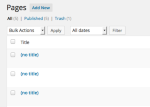
When you say “it won’t let me” – could you explain what happens so I can investigate further?
Which editor are you using, the one at wp-admin or the one at wordpress.com/post? If it’s the second one, try the classic editor at wp-admin.
-
vicarswife – I just tested the new editor at wordpress.com/post and was able to leave the page title blank there as well, so it would be great to have some more details about exactly where you’re posting and what error you’re seeing so we can get to the bottom of why you aren’t able to leave the title blank. Thanks!
Would it be possible to upload a screenshot of what you’re seeing to help in troubleshooting?
Here’s a guide on how to make a screenshot, if you’re not sure: http://en.support.wordpress.com/make-a-screenshot/
You can upload the screenshot – in a graphic format like JPG, PNG, or PDF – in your Media Library so I can see it. Thanks.
-
Hi Kathryn, thanks so much for your message. I have uploaded a couple of screenshots for you, so you can see the problem. When I go to edit the page, the current page title is home. I can delete the title, and then preview the change, and it all looks exactly as I want it, and then when I click update, the title gets reinserted again and appears on the page. I have tried both the old and new editors.
-
I have just figured out that if I change from ‘grid page’ to ‘front page’ the ‘home’ title doesn’t appear over the featured image on the page titled home. Yay!
-
OK, glad you’re all set! I think we were talking about two completely different things, in the end. :-) I don’t see any screenshots in your Media Library, but I’m guessing that’s because you solved your own issue.
If you have any other questions, please feel free to start a brand-new thread. Thanks!
-
Ah, I see your screenshots now – I was looking at the first poster’s site by accident. It looks like you were referring to the homepage title, not the title of each grid child page, which is what the original poster had been asking about.
Good luck with your site!


- The topic ‘Remove featured page titles on front page in Edin’ is closed to new replies.
 WordPress.com Forums