Remove home page
-
I’m using the TwentyFourteen theme and I’m trying to have thumbnails of images that link to specific pages within my site. I’m able to feature posts/pages on the homepage with an image thumbnail. So, I would like to remove the static home page, and I don’t want my blog posts to appear on the front page. How can I achieve that?
The blog I need help with is: (visible only to logged in users)
-
So, I would like to remove the static home page, and I don’t want my blog posts to appear on the front page. How can I achieve that?
The static home page is precisely the choice to use for when you don’t want your posts to appear on the front page. But you don’t want either. Where will you put the thumbnail images with links to your pages or posts without either a front page or visible posts?
A blog constructed primarily of pages is a possibility, but this is not a very popular route and has consequences.
-
You have two choices.
(1) All posts on the front page.
(2) A static front page and posts on a different page.By default the front page of your blog displays all published posts (not pages) in reverse chronological order, with the most recently published post on top. That is for the convenience of your returning visitors.
However, if you do not want all the posts to show on the front page, then you can create a static front page called for example “Welcome” for your site and a “Blog” page for posts.
To do that create two pages first http://en.support.wordpress.com/pages/
After you do that you go to > Settings > Reading and make the designation change and click “save changes”.
http://en.support.wordpress.com/pages/front-page/A static page (select below)
Front page:
Posts page: -
I would like to have images on my front page that will link you to other pages within my site. I’ve tried adding a gallery, but then I cannot link my images to other pages.
With the theme that I’m using, there is a feature where I can have images in a slider on the front page which links to pages/posts within my site. Then, I don’t need to use the home page for anything, if users can be directed to content through that slider. That is what I am trying to achieve.
Is there any other way to link images in a static homepage to other pages inside my site? -
With the theme that I’m using, there is a feature where I can have images in a slider on the front page which links to pages/posts within my site. Then, I don’t need to use the home page for anything, if users can be directed to content through that slider.
It’s my impression that to display a featured slider, in a theme that has this capability, requires that you do the following:
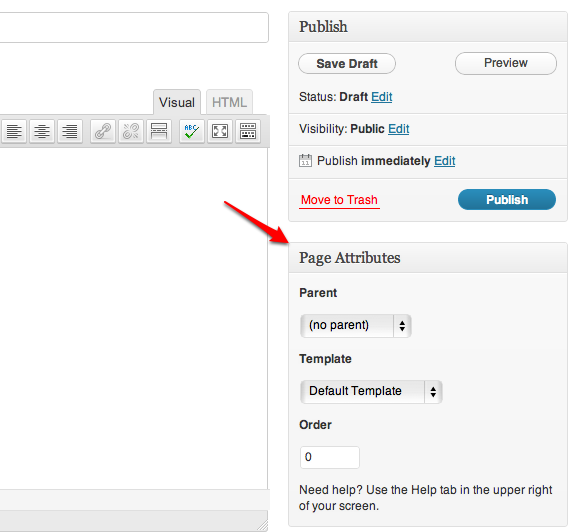
1. Assign a page to the Showcase Page template at Page Attributes,
2. Set the Front page option to Static Page at Reading Settings,
3. Select the page you just assigned the Showcase Page template to as your front page, and
4. Choose another page to serve as your blog page.Is there any other way to link images in a static homepage to other pages inside my site?
With a table, but you’ll have to construct your own (see link below). Or you might be able to find one that’s already constructed, which you could adapt by replacing the text or images with your own.
See Table coding for WordPress.com users (wpbtips.com). -
I’m going to try your first suggestion and if that doesn’t work I will try the table.
How do I get to Page Attributes? -
Hi there,
How to find the information you need.Search the support docs http://support.wordpress.com for page attributes
http://en.support.wordpress.com/?s=page+attributes
results http://en.support.wordpress.com/pages/page-attributes/
image http://en.support.files.wordpress.com/2008/12/find_page_attributes.png?w=688 -
More information:
To create your own HTML tables see here > Align Images: HTML Tables for WordPress Blogs http://onecoolsitebloggingtips.com/2010/03/24/align-images-html-tables-for-wordpress-blogs/
Another good reference link is http://www.w3schools.com/html/html_tables.asp
Note that if you use Windows then Windows Live Writer it has a tablemaker > http://en.support.wordpress.com/xml-rpc/windows-live-writer/ Note: Firefox users on Windows machines may need to clear the browser cache with ctrl+shift+del in order to get Firefox to recognize the formatting. https://en.forums.wordpress.com/topic/posting-of-word-files-with-tables?replies=6
-
-
I’m trying to have thumbnails of images that link to specific pages within my site.
Hey, your home page looks great! Best of luck with your table building, but you might want to have a look at the Mixfolio theme. Here’s an example website using the theme: Runaway Wild. It evidently uses a static front page, which can be constructed entirely of images which represent, and link to, posts. I don’t know if you can have them link to pages as well. Also, I don’t know how many images you can put in a row. The images in the example are certainly not thumbnails.
-
-
musicdoc1,
Thanks for the suggestion. I’m definitely going to try it out. It may be the solution I was looking for.
My front page isn’t where I want it to be yet, but it’s getting there.


- The topic ‘Remove home page’ is closed to new replies.
 WordPress.com Forums