

Remove page title from header image
-
Is there a way of removing the page title from the header image as it gets in the way and isn’t always necessary. I can do it on the home page by unchecking tagline but not on the other pages..? Also, is there a way of changing the colour of the text for the content? Thnanks
The blog I need help with is: (visible only to logged in users)
-
If you uncheck “Display Site Title and Tagline” in your Customizer‘s Site Identity panel that should hide both elements from all pages.
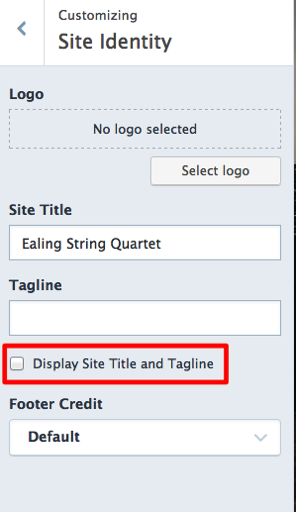
If that doesn’t work as you expected, can you provide a screenshot pointing to the issue? Here’s a guide on how to make a screenshot:
http://en.support.wordpress.com/make-a-screenshot/You can upload the screenshot – in a graphic format like JPG, PNG, or PDF – in your Media Library so I can see it. Thanks.
Also, is there a way of changing the colour of the text for the content?
You can choose from one of the free featured palettes in the Customizer’s Colors & Backgrounds panel.
To make other colour changes beyond that you’d need to use Custom CSS is available with the Premium or Business plans.
-
-
Hi there – did you still need help? If you’d like to post a screenshot, you can put it directly in your Media Library where I’ll be able to see it:
-
Hi,
Thank you for getting back to me. I have resolved the font colour but even if I uncheck the “Display Site Title and Tagline” I still get the title of each page in the middle of the main photo.
I have put a screen shot in my media library. Any more ideas you have would be very appreciated.
Thanks,
Ben -
Ah – my apologies, I mistakenly thought you were referring to the site title.
You have two options:
– Remove the titles themselves from the page title field.
– Hide all page titles with custom CSS:.page .entry-title { display: none; }Custom CSS is available with the Premium or Business plans.
If you prefer not to upgrade at this time, removing the page title from the page title field is the easiest solution.
-
Hi,
Thank you for your help. I have done that but in the menu it now says #64 (no title). I have put a screenshot in my media gallery. I would like the title to be in the menu but not on the image. Is that possible? Or only if I upgrade and use the custom CSS?
Thanks for all of your help
Ben -
You can edit the Menu’s “navigation label” so it says something else:
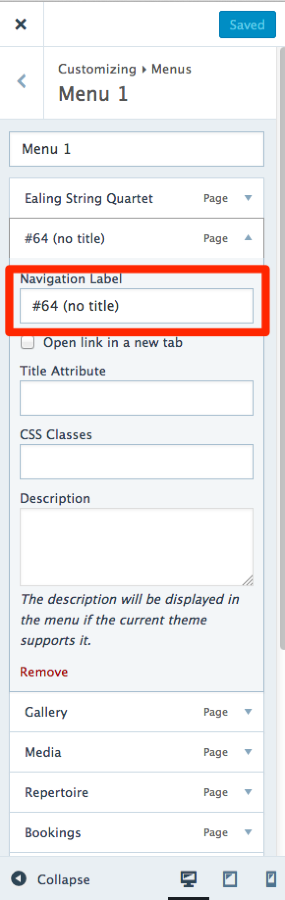
Let me know how it goes!


- The topic ‘Remove page title from header image’ is closed to new replies.
 WordPress.com Forums