

Remove WordPress Banner at top of Chrome page
-
How do I get rid of the annoying WordPress Banner at the top of my internet pages on Google Chrome. It is annoying and covers documents I am trying to read.
-
Please provide the URL for the WordPress.COM hosted blog in question in the form of an active link starting with http://
-
I don’t have a blog. When I go to read a newspaper, the black W banner is stuck at the top of my page. It affects how I can read, or not. It was not there before and I want it gone now.
-
Hi there,
I tagged this thread for Staff assistance. Please subscribe to it so you are notified when they respond. To subscribe look in the sidebar of this thread, find the subscribe to topics link and click it.Please let Staff know:
(a) Exactly what kind of device you are using to connect to the internet and to WordPress.com.
(b) Exactly which browser (and version of it) you’re using by checking here if necessary http://supportdetails.com/
(c) Exactly what you experience including what any error reports you receive state. Note you can use http://snag.gy/ to share screenshots and link to them here. -
Hi there,
Can you please give me a link to your newspaper so I can take a look? Also, if you can take a screenshot as @timethief stated, that would be very helpful.
Thank you!
-
http://ottawacitizen.com/
Here you go.thanks, Joan Joan Andersonjoan [phone number removed by staff]
-
Hi there,
When I go to the link when I’m logged out of WordPress.com it looks like this:
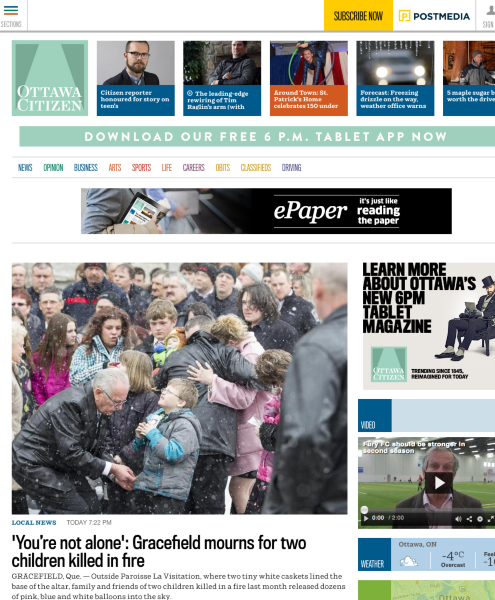
When I am logged into WordPress.com, you will see the top black banner as seen here:
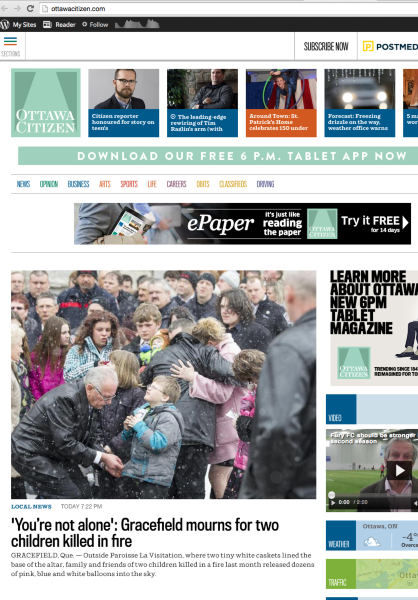
Let me know if you have any questions with this!
-
I don’t know how to send you an image here. Can I send it in the email?
Joan
-
-
Why is my name and number showing? Can everyone see it? I hope not. There is a black banner but I only signed in to WordPress to talk to someone for support to get rid of it. I haven’t used W in a long long time.
-
-
No you are signed in to create the posts in this thread. You are signed in which is why you see that black banner as well. If you sign out the banner will be gone. You can still see this thread, but in order to reply you just have to sign back in.
I’ve removed your name/phone number.
-
I logged out. Reloaded the newspaper. The black banner is still there.I am replying to you via the email.
-
I have responded to you privately. Please check your email and respond from there if you have any questions.
-
You did not remove the phone number. I can still see it.
joantrveller you need to clear your browser cache after logging out.
-
Your name is only visible to you when you are logged in – when I am logged in I see my name – – sounds like you might have a browser caching issue holding some old content
-
-
You probably want to remove the signature on your emails if you’re replying to forum posts by email.


- The topic ‘Remove WordPress Banner at top of Chrome page’ is closed to new replies.


 WordPress.com Forums