

removed the search tab and difficulties with the polices with custom design
-
hello. I would like to removed the Search tab located in the header of my blog, I do not know how. And I have another concern. I paid for the Custom Design option, but the fonts I chose does not appear on my pages, only on my articles.
Bonjour. je voudrais retiré l’onglet de recherche qui se trouve dans l’entête de mon blog, je ne sais pas comment faire. Et j’ai un autre soucis. j’ai payé pour l’option Custom design, mais les typographies que j’ai choisi ne s’affiche pas sur mes pages, seulement sur mes articles.
The blog I need help with is: (visible only to logged in users)
-
Hi there!
You can remove the Search bar by editing your CSS. Please go to Appearance > Customize in your Dashboard and go to the CSS at the bottom. Remove the text and paste in:
#branding #searchform {
	display: none;
}
As for the fonts, I found that I was able to change the fonts of pages, for example the About page, as seen in the screenshot below:
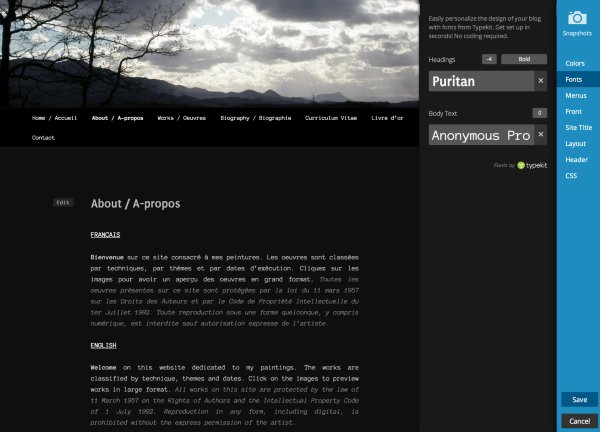
Please try it again and save it to the font you want. If it still doesn’t work, please let me know!
Cheers!
-
Thank you very much, it works for the css and fonts too. In fact what has misled me with fonts is that the pages have titles larger than the titles of articles. Is it possible to change the size of the title page without changing the articles?
Thank you for your response.
Cheers!
good day! -
Hi!
Yes you can! Please add this to your CSS:
.page .entry-title {
	font-size: 18px!important;
}
You can change around the 18, to lower or higher to fit your needs!
Let me know if you have any questions about this!


- The topic ‘removed the search tab and difficulties with the polices with custom design’ is closed to new replies.


 WordPress.com Forums