

Removing "Blog at WordPress.com. | The sela Theme" from each page
-
We do not want each of our pages to state “Blog at WordPress.com. | The sela Theme. ” at the bottom. How do we remove this?
The blog I need help with is: (visible only to logged in users)
-
Those are required to stay – removing them will get your blog suspended
Current Terms of Service:
11. Attribution. Automattic reserves the right to display attribution links such as ‘Blog at WordPress.com,’ theme author, and font attribution in your blog footer or toolbar. Footer credits and the WordPress.com toolbar may not be altered or removed regardless of upgrades purchased.
May I remove the Admin Bar, credit links such as ‘Blog at WordPress.com’, theme, font, or toolbar links?
All WordPress.com bloggers are required to maintain the Admin Bar (the dark bar that appears at the top of WordPress.com sites when logged in) as well as credit links, even our VIP bloggers. Please do not hide or alter text or links for the footer credits or the toolbar. Modifying the style of the footer text (i.e. colors and font size) is fine as long as it’s still readable.
http://en.support.wordpress.com/custom-design/#frequently-asked-questions
-
We are not happy with WordPress.com. We believed by paying you we would get a website without advertising. We also thought we would be able to use Webforms which had the facility of sending attachments. Basically we think we have been mis-sold and your conditions were not made transparent. How do we apply for a refund of fees paid?
-
-
We believed by paying you we would get a website without advertising.
Why did you believe that? What in the Terms of Service led you astray? Maybe the support documents need to be updated
-
We paid for WordPress.com Premium. Your website at:
clearly says “No Ads”. Why do we still get the ad at the bottom?
-
@rams2015:
-If you want refunds, see my my response above:
https://en.forums.wordpress.com/topic/removing-blog-at-wordpresscom-the-sela-theme-from-each-page?replies=6#post-2352201-If you want remove the footer credits, you can’t:
http://en.support.wordpress.com/custom-design/#frequently-asked-questionsThat’s it.
-
You have misled us. Footer credits are advertising for WordPress. To say they are not ads is not correct. How do we get a refund if it has been more than 30 days?
-
Contact with a Staff member.
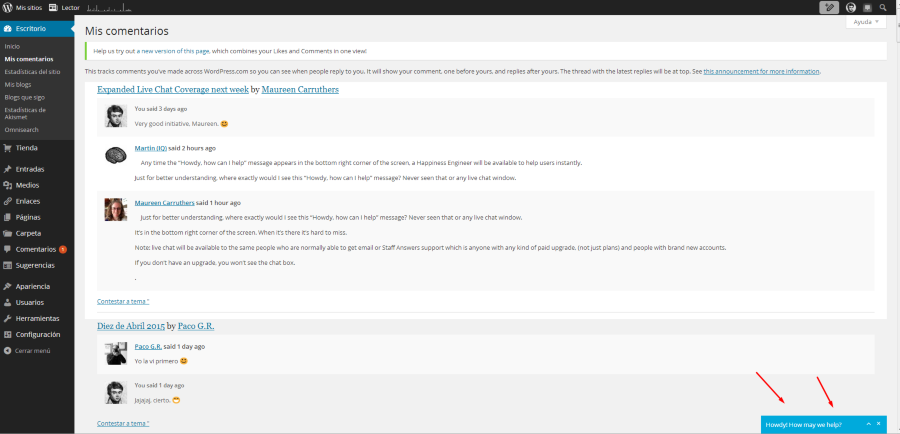
You can do that with the Live Chat feature. That feature is in the bottom right corner of the screen:
-
Hi there.
We ask that you keep the credit to WordPress.com and your theme as part of our Terms of Service. It’s worth noting that we also ask sites hosted through our VIP program to keep a credit to WordPress.com in their footer. You can see an example of this at the bottom of the TED blog:
Although I can’t help you remove the existing credits, I can help you add your own credit alongside them in the footer with some custom CSS. If you’re not familiar with CSS, it’s a coding language that’s used across the web to change the appearance of websites. Here at WordPress.com, it’s possible to add custom CSS to change certain parts of your theme’s design. You can read more about this here:
https://en.support.wordpress.com/custom-design/#custom-css
To add custom CSS, you firstly need to go to My Site in WordPress.com then choose the option to Customize In the left sidebar. You’ll reach what’s known as the WordPress.com Customizer:
https://wordpress.com/customize/rams2015.org
From here, click on the CSS tab. Below the introductory text in the resulting editor, copy and paste the following CSS:
.site-info a:first-child:before {
  content: "Copyright RAMS 2015. | ";
}
The text in above CSS snippet, Copyright RAMS 2015., will appear alongside the existing footer credits and can be changed to whatever text you wish to display in the footer.
Hope this helps out. Please do let me know if you have any extra questions around that.


- The topic ‘Removing "Blog at WordPress.com. | The sela Theme" from each page’ is closed to new replies.


 WordPress.com Forums