

Removing Call to Action button and text
-
I an using Gateway theme and have no idea how to get rid of Welcome to WordPress.com etc. and Call to Action button on Home page header image..
Also cannot change colour of Site Identity text to white from black.The blog I need help with is: (visible only to logged in users)
-
Did you get this sorted out?
Looks like you’ve switched your front page to use the default template now. If you want the homepage template, you can remove the default text and call to action in the Customizer‘s Theme Options > Homepage Template panel:
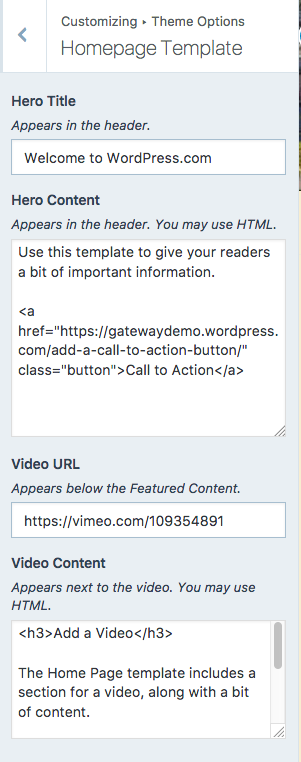
Looks like you’ve removed your Site Title and tagline in the Customizer’s Site Identity panel.. I’d suggest you add those back as they’re very important for search engines. If you don’t want them displayed on the front end (public side) you can hide them by unchecking the box next to “Display Site Title and Tagline.” This keeps them visible to search engines and browsers, while hiding them on your header image.
-
I successfully removed the default text and added my Site Title.
Can I change the Site Title font style, colour and size?
It is not readable (black)) until you pass the cursor over it and appears white. -
Good idea, musicdoc.
hgphilip – you might like the second palette, it’s similar to what you have now, but with a white Site Title:
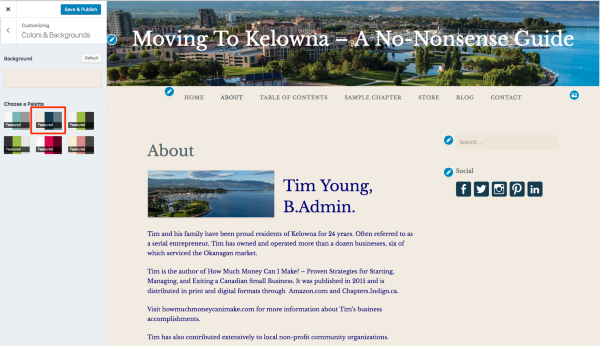
Let us know how it goes.


- The topic ‘Removing Call to Action button and text’ is closed to new replies.
 WordPress.com Forums