

Removing coding I didn't add
-
How do I get rid of added coding that I did not add into the blog? It shows the following in my blog which I didn’t add and can’t find how to get rid of. Also, how do I ensure I don’t do whatever caused this to happen this time so as not to have this happen in the future? Thank you.
Normal
0false
false
falseEN-US
X-NONE
X-NONEMicrosoftInternetExplorer4
Normal
0false
false
falseEN-US
X-NONE
X-NONEMicrosoftInternetExplorer4
The blog I need help with is: (visible only to logged in users)
-
Hi there!
I see this at the bottom of your post “Succeed with Seeds.” You can remove it by deleting it from your post before publishing.
This likely happened if you copied and pasted your post into the post editor from a rich text editor like Microsoft Word. If you did, you can prevent it from happening again by using the ‘Paste from Word’ button:
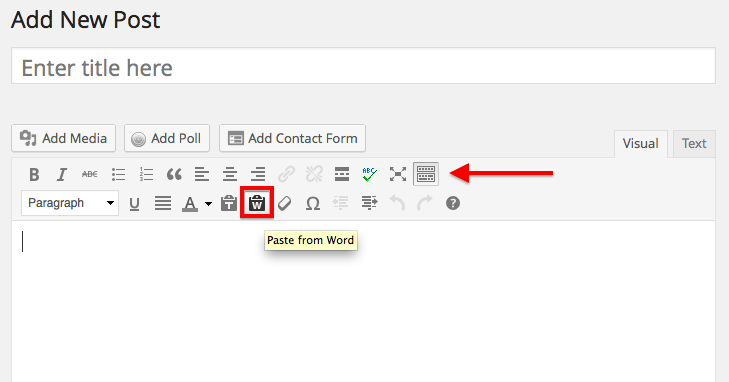
If you don’t see the second row of buttons, click on the button with the arrow pointed to it, that will open the second row of buttons.
Let me know if I can help with anything else!


- The topic ‘Removing coding I didn't add’ is closed to new replies.
 WordPress.com Forums