

Removing padding/margin on page
-
I would like to reduce the amount of white space at the bottom of the page post on my front page between the last image on the post, and where the post border is. The theme is Canape.
Due to the nature of the site, it is set to invisible until it is ready to go live.
I just upgraded to CSS customization, and am a relative novice.
The blog I need help with is: (visible only to logged in users)
-
The space looks to be coming from the 2em of padding on the
.widgetclass on all widgets:.widget { border: 2px solid #ece8e0; font-size: 1.4rem; line-height: 2; margin-bottom: 2em; overflow-wrap: break-word; padding: 2em; }If you’d like to remove the bottom padding on the three homepage widgets specifically, try this in your custom CSS:
.front-widget-area .widget { padding-bottom: 0; } -
Kathrynwp,
Thank you for the reply. The css worked for the widgets, but I also need to include the content area border.
I tried >>
.content-area .front-page-content-area {
padding-bottom: 0;
}But I think i am using the wrong class.
-
It sounds like you’re referring to this element:
.front-widget-area {
    margin-bottom: 25px;
}
Adjust the value as you like and let me know if this is what you were trying to target.
-
Thank you for your reply. That targets directly below the area I would like to decrease. It is the space inside the red border in the post area, not the widgets.
-
Thank you for your reply. That targets directly below the area I would like to decrease. It is the space inside the red border in the post area, not the widget padding areas.
-
Ha! Sometimes a picture is worth a thousand words – is this the space you mean?
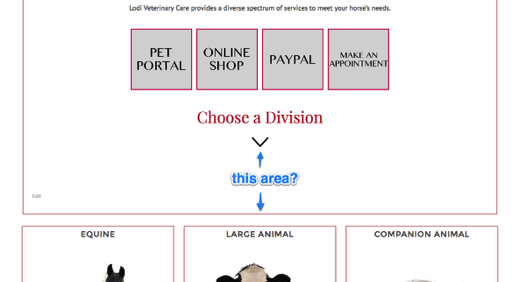
If so, give this a try:
.home .entry-content {
    margin-bottom: 0;
}
That should make it look like this when you’re not logged in:
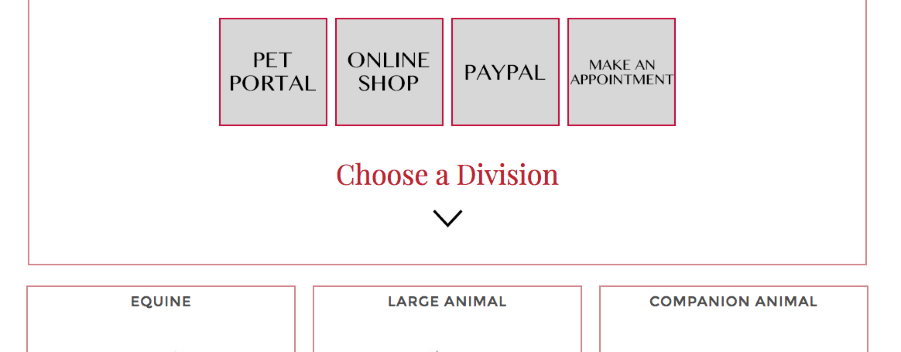
If that’s not the right spot, I’d appreciate a screenshot showing what area I’m looking for. :)
Here’s a guide on how to make a screenshot:
http://en.support.wordpress.com/make-a-screenshot/You can upload the screenshot – in a graphic format like JPG, PNG, or PDF – in your Media Library so I can see it. Thanks.
-
-
Third time’s the charm! I’ll mark this thread as resolved but feel free to start a new one if you need help with anything else.
By the way, I really like what you’ve done with Canape – it’s always fun to see a theme originally intended for one thing (restaurants in this case) used so well for something completely different!


- The topic ‘Removing padding/margin on page’ is closed to new replies.
 WordPress.com Forums