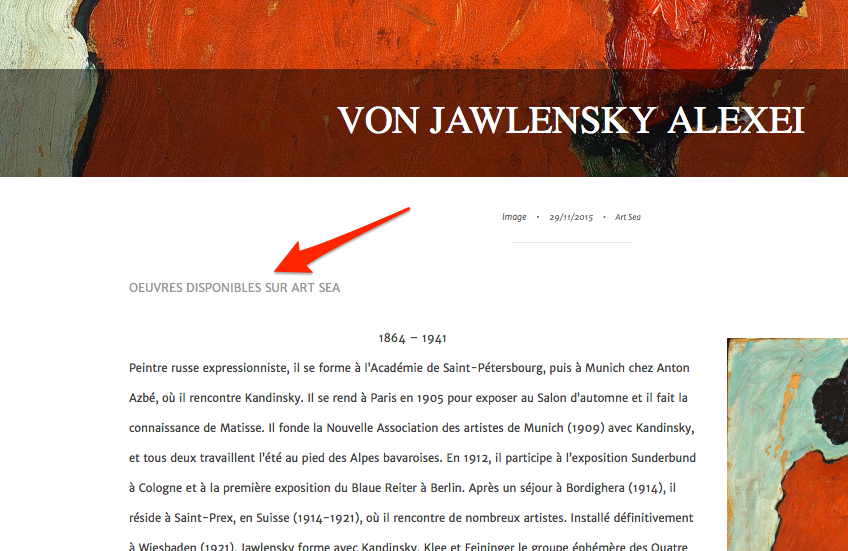
repeat a text for all posts in content aera
-
Hi,
I would like to repeat that text in all posts, in the content aera, not in the footer menu, in the same color as now : grey. at the top end of the post :
OEUVRES DISPONIBLES SUR ART SEAas example on this page :
http://art-sea.co/2015/12/10/degas-edgar/
What is the css code or the menu topic(s) I have to chosse?
Thank you.The blog I need help with is: (visible only to logged in users)
-
Hi, this will put the text you referenced at the top of all single post pages right above the content and below the date/category.
.single .entry-content:before { content: "OEUVRES DISPONIBLES SUR ART SEA"; display: block; color: #999; padding-bottom: 20px; } -
Hi,
Thank you, but the text is not in the Content area, when I edit the post I can not sea the text. I need too that the text is at the top end of the post, not the top.Thank you
Regards -
Hi, if I go to http://art-sea.co/2015/11/29/von-jawlensky-alexei/, this is what I see, and the text is at the top of the post content. Screenshot: https://cldup.com/y_FMkjWOnv.png .
Is that not what you wanted?
The CSS code I gave you above adds that text to all single post pages and will not appear in the content of the post itself when you open the post in the editor.
-
Hi
Thank you for email.
No, it is not what I want, I have deleted the code. What I want is the same as you actually see (at the top END) but the problem is that the text is in the footer menu. When I edit a post, I can not see the text in it. I need the text “OEUVRES DISPONIBLES SUR ART SEA” is in the post, same as text and photos…The code I have at the moment is this one:
.type-post #jp-post-flair:before {
content: “OEUVRES DISPONIBLES SUR ART SEA”;
color: #999;
display: block;
}I don’t know codes but may be the problem is “block”
Regards
Sophie
-
Sophie, when we use CSS to add text with the :before or :after, it is not inserted into the post content that you see when you edit a post. It is only visible on the web page itself.
If you want the text to appear in the editor where you write your posts or pages, you would have to add the text within the editor where you want it to go.
What you would do is to type the text in and then highlight/select the line of text and change the color of it to #999999. You would do that by clicking button #4 on the lower row of tool bars in the Visual Editor.
There is no way to have that text always appear within the page/post editor when you create a new page or post.
Perhaps I am not understanding.
-
Hi,
Thank you for email.
Yes it is what I want….Other (and last) thing I want is to change the buttom of the front page “ARTICLES PRECEDENTS” with “CONTINUER”. I can change it in the htlm, and see changes reflect on the site but the CSS do not register any changes, so I can’t copy and paste the changes in the CSS editor, and the changes on the htlm are disapearing whan I close the Custom editor.
Thank you. -
-
Hi, on the text on the button at the bottom of the posts, this will change it.
#infinite-handle span button:before {
    content: "CONTINUER";
    visibility: visible;
    position: relative;
    display: block;
    top: 10px;
}
#infinite-handle {
    height: 40px;
}
“are disapearing when I close the Custom editor”
What is disappearing?
-
Hi,
Thank you very much for the code, it is great!! But now I have 2 buttoms. Do you know the way to delete the previous one?(disapearing … it was just the correction of my mistake because I wrote “whan” in the place of “when”) in my previous message.
Regards,
-
Oh dear, I’m sorry, I forgot to copy this other rule. Put this one above the two I gave previously.
#infinite-handle span button {
    visibility: hidden;
}
(disapearing … it was just the correction of my mistake because I wrote “whan” in the place of “when”) in my previous message.
Ah, I understand. :)
-
Hi, Thank you very much, it is great like this. The only problem, that may come from y computer, is that the buttom text is not visible in IE, but in FIREFOX it is fine… Do you think I should indicate the color in the code for IE, if yes, at what place?
Many thanks, -
-
the buttom text is not visible in IE
Could you specify what version of Internet Explorer? Thanks.
-
-
Thanks for specifying the version – I can see the issue with IE11.
YOu can certainly try explicitly declaring a colour in the custom CSS, so instead of this:
#infinite-handle span button:before {
    content: "CONTINUER";
    visibility: visible;
    position: relative;
    display: block;
    top: 10px;
}
Try this:
#infinite-handle span button:before {
    content: "CONTINUER";
    visibility: visible;
    position: relative;
    display: block;
    top: 10px;
  color: #ffffff;
}
Let me know how it goes.
-
-
-
Hello,
no change… sorry
Here is the code in totality, may be it will help you… Regards#infinite-handle span button {
visibility: hidden;
}#infinite-handle span button:before {
content: “CONTINUER”;
visibility: visible;
position: relative;
display: block;
top: 10px;
color: #ffffff !important;
}#infinite-handle {
height: 40px;
} -
Hi, IE can be a pain. The code we have given works on every other browser and has for years, but apparently IE is thumbing its nose at the visibility: visible; declaration for :before and it is not allowing it to be forced with a !important keyword either. In fact, it is totally ignoring the entire :before CSS rule.
I don’t know of any bigger hammers I can throw at this issue. Sometimes IE (many times) can be far too rigid when applying CSS. I’m afraid my only suggestion is to remove the code and to back to having the standard ARTICLES PRECEDENTS.


- The topic ‘repeat a text for all posts in content aera’ is closed to new replies.
 WordPress.com Forums