

Request Feedback Button
-
Where is the request feedback button? I can’t find it on my site.
The blog I need help with is: (visible only to logged in users)
-
See here in the support docs please https://en.support.wordpress.com/writing-helper/request-feedback/
-
Thanks! I saw this article and the problem is though it tells me how HOW to use the button, it does not tell me WHERE it is. Do you know where I can find it?
-
Does this help? https://en.support.wordpress.com/writing-helper/
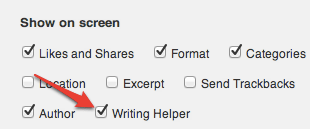
The Screen Options http://support.wordpress.com/screen-options/ menu can be found in the upper right corner of your Post Edit page.


- The topic ‘Request Feedback Button’ is closed to new replies.
 WordPress.com Forums