

restore menu default; change author bio from one blog to another
-
How can I restore the default menu and headings? I tried to do custom menus but have mucked it up. Also, how can I change my author info that is coming up from a different blog? Thanks
The blog I need help with is: (visible only to logged in users)
-
Hi there,
It looks like the only menu item currently active on your site is “Home”. Is that the only one you wanted? If not, please let me know exactly what you’re looking for!
Also, how can I change my author info that is coming up from a different blog?
You can edit your author info here:
https://wordstosales.wordpress.com/wp-admin/users.php?page=grofiles-editor
Please note, this carries over from blog to blog so whatever you place in that box will be shown on all blogs you have connected to this account. Does that make sense?
If you would like to have two separate author bios, you would need to create another user account specific to this site and author all posts under that profile.
-
forum support+Zm9ydW09ZW4mc2lnbmF0dXJlPTRmM2NiYzExOTA3MTUwZjk2YmU2ZjczYTBlMjM5NzJhNTI0ZmY5YzBkOTcwMDVlOTUzZjBiNWRmYTFkNzIyNmEmdG9waWNfaWQ9NTU0NjIyJnVzZXJfaWQ9NDAwODczMg==@wordpress.com
Hi Jeremy
Thank you so much for taking the time to help a desperate newbie. I love WordPress but I’m struggling to get things happening…
In response to your email:
I’ve opened a new account for ‘Words to Sales’ but was too afraid to cancel the original one. Would you mind transferring data aver to this new site please?
Re the menus I’d like – just the default menus for Choco pleasewith my new bio.
Re other sites that I have:
I tried to update: Get That Government Job or GTGJ (not sure – they are the same site) and I managed to lose both of them. I’ve since tried to renew the Pilcrow theme to ‘Get That Government Job’. It works until I close the site and then the landing page of my website comes up again. Yikes!
I have a few wordpress sites but want to get rid of the ones I’m not using. Can you help me please? I want to delete the ‘hidden’ websites.
I want to keep:
1. Get That Government Job (with the ten or so posts that have been very successful) – or, it may have been gtgj. I have a website:www.getthatgovernmentjob.com with WordPress. I tried to renew this to the Pilcrum theme but couldn’t access the Dashboard to make any changes and every time I open the site I get the landing page from my corporate website: http://www.smartstartmarketing.com.au Bet you’ve never had that happen before…I’m obviously super talented…or duh?
2. Words to Sales
3. Book Marketing Toolkit
I’m sorry to be a bother you – thank you soooo much for your help.
Regards
Dawn Richards
From: WordPress.com Support Forums [mailto:(email visible only to moderators and staff)] Sent: Thursday, 2 October 2014 2:23 AMTo: (email visible only to moderators and staff): [WordPress.com Forums] restore menu default; change author bio from one blog to another
jeremeylduvall replied to a forum topic that you subscribe to
in response to the topic “restore menu default; change author bio from one blog to another”:
Hi there,
It looks like the only menu item currently active on your site is “Home”. Is that the only one you wanted? If not, please let me know exactly what you’re looking for!
Also, how can I change my author info that is coming up from a different blog?
You can edit your author info here:
https://wordstosales.wordpress.com/wp-admin/users.php?page=grofiles-editor
Please note, this carries over from blog to blog so whatever you place in that box will be shown on all blogs you have connected to this account. Does that make sense?
If you would like to have two separate author bios, you would need to create another user account specific to this site and author all posts under that profile.
Reply View forum topic
Want less email? Unsubscribe from this topic
Thanks for flying with WordPress.com
-
I’ve opened a new account for ‘Words to Sales’ but was too afraid to cancel the original one. Would you mind transferring data aver to this new site please?
I’m happy to help sort this out! First, I’ll need several details:
– When you say you opened a new account, did you create another username? If so, could you let me know the username you’re referring to? Currently, you’re writing in under “gtgj”.
– When you say “transfer the data over”, are you asking for the blog wordstosales.wordpress.com and domain wordstosales.com to be transferred to the new user account? Just keep in mind if we do this, you will need to login under your new account to manage this blog.
Re the menus I’d like – just the default menus for Choco please with my new bio.
I’m not quite sure what you mean by the default menus for Choco. By default, the Choco theme will include a “Home” link as it does now when you visit wordstosales.com. If you would like to add a link to your bio, you’ll want to create a new page for your bio following the instructions here:
Once you create and publish the page, it should automatically add the page to your menu next to “Home”. Can you give that a try?
I tried to update: Get That Government Job or GTGJ (not sure – they are the same site) and I managed to lose both of them. I’ve since tried to renew the Pilcrow theme to ‘Get That Government Job’. It works until I close the site and then the landing page of my website comes up again.
Currently, the site getthatgovernmentjobdotcom.wordpress.com on your account has two domains on it:
– getthatgovernmentjob.com
– smartstartmarketing.com.au
The primary domain on the account is smartstartmarketing.com.au meaning all other domains on that blog (including getthatgovernmentjobdotcom.wordpress.com) will get redirected there.
Currently, the domain smartstartmarketing.com.au is setup elsewhere with a separate landing page.
Are you trying to get getthatgovernmentjob.com to reflect your content at etthatgovernmentjobdotcom.wordpress.com instead? If so, we have two main options:
1. Change the primary domain on the account to getthatgovernmentjob.com via the link here:
https://getthatgovernmentjobdotcom.wordpress.com/wp-admin/paid-upgrades.php?page=domains
You would want to select this option if you no longer wanted smartstartmarketing.com.au to reflect the landing page that is currently up now.
2. Remove the domain mapping upgrade for smartstartmarketing.com.au. This would allow smartstartmarketing.com.au and getthatgovernmentjob.com to function as separate sites.
If you want to move forward with option #2, let me know as it’s something I would need to do for you!
I have a few wordpress sites but want to get rid of the ones I’m not using. Can you help me please? I want to delete the ‘hidden’ websites.
So, it sounds like we want to keep the following:
– getthatgovernmentjobdotcom.wordpress.com
– wordstosales.wordpress.com
– bookmarketingtoolkit.wordpress.com
You no longer want the following:
– selectioncriteriatoolkit.wordpress.com
– gtgj.wordpress.com
– businessbloopers.wordpress.com
– uspropertysales.wordpress.com
– youngeronsetdementia.wordpress.com
Is that correct? If so, you’ll want to follow the instructions here on the five sites in that second list:
Let me know if you run into any trouble!
-
Hi Jeremy
Thank you so much for your help. I’m finding it a bit overwhelming but really want to have the blogs and hopefully turn my website into a WordPress website soon.
Thanks again
Regards
Dawn Richards
From: WordPress.com Support Forums [mailto:(email visible only to moderators and staff)] Sent: Friday, 3 October 2014 2:58 AMTo: (email visible only to moderators and staff): [WordPress.com Forums] restore menu default; change author bio from one blog to another
jeremeylduvall replied to a forum topic that you subscribe to
in response to the topic “restore menu default; change author bio from one blog to another”:
I’ve opened a new account for ‘Words to Sales’ but was too afraid to cancel the original one. Would you mind transferring data aver to this new site please?
I’m happy to help sort this out! First, I’ll need several details:
THANK YOU!!!!
– When you say you opened a new account, did you create another username? If so, could you let me know the username you’re referring to? Currently, you’re writing in under “gtgj”.
My username is Words to Sales as it was on the previous account for gtgj, get that government job, etc.
I have wordstosales.com as my domain name
– When you say “transfer the data over”, are you asking for the blog wordstosales.wordpress.com and domain wordstosales.com to be transferred to the new user account? Yes please!
Just keep in mind if we do this, you will need to login under your new account to manage this blog.
That’s fine- it will be less confusing because I need separate bios for careers and for freelance writing so separate accounts will be a bonus.
Re the menus I’d like – just the default menus for Choco please with my new bio.
I’m not quite sure what you mean by the default menus for Choco. By default, the Choco theme will include a “Home” link as it does now when you visit wordstosales.com.
I’d like to start fresh with the choco theme (without all the dreadful; changes I made to stuff it up).
Would it be easier to delete the current blog and start from scratch?
If you would like to add a link to your bio, you’ll want to create a new page for your bio following the instructions here:
Done!
https://wordstosales.wordpress.com/wp-admin/post.php?postA&actioníit&message
Once you create and publish the page, it should automatically add the page to your menu next to “Home”. Can you give that a try?
Can’t find it. I’ve saved it as a draft but can’t locate it
This short BIO is fine to use for Words to Sales if you have time to do it for me
We love to help small businesses grow. Whether you need an urgent sales letter, a proposal, web copy or an ebook to drive traffic to your website, we can help. Give us a call.
I tried to update: Get That Government Job or GTGJ (not sure – they are the same site) and I managed to lose both of them. I’ve since tried to renew the Pilcrow theme to ‘Get That Government Job’. It works until I close the site and then the landing page of my website comes up again.
Currently, the site getthatgovernmentjobdotcom.wordpress.com on your account has two domains on it:
– getthatgovernmentjob.com
This is the one I want for the blog
– smartstartmarketing.com.au
This is my website and I have no idea how it got to the blog. Could you please remove it? Thanks.
The primary domain on the account is smartstartmarketing.com.au meaning all other domains on that blog (including getthatgovernmentjobdotcom.wordpress.com) will get redirected there.
Currently, the domain smartstartmarketing.com.au is setup elsewhere with a separate landing page.
Are you trying to get getthatgovernmentjob.com to reflect your content at etthatgovernmentjobdotcom.wordpress.com instead? If so, we have two main options:
1. Change the primary domain on the account to getthatgovernmentjob.com via the link here:
https://getthatgovernmentjobdotcom.wordpress.com/wp-admin/paid-upgrades.php?page=domains
You would want to select this option if you no longer wanted smartstartmarketing.com.au to reflect the landing page that is currently up now.
2. Remove the domain mapping upgrade for smartstartmarketing.com.au. This would allow smartstartmarketing.com.au and getthatgovernmentjob.com to function as separate sites.
If you want to move forward with option #2, let me know as it’s something I would need to do for you!
Sorry, I’m confused. I want to just have the blog getthatgovernmentjob.com – or it may be gtgj.com (which should have numerous posts and comments attached). I don’t want any association with my website which is http://www.smartstartmarketing.com.au (i didn’t understand what the upgrade meant and would like to cancel the upgrade please).
I have a few wordpress sites but want to get rid of the ones I’m not using. Can you help me please? I want to delete the ‘hidden’ websites.
So, it sounds like we want to keep the following:
– getthatgovernmentjobdotcom.wordpress.com (original account)
– wordstosales.wordpress.com (new account)
– bookmarketingtoolkit.wordpress.com (Should I open a new account for this site because the bio info is for careers, while this site is aimed at self published authors?)
You no longer want the following:
– selectioncriteriatoolkit.wordpress.com-deleted
– gtgj.wordpress.com I’m not sure if this is the site with posts on it or if it’s getthatgovernmentjob.com
Please see attached screenshot. I tried to update this blog and ended up with a changed blog with a small font
– businessbloopers.wordpress.com – deleted
– uspropertysales.wordpress.com – deleted
– youngeronsetdementia.wordpress.com- deleted
Is that correct? If so, you’ll want to follow the instructions here on the five sites in that second list:
Let me know if you run into any trouble!
Jeremy thank you for helping me. I am out of my depth and really appreciate your help.
Regards
Dawn Richards
Reply View forum topic
Want less email? Unsubscribe from this topic
Thanks for flying with WordPress.com
[attach 3]
-
Hi!
Please see below:
My username is Words to Sales as it was on the previous account for gtgj, get that government job, etc. I have wordstosales.com as my domain name
I don’t see the username “wordstosales” at WordPress.com. Can you let me know what email address the other account you created is under?
I’d like to start fresh with the choco theme (without all the dreadful; changes I made to stuff it up). Would it be easier to delete the current blog and start from scratch?
I’d prefer to just stick with the current blog as deleting and then recreating can get a bit messy. Currently, the menu on wordstosales.com is completely blank. What other changes are you still seeing on your side?
Can’t find it. I’ve saved it as a draft but can’t locate it
You can find it right here:
https://wordstosales.wordpress.com/wp-admin/post.php?post=41&action=edit
You’ll need to publish it for it to be active on your site.
I tried to update: Get That Government Job or GTGJ (not sure – they are the same site) and I managed to lose both of them. I’ve since tried to renew the Pilcrow theme to ‘Get That Government Job’. It works until I close the site and then the landing page of my website comes up again.
Can you try getthatgovernmentjob.com now? You should see the correct site with the Pilcrow theme.
Bookmarketingtoolkit.wordpress.com (Should I open a new account for this site because the bio info is for careers, while this site is aimed at self published authors?)
That’s entirely up to you! Keep in mind, if you want to create a new account, you’ll need to set it up with a separate email. Emails can only be associated with one account at a time at WordPress.com. So, you would need to create the other account under a different email address than the one you’re using under gtgj.
Please see attached screenshot. I tried to update this blog and ended up with a changed blog with a small font
It sounds like you attached the image to an email reply to this forum thread. Can you upload it to your Media Library instead so I can take a look?
-
Jeremy, you have been an amazing help to me. I was totally lost and ready to give up. Thank you so much for your patience and support.
I want to transfer my existing website, http://www.smartstartmarketing.com.au over to make it a WordPress site so that I can manage it myself. Can you suggest someone who can do this for me for a fee?
Thank you sooo much for your patience.
Regards
Dawn Richards
From: WordPress.com Support Forums [mailto:(email visible only to moderators and staff)] Sent: Saturday, 4 October 2014 4:43 AMTo: (email visible only to moderators and staff): [WordPress.com Forums] restore menu default; change author bio from one blog to another
jeremeylduvall replied to a forum topic that you subscribe to
in response to the topic “restore menu default; change author bio from one blog to another”:
Hi!
Please see below:
My username is Words to Sales as it was on the previous account for gtgj, get that government job, etc. I have wordstosales.com as my domain name
Email address is (email visible only to moderators and staff)
My confirmation message from WordPress follows:
[Omitted by staff]
You can now log in: https://wordpress.org/support/
Domain is wordstosales.com
I don’t see the username “wordstosales” at WordPress.com. Can you let me know what email address the other account you created is under?
I’d like to start fresh with the choco theme (without all the dreadful; changes I made to stuff it up). Would it be easier to delete the current blog and start from scratch?
I’d prefer to just stick with the current blog as deleting and then recreating can get a bit messy. Currently, the menu on wordstosales.com is completely blank. What other changes are you still seeing on your side?
Here it is
You can find it right here:
https://wordstosales.wordpress.com/wp-admin/post.php?postA&actioníit
Sorry, it doesn’t work
You’ll need to publish it for it to be active on your site.
I tried to update: Get That Government Job or GTGJ (not sure – they are the same site) and I managed to lose both of them. I’ve since tried to renew the Pilcrow theme to ‘Get That Government Job’. It works until I close the site and then the landing page of my website comes up again.
-
Howdy Dawn!
Please see below. Just a note, it looks like you dropped your password in the reply. I’ve since omitted it. As a reminder, this is a public forum so anyone could grab your username and password. Please change your password immediately!
I want to transfer my existing website, http://www.smartstartmarketing.com.au over to make it a WordPress site so that I can manage it myself. Can you suggest someone who can do this for me for a fee?
Just to be clear, you’re looking to move smartstartmarketing.com.au to WordPress.com. Is that correct?
We don’t offer direct support for this kind of move. We do have some instructions here:
http://en.support.wordpress.com/moving-a-blog/#moving-from-wordpress-org
If you’re looking for someone to help you do this, we have some recommended folks here:
Alternatively, you could post the job here:
I just wanted to follow-up on one other bit. The goal was to move wordstosales.com to another user account so you can manage it from a separate profile other than gtgj. I don’t believe we’ve successfully created the other account just yet. Can you please fill out the following form to create the other account?
-
From: WordPress.com Support Forums [mailto:(email visible only to moderators and staff)] Sent: Tuesday, 7 October 2014 2:14 AMTo: (email visible only to moderators and staff): [WordPress.com Forums] restore menu default; change author bio from one blog to another
jeremeylduvall replied to a forum topic that you subscribe to
in response to the topic “restore menu default; change author bio from one blog to another”:
Howdy Dawn!
Please see below. Just a note, it looks like you dropped your password in the reply. I’ve since omitted it. As a reminder, this is a public forum so anyone could grab your username and password. Please change your password immediately!
I want to transfer my existing website, http://www.smartstartmarketing.com.au over to make it a WordPress site so that I can manage it myself. Can you suggest someone who can do this for me for a fee?
Just to be clear, you’re looking to move smartstartmarketing.com.au to WordPress.com. Is that correct?
We don’t offer direct support for this kind of move. We do have some instructions here:
http://en.support.wordpress.com/moving-a-blog/#moving-from-wordpress-org
If you’re looking for someone to help you do this, we have some recommended folks here:
Alternatively, you could post the job here:
Thanks for the info Jeremy – I’ll look into it.
I just wanted to follow-up on one other bit. The goal was to move wordstosales.com to another user account so you can manage it from a separate profile other than gtgj. I don’t believe we’ve successfully created the other account just yet. Can you please fill out the following form to create the other account?
Jeremy, I have already opened another account for Words to Sales and will put the WordPress receipt in with my site media for you to see. At the moment, I have wordstosales on a new account plus wordstosales, gtgj, getthatgovernmentjob and book marketing toolkit on the gtgj account. The changes I made to my profile for the new account are now on the gtgj account. It’s very confusing!
https://signup.wordpress.com/signup/?user=1
I tried this link but was told that the name wordstosales is already taken (I have it).
Thanks heaps Jeremy
Reply View forum topic
Want less email? Unsubscribe from this topic
Thanks for flying with WordPress.com
-
Hi!
I tried this link but was told that the name wordstosales is already taken (I have it).
Ah – so this happens when you create a blog like wordstosales.wordpress.com. We automatically reserve the username “wordstosales”. I can create this username for you. Can you just send me the email address you would like to be associated with that account? Please note, it must be different than the one currently associated with your gtgj account.
-
From: WordPress.com Support Forums [mailto:(email visible only to moderators and staff)] Sent: Wednesday, 8 October 2014 3:35 AMTo: (email visible only to moderators and staff): [WordPress.com Forums] restore menu default; change author bio from one blog to another
jeremeylduvall replied to a forum topic that you subscribe to
in response to the topic “restore menu default; change author bio from one blog to another”:
Hi!
I tried this link but was told that the name wordstosales is already taken (I have it).
Ah – so this happens when you create a blog like wordstosales.wordpress.com. We automatically reserve the username “wordstosales”. I can create this username for you. Can you just send me the email address you would like to be associated with that account? Please note, it must be different than the one currently associated with your gtgj account.
Thanks
(email visible only to moderators and staff)
Reply View forum topic
Want less email? Unsubscribe from this topic
Thanks for flying with WordPress.com
-
Hi Jeremy
Re the gtgj account – the blog is now gethtatgovernmentjob.com I don’t need the gtgj account but am nervous about ditching it in case I lose the blog. Can you delete it for me please?
Thanks
From: WordPress.com Support Forums [mailto:(email visible only to moderators and staff)] Sent: Wednesday, 8 October 2014 3:35 AMTo: (email visible only to moderators and staff): [WordPress.com Forums] restore menu default; change author bio from one blog to another
jeremeylduvall replied to a forum topic that you subscribe to
in response to the topic “restore menu default; change author bio from one blog to another”:
Hi!
I tried this link but was told that the name wordstosales is already taken (I have it).
Ah – so this happens when you create a blog like wordstosales.wordpress.com. We automatically reserve the username “wordstosales”. I can create this username for you. Can you just send me the email address you would like to be associated with that account? Please note, it must be different than the one currently associated with your gtgj account.
Reply View forum topic
Want less email? Unsubscribe from this topic
Thanks for flying with WordPress.com
-
Hi!
You should receive an email with the login information for your new account “wordstosales” to the address you mention (started with “ebooks”). Can you let me know if you receive it?
Re the gtgj account – the blog is now gethtatgovernmentjob.com I don’t need the gtgj account but am nervous about ditching it in case I lose the blog. Can you delete it for me please?
There are a few elements here that I want to clarify. First, you have a blog on your account with the URL “gtgj.wordpress.com”. It doesn’t look like you’re currently using that blog. If you just reply back to confirm, I can deactivate it from your account so you don’t see it anymore.
Regarding the account “gtgj”, that’s the account you’re currently logged into when you’re submitting posts to this forum thread. It’s also the account that owns the upgrades for both getthatgovernmentjobdotcom.wordpress.com and wordstosales.wordpress.com. So, we don’t want to ditch that account right now since you need it to login and access these blogs. Does that make sense?
-
Hi Jeremy
I received the email with the login details. Thanks.
From: WordPress.com Support Forums [mailto:(email visible only to moderators and staff)] Sent: Thursday, 9 October 2014 2:06 AMTo: (email visible only to moderators and staff): [WordPress.com Forums] restore menu default; change author bio from one blog to another
jeremeylduvall replied to a forum topic that you subscribe to
in response to the topic “restore menu default; change author bio from one blog to another”:
Hi!
You should receive an email with the login information for your new account “wordstosales” to the address you mention (started with “ebooks”). Can you let me know if you receive it?
Re the gtgj account – the blog is now gethtatgovernmentjob.com I don’t need the gtgj account but am nervous about ditching it in case I lose the blog. Can you delete it for me please?
There are a few elements here that I want to clarify. First, you have a blog on your account with the URL “gtgj.wordpress.com”. It doesn’t look like you’re currently using that blog. If you just reply back to confirm, I can deactivate it from your account so you don’t see it anymore.
Thanks – I’d appreciate that.
Regarding the account “gtgj”, that’s the account you’re currently logged into when you’re submitting posts to this forum thread. It’s also the account that owns the upgrades for both getthatgovernmentjobdotcom.wordpress.com and wordstosales.wordpress.com. So, we don’t want to ditch that account right now since you need it to login and access these blogs. Does that make sense? Yes.
Reply View forum topic
Want less email? Unsubscribe from this topic
Thanks for flying with WordPress.com
-
Hi Jeremy
The email you sent with the login details is for the gtgj account that currently uses email: (email visible only to moderators and staff) – not wordstosales as you listed (the new account uses the email account: (email visible only to moderators and staff))
Sorry for the confusion.
Cheers
From: WordPress.com Support Forums [mailto:(email visible only to moderators and staff)] Sent: Thursday, 9 October 2014 2:06 AMTo: (email visible only to moderators and staff): [WordPress.com Forums] restore menu default; change author bio from one blog to another
jeremeylduvall replied to a forum topic that you subscribe to
in response to the topic “restore menu default; change author bio from one blog to another”:
Hi!
You should receive an email with the login information for your new account “wordstosales” to the address you mention (started with “ebooks”). Can you let me know if you receive it?
Re the gtgj account – the blog is now gethtatgovernmentjob.com I don’t need the gtgj account but am nervous about ditching it in case I lose the blog. Can you delete it for me please?
There are a few elements here that I want to clarify. First, you have a blog on your account with the URL “gtgj.wordpress.com”. It doesn’t look like you’re currently using that blog. If you just reply back to confirm, I can deactivate it from your account so you don’t see it anymore.
Regarding the account “gtgj”, that’s the account you’re currently logged into when you’re submitting posts to this forum thread. It’s also the account that owns the upgrades for both getthatgovernmentjobdotcom.wordpress.com and wordstosales.wordpress.com. So, we don’t want to ditch that account right now since you need it to login and access these blogs. Does that make sense?
Reply View forum topic
Want less email? Unsubscribe from this topic
Thanks for flying with WordPress.com
-
Hi!
I have deactivated the site gtgj.wordpress.com per your request.
Regarding the wordstosales account, that account was created with the ebooks email address. You should have received a password at that email address that you can use to login to the wordstosales account. Did you receive that email?
-
Hi Jeremy
No, I received an email to log in to the gtgj account.
Thanks
From: WordPress.com Support Forums [mailto:(email visible only to moderators and staff)] Sent: Friday, 10 October 2014 3:14 AMTo: (email visible only to moderators and staff): [WordPress.com Forums] restore menu default; change author bio from one blog to another
jeremeylduvall replied to a forum topic that you subscribe to
in response to the topic “restore menu default; change author bio from one blog to another”:
Hi!
I have deactivated the site gtgj.wordpress.com per your request.
Regarding the wordstosales account, that account was created with the ebooks email address. You should have received a password at that email address that you can use to login to the wordstosales account. Did you receive that email?
Reply View forum topic
Want less email? Unsubscribe from this topic
Thanks for flying with WordPress.com
-
Hi!
Can you try entering your ebooks email address in the form here?
https://en.wordpress.com/wp-login.php?action=lostpassword
You will receive an email to the ebooks address with your password. Then, you’ll need to visit WordPress.com and first log-out of your gtgj account. Then, login with the wordstosales account.
-
Hi Jeremy
This isn’t the latest thread – I must have deleted it accidentally.
You set up the new account for Words to Sales for me with the email address: (email visible only to moderators and staff)
You sent me the instructions to complete this account.
I think I have done that correctly but I can’t open the dashboard on wordstosales.
My other account is gtgj for blog getthatgovernmentjob.com
This is now under the same account a words to sales and I can’t access the dashboard on this site either. Also, the right sidebar has disappeared.
Thanks for your help.
Regards
Dawn
From: WordPress.com Support Forums [mailto:(email visible only to moderators and staff)] Sent: Thursday, 9 October 2014 2:06 AMTo: (email visible only to moderators and staff): [WordPress.com Forums] restore menu default; change author bio from one blog to another
jeremeylduvall replied to a forum topic that you subscribe to
in response to the topic “restore menu default; change author bio from one blog to another”:
Hi!
You should receive an email with the login information for your new account “wordstosales” to the address you mention (started with “ebooks”). Can you let me know if you receive it?
Re the gtgj account – the blog is now gethtatgovernmentjob.com I don’t need the gtgj account but am nervous about ditching it in case I lose the blog. Can you delete it for me please?
There are a few elements here that I want to clarify. First, you have a blog on your account with the URL “gtgj.wordpress.com”. It doesn’t look like you’re currently using that blog. If you just reply back to confirm, I can deactivate it from your account so you don’t see it anymore.
Regarding the account “gtgj”, that’s the account you’re currently logged into when you’re submitting posts to this forum thread. It’s also the account that owns the upgrades for both getthatgovernmentjobdotcom.wordpress.com and wordstosales.wordpress.com. So, we don’t want to ditch that account right now since you need it to login and access these blogs. Does that make sense?
Reply View forum topic
Want less email? Unsubscribe from this topic
Thanks for flying with WordPress.com
-
Hi Dawn!
I think I have done that correctly but I can’t open the dashboard on wordstosales.
Yep – that’s expected at this point. Right now, the site wordstosales.wordpress.com is still under the account gtgj. If you would like, I can transfer the entire site (including all upgrades) over to your new wordstosales account. Please note, in this case, you would no longer be able to access the site from your gtgj account. Can you reply back to confirm?
This is now under the same account a words to sales and I can’t access the dashboard on this site either. Also, the right sidebar has disappeared.
Currently, you will only be able to access the wordstosales.com Dashboard from your gtgj account until we complete the step above. Your sidebar is still appearing correctly on my side:
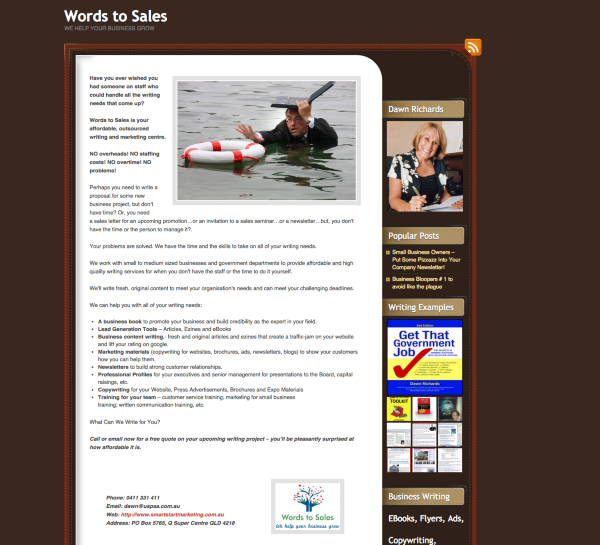
Can you let me know what you’re seeing on your side?


- The topic ‘restore menu default; change author bio from one blog to another’ is closed to new replies.
 WordPress.com Forums