

restore menu default; change author bio from one blog to another
-
Hi Jeremy
When I type in getthatgovernmentjob.com, I can’t open the website as I could before.
On both gtgj and wordstosales, I can’t access the dashboard.
On getthatgovernmentjob, the main sidebar has disappeared.
Both sites ar eon the wordstosales account.
Yikes!
Thanks for your help.
From: WordPress.com Support Forums [mailto:(email visible only to moderators and staff)] Sent: Tuesday, 14 October 2014 4:10 AMTo: (email visible only to moderators and staff): [WordPress.com Forums] restore menu default; change author bio from one blog to another
jeremeylduvall replied to a forum topic that you subscribe to
in response to the topic “restore menu default; change author bio from one blog to another”:
Hi Dawn!
I think I have done that correctly but I can’t open the dashboard on wordstosales.
Yep – that’s expected at this point. Right now, the site wordstosales.wordpress.com is still under the account gtgj. If you would like, I can transfer the entire site (including all upgrades) over to your new wordstosales account. Please note, in this case, you would no longer be able to access the site from your gtgj account. Can you reply back to confirm?
This is now under the same account a words to sales and I can’t access the dashboard on this site either. Also, the right sidebar has disappeared.
Currently, you will only be able to access the wordstosales.com Dashboard from your gtgj account until we complete the step above. Your sidebar is still appearing correctly on my side:
Can you let me know what you’re seeing on your side?
Reply View forum topic
Want less email? Unsubscribe from this topic
Thanks for flying with WordPress.com
-
Hi!
When I type in getthatgovernmentjob.com, I can’t open the website as I could before.
On both gtgj and wordstosales, I can’t access the dashboard.
On getthatgovernmentjob, the main sidebar has disappeared.
Both sites ar eon the wordstosales account.The getthatgovernmentjob.com site is owned by your gtgj account. You can access your Dashboard from that account. First, please make sure you’re completely logged out of WordPress.com. Then, login using your gtgj credentials. You will be able to see your getthatgovernmentjob.com site then.
There are no sites currently connected with your new wordstosales account. If you would like, I’m happy to transfer your wordstosales.wordpress.com blog and associated domain (wordstosales.com) to that address. In that case, you would need to do the following:
– Login to wordstosales if you wanted to access wordstosales.com
– Login to gtgj if you wanted to access getthatgovernmentjob.com
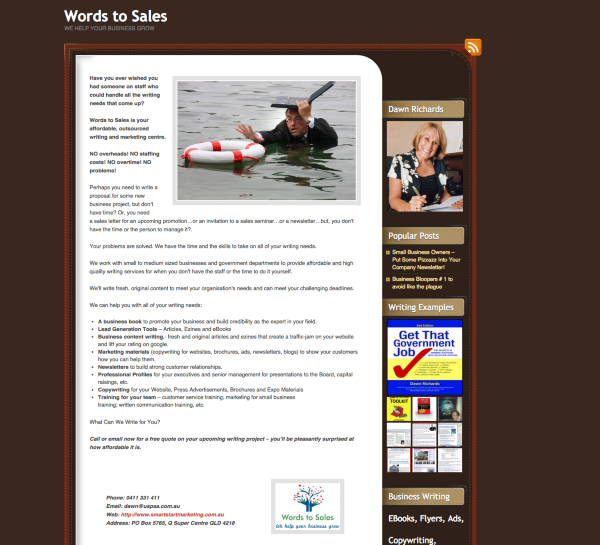
Currently, I’m still seeing the sidebar on getthatgovernmentjob.com as shown here:

I believe you might be referring to the right-hand side widgets. Those widgets are working correctly right now, but I don’t think they’re generating the desired appearance.
First, you have a category cloud widget. That’s designed to show all of your post categories, but currently, you have excluded all but “Uncategorized” within the widget. You can see that here:
https://getthatgovernmentjobdotcom.wordpress.com/wp-admin/widgets.php
You’ll just need to expand the Category Cloud widget and look in the “Exclude” line. Please note, you’ll have to be logged in under gtgj to see this.
As for the Display WordPress Posts, that widget isn’t quite setup correctly. More instructions on that can be found here:
Can you give those a try?
-
Hi Jeremy
I think we have crossed messages. To clarify:
At present on gtgj:
I can’t load the dashboard
I get a sign saying ‘We cannot load blog data at this time’ and the right hand sidebar is missing (containing the dozen or so posts I’ve written)
This blog is now on the wordstosales account (it should be on the email address info@smartstartmarketing on the gtgj account).
At present on wordstosales:
YES! I really would like you to transfer the blog, upgrade and domain across so that I have two separate accounts.
(Words to Sales ((email visible only to moderators and staff)) and
gtgj ((email visible only to moderators and staff))
Thanks for sorting this out for me.
Regards
Dawn
From: WordPress.com Support Forums [mailto:(email visible only to moderators and staff)] Sent: Tuesday, 14 October 2014 11:41 PMTo: (email visible only to moderators and staff): [WordPress.com Forums] restore menu default; change author bio from one blog to another
jeremeylduvall replied to a forum topic that you subscribe to
in response to the topic “restore menu default; change author bio from one blog to another”:
Hi!
When I type in getthatgovernmentjob.com, I can’t open the website as I could before. On both gtgj and wordstosales, I can’t access the dashboard. On getthatgovernmentjob, the main sidebar has disappeared. Both sites are now on the wordstosales account.
The getthatgovernmentjob.com site is owned by your gtgj account. You can access your Dashboard from that account. First, please make sure you’re completely logged out of WordPress.com. Then, login using your gtgj credentials. You will be able to see your getthatgovernmentjob.com site then.
There are no sites currently connected with your new wordstosales account. If you would like, I’m happy to transfer your wordstosales.wordpress.com blog and associated domain (wordstosales.com) to that address. In that case, you would need to do the following:
– Login to wordstosales if you wanted to access wordstosales.com
– Login to gtgj if you wanted to access getthatgovernmentjob.com
Currently, I’m still seeing the sidebar on getthatgovernmentjob.com as shown here:
(This link doesn’t open)
I believe you might be referring to the right-hand side widgets. Those widgets are working correctly right now, but I don’t think they’re generating the desired appearance.
First, you have a category cloud widget. That’s designed to show all of your post categories, but currently, you have excluded all but “Uncategorized” within the widget. You can see that here:
https://getthatgovernmentjobdotcom.wordpress.com/wp-admin/widgets.php
(This link doesn’t open)
You’ll just need to expand the Category Cloud widget and look in the “Exclude” line. Please note, you’ll have to be logged in under gtgj to see this.
As for the Display WordPress Posts, that widget isn’t quite setup correctly. More instructions on that can be found here:
I’m talking about posts on the actual blog, not posts from another blog
Can you give those a try?
Reply View forum topic
Want less email? Unsubscribe from this topic
Thanks for flying with WordPress.com
-
Hi Dawn,
I have transferred the blog wordstosales.wordpress.com and all associated upgrades (including the domain) to the account wordstosales for you. You will need to login to that account in order to access that blog going forward as gtgj is no longer a user on that blog.
I get a sign saying ‘We cannot load blog data at this time’ and the right hand sidebar is missing (containing the dozen or so posts I’ve written)
Can you take a screenshot of what you’re currently seeing and upload it to your Media Library? Instructions for taking a screenshot can be found here:
-
Hi Jeremy
Thanks for getting Words to Sales working. Yaah!
Getthatgovernmentjob is now on the wordstosales site (not the gtgj site). I’ve taken a screenshot to show that the dashbar isn’t working bd the column on the left withthe posts has disappeared.
Thanks again for your help
Dawn
From: WordPress.com Support Forums [mailto:(email visible only to moderators and staff)] Sent: Thursday, 16 October 2014 1:23 AMTo: (email visible only to moderators and staff): [WordPress.com Forums] restore menu default; change author bio from one blog to another
jeremeylduvall replied to a forum topic that you subscribe to
in response to the topic “restore menu default; change author bio from one blog to another”:
Hi Dawn,
I have transferred the blog wordstosales.wordpress.com and all associated upgrades (including the domain) to the account wordstosales for you. You will need to login to that account in order to access that blog going forward as gtgj is no longer a user on that blog.
I get a sign saying ‘We cannot load blog data at this time’ and the right hand sidebar is missing (containing the dozen or so posts I’ve written)
Can you take a screenshot of what you’re currently seeing and upload it to your Media Library? Instructions for taking a screenshot can be found here:
Reply View forum topic
Want less email? Unsubscribe from this topic
Thanks for flying with WordPress.com
-
Hi Dawn,
Getthatgovernmentjob is now on the wordstosales site (not the gtgj site). I’ve taken a screenshot to show that the dashbar isn’t working bd the column on the left withthe posts has disappeared.
The domain getthatgovernmentjob.com is on your site getthatgovernmentjobdotcom.wordpress.com, which is managed by the user account gtgj. You can see this here:
https://getthatgovernmentjobdotcom.wordpress.com/wp-admin/paid-upgrades.php?page=my-upgrades
That domain and site aren’t tied to your wordstosales at all. Currently, your wordstosales account is only tied to wordstosales.wordpress.com with the domain wordstosales.com.
When you’re logged in under a particular account (either wordstosales or gtgj), you can see all associated sites here:
Your gtgj account is connected to your wordstosales.wordpress.com site. So, in short, you can manage all of your sites while logged in as gtgj. However, as wordstosales, you can only manage your wordstosales.wordpress.com account. Does that make sense?
Regarding the screenshot here:
https://wordstosales.wordpress.com/wp-admin/upload.php?item=111
In that screenshot, you aren’t logged into WordPress.com. Try to enter the following URL and login with your gtgj credentials:
http://getthatgovernmentjobdotcom.wordpress.com/wp-admin
Regarding the sidebar column, do you mean the right column by chance? It looks like the left one is filled up. For the right one to work, you’ll need to follow the steps outlined below:
First, you have a category cloud widget. That’s designed to show all of your post categories, but currently, you have excluded all but “Uncategorized” within the widget. You can see that here:
https://getthatgovernmentjobdotcom.wordpress.com/wp-admin/widgets.php
You’ll just need to expand the Category Cloud widget and look in the “Exclude” line. Please note, you’ll have to be logged in under gtgj to see this.
As for the Display WordPress Posts, that widget isn’t quite setup correctly. More instructions on that can be found here:
-
Hi Jeremy
Thanks for all of your help.
The only remaining problem is that gtgj is on the Words to Sales site with the Words to Sales public profile.
I’ve taken a screenshot (dated 24 Oct) to show you the problem. Thanks
-
Hey Dawn,
I’m not seeing the screenshot in your Media Library. Could you let me know where you uploaded it?
The user gtgj is still a user on the Words To Sales page. However, I”m happy to remove that user from the account. Just reply back to confirm!
-
Hi Jeremy
I know you are working on dozens of clients’ problems at the same time so you not recall that originally I had both sites on the gtgj account. Then, you assisted me to open a new account with a different email and bio for Words to Sales. This is working fine, thanks. But, somewhere along the way, getthatgovernmentjov is now under the new account instead of the gtgj account.
I’ll attach a new screenshot marked with the date25 Oct.
Thanks.
Dawn
From: WordPress.com Support Forums [mailto:(email visible only to moderators and staff)] Sent: Saturday, 25 October 2014 1:02 AMTo: (email visible only to moderators and staff): [WordPress.com Forums] restore menu default; change author bio from one blog to another
jeremeylduvall replied to a forum topic that you subscribe to
in response to the topic “restore menu default; change author bio from one blog to another”:
Hey Dawn,
I’m not seeing the screenshot in your Media Library. Could you let me know where you uploaded it?
The user gtgj is still a user on the Words To Sales page. However, I”m happy to remove that user from the account. Just reply back to confirm!
Reply View forum topic
Want less email? Unsubscribe from this topic
Thanks for flying with WordPress.com
-
Hey Dawn,
I believe you’re referring to the screenshot here:
https://wordstosales.wordpress.com/wp-admin/upload.php?item=119
On the top right-hand corner, you’ll see the following:
Words to Sales
gtgj
The top name is referred to as your “Display Name”, which is how your name will appear in forums like this one and when you leave comments on other blogs from this account.
The “gtgj” portion references the actual account username. You can read a bit more about the difference here:
The site getthatgovernmentjob.com is on the gtgj account, not on the new wordstosales account. The only blog that is on the wordstosales account is wordstosales.wordpress.com.
The “gtgj” user account is also a user on the wordstosales.wordpress.com site. Would you like me to remove that site so that the new blog is solely managed from the wordstosales account?


- The topic ‘restore menu default; change author bio from one blog to another’ is closed to new replies.
 WordPress.com Forums