

Return to classic editor
-
It took me five edits to get my thing posted. I write in MS Word and copy it to here. When I edited in your editor blocks, it would magically take out spaces between words. I just want to write and post. It says that under Options is Return to Classic Editor, but that’s missing. I can’t deal with your ‘helpful’ messing up my text time and time again. How do I get back to the old thing while you figure out how to fix this mess?
The blog I need help with is: (visible only to logged in users)
-
I need help with this too. I have a blog post due today for work and this new editor is causing havoc with my posts, when I preview it, even though everything is meant to be centre aligned it’s all left aligned in one very thin column. I’m talking max three words per tiny italic column. I can sympathise with the missing spaces too, it took me forever to write out the tutorial and now it’s basically not usable.
In case it’s needed, my blog is brodiecreations.wordpress.com
-
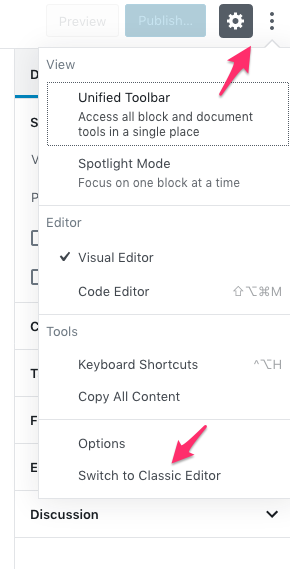
Okay I’ve just resolved it, when writing a post if you click on the three dots beside the settings button in the top right corner at the very bottom it says switch to classic editor. Phew!
-
Hi there,
@patriciahysell, if you want to copy complete posts from another program like Word, you’ll need to use the Classic Block, else the editor will try to convert your content into blocks. That’s how it’s designed to work.But that said, it’s not a good idea to copy content in from a word processor to start with. Word processors like MS Word use a type of code called Rich Text (RTF), that follows completely different rules than HTML that is used on websites, so there is always a risk of formatting getting messed up when pasting content from a word processor, no matter which editor you’re using.
When copying content from Word, please first paste it in a plaintext editor like Notepad. That will strip out any invisible Rich Text code that might have been copied along with your text. Then copy from there and paste into your site’s editor.
To switch back to the classic editor, edit an existing post or start a new one, then click on the three vertical dots top-right on the screen:
On which site do you have the block editor active, though? http://patriciahysell.wordpress.com/ does not appear to have the block editor active.
@brodiecreations glad to hear you figured it out. However, we’d appreciate more information on the issue you experienced so we can investigate and fix it. Please start a new thread at https://en.forums.wordpress.com/?new=1 with the exact steps you took so we can try and replicate it on our end, and add the modlook tag to make sure we see it, and we can continue helping you there.


- The topic ‘Return to classic editor’ is closed to new replies.
 WordPress.com Forums