

robots txt
-
I have looked through previous messages and can’t find an answer. I get this message in google when I search for elainevankempen.com
elainevankempen.com/
A description for this result is not available because of this site’s robots.txt – learn more.
You visited this page on 1/12/14.When I first saw it a few weeks back I checked my privacy settings, wrote to google – with 2 replies saying all should be fine. Now I look again and same message.
I am hoping that a google search for elaine van kempen would show the new wordpress site above other much older references.
Feeling stuck and would appreciate any help.
Thanks, SueThe blog I need help with is: (visible only to logged in users)
-
You are creating Pages not Posts and search engines care next to diddly squat about indexing pages as they are intended for use for content that rarely if ever changes.
It takes weeks for search engines to index content in a new blog and/or to re-index content under a new URL. What attracts search engines is unique content in posts (not pages) that cannot be found anywhere else on the internet. Start now publishing original content posts frequently two or even three times weekly. For more information read > http://onecoolsitebloggingtips.com/2010/01/21/omg-i-cant-find-my-blog-on-google/
To verify blog ownership of a WordPress.com blog with the major search engines you must use this process > http://en.support.wordpress.com/webmaster-tools/
Note: Even if you do not verify the blog the content will be indexed by search engines so don’t feel panicky about this please.WordPress.com automatically supplies sitemaps for our blogs to search engines – we do nothing. http://en.support.wordpress.com/sitemaps/#xml-sitemaps-for-search-engines
-
Thanks for the quick response. I do create pages and not posts as the sites I create are all websites not blogs. All my other wordpress com sites are showing well in google search and I do the verification process with each of them. All the contact I use is original – but my websites are not intended to be added to a few times each week as in posting – but updated when needed with changes to info. I have been pretty confident that wordpress is also for creating websites – not just posting. I have never seen this robots txt message before and have never done anything with robots txt in any way. Are you saying that I am not using wordpress correctly? I have 6 active websites with wordpress and others that I am working on.
-
Hi again,
My response was made based on my visit to http://elainevankempen.com/Please post the URL of the exact site you refer to knowing we provide support only for sites hosted by WordPress.COM here and not any others.
-
I also searched and found what you refer to. I tagged this thread for Staff assistance. Please subscribe to it so you are notified when they respond.
-
Yes it is elainevankempen.com that I referred to re the robots txt message on google.
I only use wordpress.com
I have not had this problem with suerado.com – theweddingscarf.com – bvk.com.au – newyrbardowns.com – so am feeling confused that I suddenly have it on this one.
-
-
Thanks for confirming that I was looking at the correct blog. Please be patient while waiting for Staff to respond.
-
Hi there,
This is currently what I see when I search your site:
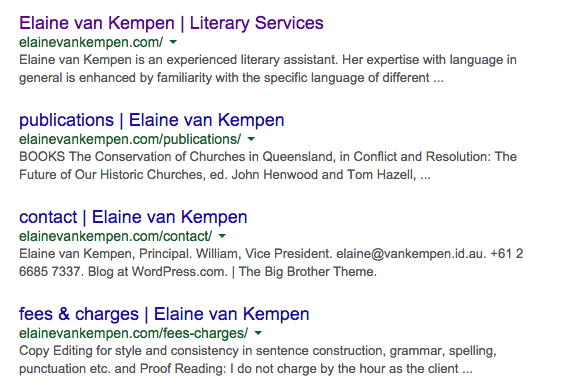
I’m not seeing a robots.txt message.
Cheers!
-
-


- The topic ‘robots txt’ is closed to new replies.
 WordPress.com Forums