rss feed no longer working
-
The rss feed for my blog is no longer working.
It worked up to at least Aug 2013 as I can see all posts up to 12 Aug 2013 (the last time I looked and did a “fetch feed”) in my feed reader.
But “fetch feed” now gets no posts after that.
If I check my feed address,
http://alien-heartbeat.com/feed/
it has only 2 very old posts from 2012.Is this broken or did I inadvertently step on a karma-rich life form?
The blog I need help with is: (visible only to logged in users)
-
I’ve tagged this for Staff assistance. Please subscribe to this thread if you haven’t already so you will see their reply and please be patient while waiting.
-
When did you change your theme? Your feed validates http://feedvalidator.org/check.cgi?url=http%3A%2F%2Falien-heartbeat.com%2F
-
The feed may validate, but it is showing the same 2 old posts from 2012 that the OP is talking about.
-
I suspect, on no particular evidence except the old “sticky posts stop RSS feeds dead” issue, that this may be theme related.
-
Thanks, Jennifer – I have already subscribed. I bought a new tin of Patience from the Patience Store yesterday.
thanks raincoaster. I changed themes just prior to March 19 2013 – well before this occurred, and have no sticky posts. But I appreciate your digging into your gut-feelings on this. Amazing how often one just ‘smells’ the answer.
-
@alienheartbeat, I have looked into things and wasn’t able to find anything obvious that could explain why your feed isn’t updating. I did find some invisible characters in the two posts that show up in the feed, and cleared those out, since that will often fix the feed, but in this case it didn’t help.
Do you usually compose your posts in the WordPress.com window or are you copy/pasting them in from MS Word or another word processor?
I have let our developers know about the issue and will let you know when I have an update for you. In the meantime, it looks like your posts are showing up in the WordPress.com Reader, so that’s a good thing. :)
-
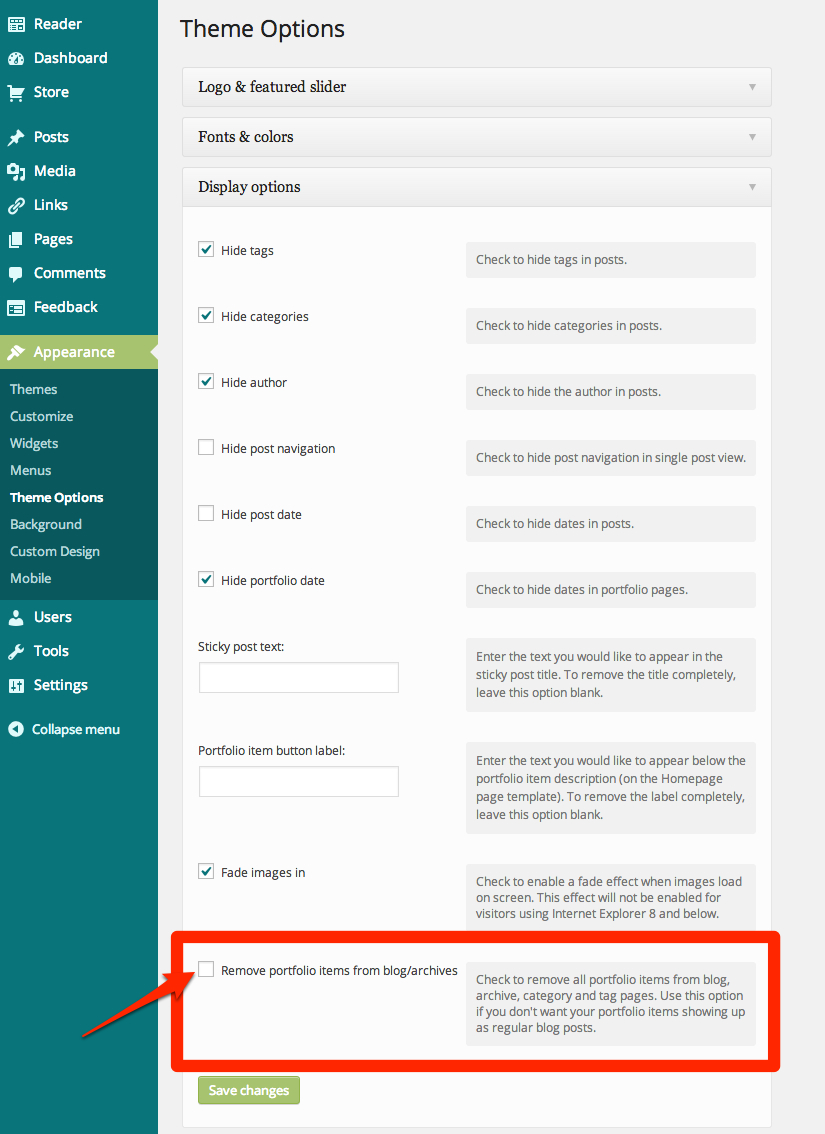
It turns out that there’s a setting in the Portfolio theme that allows you to “hide” certain content:
https://i.cloudup.com/AOD3CDOQUB.jpgI turned it off, and presto! Your content is now appearing again in your feed as normal.
Props to raincoaster for noting that it could be a result of a theme change. :)
-
Jackie
Magnificent detective work – thanks very much. The rss feed is lovely to behold.
I create all my posts as “portfolio items” and don’t use the normal “rolling post” concept at all. The reason is that I write the posts to try to have some timelessness, rather than being tied to a particular date. So, I have never liked the ‘archives’ concept and make all posts reachable by portfolio menus.
I had not realised (and I am guessing the theme authors also did not realise) that removing ‘portfolio items’ (ie all my items) from blog, archive, category and tag pages would also remove them from rss feeds.
In fact unchecking “Remove portfolio items from blog/archives” is no problem as it means that the posts now appear in a Rolling Posts page (which is invisible) as well as the portfolio pages.
(and in answer to your first question, I copy from a plain text editor (kwrite) into the WP processor then edit there.)
Thanks again.
-
-
I should mention the downside of that particular theme (“Portfolio”) is that it only allows the three most recent posts on the front page. A downside because, being a blog, people need to have immediate access to the most recent posts. I would prefer more, say 6 or 9.
Changing to a theme that would allow this is item number 8,467 on my to do list.
btw, thanks for your help on this. Your instincts on the answer were correct
-
-
Just a side note then to Staff:
If this is a bug, it should be reported to Theme Foundry, the theme author.
If not a bug, an explanation on the theme’s Showcase page would be especially helpful. :)
-
@justjennifer good point. I’m reporting the behavior to our theme developers so they can look into it further.
-
-
-
-
Howdy all!
From the theme author: “This is intended behavior. If the post is a portfolio item, it is no longer treated as a post. I’ll review the option description and consider updating it for clarity regarding this issue.”
-
I think perhaps that this is not 100%, completely and absolutely, “always and everwhere” (Milton Friedman), true.
It is not correct to say:
“If the post is a portfolio item, it is no longer treated as a post.”
Making a post a portfolio item simply allows it to be highlighted,
but does not cause it cease being a post.1. All my portfolio items still appear as posts:
eg mine:
http://alien-heartbeat.com/rolling-posts/
(though I don’t normally make this page visible)2. The Portfolio documentation agrees:
this is because a portfolio item is just a regular old WordPress post with some extra information associated with it. In the following sections you’ll learn how to set up your portfolio items, but if you remember: “A portfolio item is just a post” our instructions will (hopefully) make more sense!
3. When one writes a post, one gets a choice:
Portfolio Theme Post Options:
-  Show in featured slider
-  This is a Portfolio Item
Nothing there saying once you tick this box your post is no longer a post. It is in fact still a post.
What would be more accurate to say is that if one also checks the theme option:
Remove portfolio items from blog/archives
Check to remove all portfolio items from blog, archive, category and tag pages. Use this option if you don’t want your portfolio items showing up as regular blog posts.then in several ways the item is no longer treated as a full post, though in many ways it still is. And you will learn by trial and error, which is which. And “then my son, you will be a man”.


- The topic ‘rss feed no longer working’ is closed to new replies.
 WordPress.com Forums