

saving changes in customize
-
My theme is Bouquet; I’ve changed the background colour but it doesn’t save it even if it states it’s changed. The default background colour is pink, I’ve changed it to green but it doesn’t keep it.
The blog I need help with is: (visible only to logged in users)
-
Did you change it here?
Dashboard > Appearance > Background
http://amrainingdays.wordpress.com/wp-admin/themes.php?page=custom-background
Maybe you forgot to click “save changes”WordPress.com sells custom design upgrades. They allow us to “preview” change that do not actually display on the blog unless we purchase the upgrade.
If you have not purchased the custom design upgrade note that no changes you try out aside from those such as Custom Background, Custom Header, etc. which are stated on the theme description pages in the features column (right hand side) will be visible to visitors.
http://en.support.wordpress.com/custom-design/
http://en.support.wordpress.com/custom-design/editing-css/
http://en.support.wordpress.com/custom-design/custom-fonts/You do not need to load the design tools unless you have the Custom Design upgrade. All of these functions can be accessed from your dashboard – without loading the custom design tools – no upgrade required.
Appearance > Header
Appearance > Background
Appearance > Theme Options (applicable only to some themes)
Settings > Reading (set a static front page)
Site Title and Tagline > Settings > GeneralIf you are using the preview mode for the Custom Design upgrade some of the settings in that mode will save but they won’t show up on the front end unless you purchase the upgrade.
To go back to the free options, go to Appearance → Themes → Customize → Colors and click the “exit the preview” link in yellow at the top of the panel on the right.
See also: http://dailypost.wordpress.com/2014/01/18/video-tutorial-customizing-your-theme/
-
I saved the changes, I did all as you said, it’s not the first time I do these kind of things, for some reason it’s not working.
-
It works fine for me in my test blog so I’ll tag this thread for Staff assistance because I do not know how to help you. Another Volunteer may answer prior to Staff but I tagged the thread so it will not fall through the cracks and escape attention. Please subscribe to the thread so you are notified when they respond and please be patient while waiting.
-
Hi there, your background colour looks green to me in Firefox 28 and Chrome 34 on Mac – here’s a screenshot:
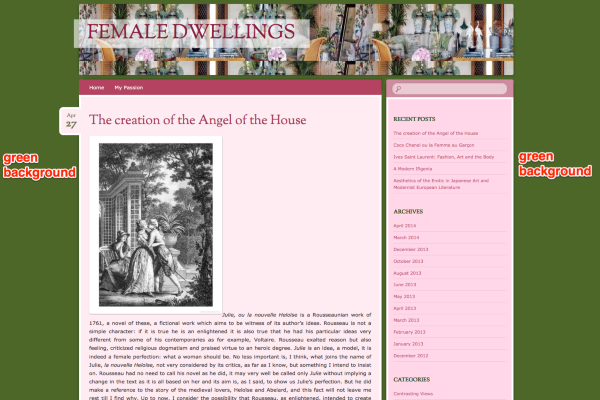
Would it be possible to upload a screenshot of what you’re seeing to help in troubleshooting?
Here’s a guide on how to make a screenshot, if you’re not sure: http://en.support.wordpress.com/make-a-screenshot/
You can upload the screenshot – in a graphic format like JPG, PNG, or PDF – in your Media Library so I can see it. Thanks.


- The topic ‘saving changes in customize’ is closed to new replies.
 WordPress.com Forums