

Saving is Not Saving my Work
-
I’m still trying to work with the new set-up we have because obviously, a new thing can’t get better unless folks are using it. Well, I ran into yet another quite vexing issue. I was working on a blog post for my blog where I included several pictures, brief stories and lots of details regarding the images. I save my work frequently despite auto-saves (thanks old-school video games for making me extra paranoid) so I know 100%, beyond a shadow of a doubt, I have saved my work up to 15-20 times during my sessions working on this particular blog post. I notice during the process at one point, my ‘save’ button goes to ‘grey’ and it won’t let me save. I wait a bit longer and continue to work to see if it comes back…it doesn’t. I am hoping at this point that the auto-saves may be working.
When it still seems like the ‘Save’ is having issues I go ahead and copy all my work to be safe. Sure enough, when I came back, it had only saved up to a point but I lost some of my work. It was no big deal as I was just at the half-way mark and it at least saved close enough to that point recouping was no big deal. The next time I go to continue my work I’m still having issues with the ‘Save’ button and ‘Auto-saves’. When I finally finish my blog post I hit ‘Publish’, go through all the bells and whistles and it says, “Published” of course and asks if I want to review my post, I hit yes. When I review my work…there is NOTHING there. Absolutely nothing. The page is blank. I go back to check/revise the post. The soonest and last ‘Save’ in my ‘Save History’…was where I was at my half-way mark. I was so frustrated. So, I used this last save to restart and I am continuing my writing portion in Open Office until I am done. I hope the next time I re-publish it, it will actually post and show, but we shall see.
This was obviously an issue I felt important to post about and if there is something I can try to fix it I am willing to do that if not, hopefully, this detailed account will help provide enough insight to help fix the issue so no other bloggers have to deal with the same headache I did. >.< Thank you for your time and efforts to help.
The blog I need help with is: (visible only to logged in users)
-
So sorry to hear this. Has anything like this happened before?
Usually if the save button is grey, it’s either saving right then or has saved since you last typed anything.
I tried to find the post you’re referring to but I don’t see it. Can you send a link? If you’ve already deleted it and you’re running into this issue with any regularity, next time make the post private so we can check it for you.
-
Yes; actually. It has happened but I either managed to work around or something else. Don’t ask me how cause I actually don’t remember. I think I just got lucky or something at one point or another and it posted just fine. I am including a link to the last post I tried posting that didn’t actually post like it was supposed to. I haven’t finished retyping it up yet to re-post it again if possible. It just took so much energy to put it together the first time is all. >.<
https://faeriegodmotherdesigns.wordpress.com/2018/07/27/faerie-godparents-friday-2/
I will keep that in mind next time if it does happen again. Thank you for the suggestion. :)
-
Hi there,
Thanks for providing a URL, when visiting the post in the editor I’m asked if I’d like to restore a saved daft:
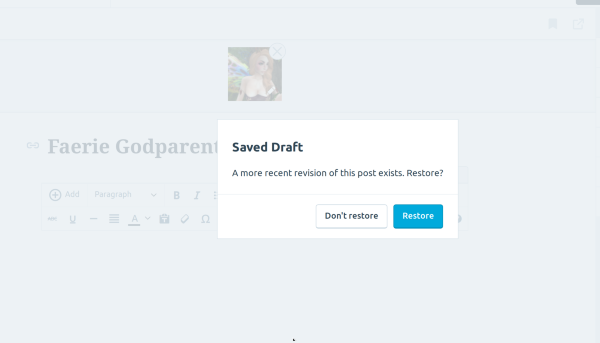
Can you restore this draft and let me know if it’s the most recent draft or if it contains lost work?
-
Without even restoring it, just looking at what’s there I can tell you it’s not the most recent save I had made. Right after the line, “He has Nivaro skin and ‘no.match’ hair on in this picture as well as the others,” I had several other pictures of my husband afterward, with more info that somehow just got lost/unsaved for whatever reason and that’s where I’m just baffled. Especially, when I had hit ‘Published’ it was ALL there, nothing missing, until I looked at the, “See your most recent post,” option to learn nothing posted except the Preview Image and the tags. :(
-
Hi there,
Do you have that missing content saved somewhere else? If you do, I suggest doing some troubleshooting to your browser by following these instructions:
* Clear your browser’s cache and cookies:
* Check that JavaScript is enabled and supported by your browser:
* Disable any ad-blocking or security extensions on your browser
* Check that you’re using the latest version of your browser:
If all of the above doesn’t work, just let me know and I’ll help further troubleshoot this issue.
-
Okay, so tried and did all of that.
What seemed to make the difference was when I switched from Edge back to Firefox. Edge has been giving me some issues with some of the other sites I frequent lately and upon switching to Firefox it seemed to do better, if not fine. I did have to restart from the last save WordPress had, but thankfully it wasn’t too much more after that. It did let me save and I did all this when I was using Firefox, not Edge. So perhaps the key is maybe just using Firefox over Edge right now for me, but it should be fluid on both. My entry posted just fine, all intact, the only issue I had was that it did not post to my twitter as I had instructed it and not sure why or what happened there. O.O;
-
@m00ntears Oh wow, so to be sure I understood this:
My entry posted just fine, all intact
Was the post restored when you switched to Firefox, or was it just that it saved properly this time where it had not saved in Edge? Thanks in advance for confirming.
the only issue I had was that it did not post to my twitter as I had instructed it and not sure why or what happened there.
If it had been previously published, it wouldn’t re-appear on Twitter, so that may be the issue there. If you continue to have issues like that going forward, though, please let us know.
-
Was the post restored when you switched to Firefox, or was it just that it saved properly this time where it had not saved in Edge? Thanks in advance for confirming.
I could restore it in either browser from the last save that it had saved, however, I was actually able to properly save and publish it via Firefox.
If it had been previously published, it wouldn’t re-appear on Twitter, so that may be the issue there.
*Facepalms* Yep; that was it. So that answers that. I completely forgot about this aspect. lol
If you continue to have issues like that going forward, though, please let us know.
I did want to let you folks know that I was able to post new entries on both of my blogs within Edge just fine, but those were exceptionally short entries as well, unlike my Faerie Godparent’s Friday Article which is considerably much longer. I am not sure what the real difference is between the shorter ones saving and publishing properly and the longer entry not.
On an additional note, my old Blog, “The Musings of Lady Gwendolynn,” says it is no longer a protected site of sorts, is there a way I can fix this so that it is again once more like before?
-
@m00ntears It’s a random guess, but I have to wonder if Edge lost its connection at some point. Do you remember about how long you were working on it in that last sitting?
my old Blog, “The Musings of Lady Gwendolynn,” says it is no longer a protected site of sorts, is there a way I can fix this so that it is again once more like before?Hmm, can you send more context on this? Typically protection is referencing site privacy or domain contact privacy. If you’ll send the text of the message you got and where you saw it, we’ll take a look.
-
It’s a random guess, but I have to wonder if Edge lost its connection at some point. Do you remember about how long you were working on it in that last sitting?
Oh gosh no! I know I was working on it for at least a handful of hours though, maybe 4 possibly a little more because I paused here there for getting more info on what I was blogging about.
Hmm, can you send more context on this? Typically protection is referencing site privacy or domain contact privacy. If you’ll send the text of the message you got and where you saw it, we’ll take a look.
Ironically I was going to upload two different photos I had for you to see side by side of both the top portion of the screen when it comes to my web-browser for either one of my blogs. Unfortunately, no upload image here so I’ll try to explain the best that I can.
Within my URL bar for the address of my 1st blog, “The Musings of Lady Gwendolynn,” there is a circle with an exclamation inside of it with the words, “Not Secure” next to it. My blogs address still contains the original https it had, but something has obviously changed now and it thinks my blog is no longer a secure site to visit. When I click on the circle with the exclamation in the middle it says this, “Be careful here! Some content on this page is not encrypted, which makes it possible for others to see or change information you share with this site”.
On my secondary blog which is much newer, Faerie Godmother Designs, it shows that it IS secure because it has the image of the ‘Lock’ at the beginning of the https of my blog URL and says this when I click on it, “Avast/WebMail Shield Root has identified this site as faeriegodmotherdesigns.wordpress.com, your connection to the server is encrypted.” And then after that, there is a link that says, “View Certificate” and “Should I trust this site?”.
But I’m not sure if this is just a personal issue on my end or Google or what. I am aware Google changed it’s security protocols concerning secured websites so I have no idea if it has to do with this either. Any info would be appreciated.
-
Ah. Can you re-upload your LinkedIn Image on this post? It seems that didn’t get properly converted to https:
https://gwendolynndedannan.wordpress.com/2014/12/07/the-difference-between-a-linkedin-profile-and-a-resume/Re: the edge issue, it *should* autosave, but for now I’d recommend periodically saving things (especially before you get up to take a break) to see if that will help you.
-
supernovia
Staff
Ah. Can you re-upload your LinkedIn Image on this post? It seems that didn’t get properly converted to https:
https://gwendolynndedannan.wordpress.com/2014/12/07/the-difference-between-a-linkedin-profile-and-a-resume/
Re: the edge issue, it *should* autosave, but for now I’d recommend periodically saving things (especially before you get up to take a break) to see if that will help you.I don’t think I can actually do that seeing as how that was not my blog post originally. I actually re-blogged that topic via the “Reblog” button provided by WordPress. I can remove it maybe, I think. I don’t know. If I do, would this automatically make my old blog secure again?
When it comes to ‘Saving’ my work, I save like it’s going out of style. That’s actually why I ended up posting about having issues saving in the first place. I never get up without saving first, because I never want to lose my work if I can help it. Also, old-school video games have made me majorly paranoid about saving (you know before a major boss fight you don’t see coming in the next room). So saving my work is not the issue, being able to save, now that was the original problem I was running into.
I haven’t written anything new but was about to post a new topic. I will most likely use my Firefox browser instead while I work for LONG topics considering the issues I have had regarding the saving of my work have been on the rather long topics as opposed to the short topics. Very odd.
-
I don’t think I can actually do that seeing as how that was not my blog post originally. I actually re-blogged that topic via the “Reblog” button provided by WordPress. I can remove it maybe, I think. I don’t know. If I do, would this automatically make my old blog secure again?
You won’t be able to edit that content, no.
I did some testing, and I think this is happening because that post was published, and you reblogged it, both before we started using https on WordPress.com. Deleting the reblogged post should make the warning go away, but on the other hand, the warning should also only appear if that post is visible on your site.
So after a couple more new posts that post will be pushed off your front page, and should no longer trigger that warning.
So saving my work is not the issue, being able to save, now that was the original problem I was running into.
I will most likely use my Firefox browser instead while I work for LONG topics considering the issues I have had regarding the saving of my work have been on the rather long topics as opposed to the short topics.
If autosave only happens on long posts it could be a case that the connection times out while autosave is in progress. So if possible, try experimenting with different internet connections to see if it makes any difference. Also please do let us know if this happens in Firefox as well.
And as an alternative, you might consider creating your drafts off-WordPress.com completely. For example, we have an app in Google Docs where you can write your post there, and then upload it as draft directly to your site for final formatting before you publish:
Introducing WordPress.com for Google Docs: A New Way Forward for Collaborative Editing
Or you can use an offline blog editor – this functionality is built into MS Word, for example:


- The topic ‘Saving is Not Saving my Work’ is closed to new replies.
 WordPress.com Forums