

Scroll Bar Missing in Visual Editor
-
The scroll bar disappeared some time yesterday and is still gone today. Is this a new feature to the visual editor?
It is very difficult to use the toolbar while writing or editing blog posts, especially long articles.
Here is a screenshot: screenshot-no-scroll-bar.jpg uploaded to my media library.
The blog post url is http://dandelionsalad.wordpress.com/2014/03/26/there-is-a-deeper-wave-than-this-by-david-swanson/ which is a long article, plus video.
The blog I need help with is: (visible only to logged in users)
-
-
Just updated FF to 28.0. The scroll bar is still missing.
At the end of the post, there is a huge amount of white space. It seems like I have to keep on scrolling forever.
-
Sorry to take so long to reply to you on this after asking you to create a new thread.
Unfortunately at this time I haven’t been able to reproduce this behavior in Firefox in Windows, and so far haven’t seen any other reports about it, so I’m not sure why it may be occurring for you.
Is this issue only happening in Firefox, or does it occur in other browsers? Have you tried changing your browser’s view (Control + or Control -) to see if that fixes it?
-
Thanks, jackiedana. No other staff person has responded to this yet.
It was reported by someone using WordPress.org yesterday or the day before. https://en.forums.wordpress.com/topic/disappearing-scroll-bar-and-long-blank-text-box?replies=6#post-1719275
I tried using Chrome and no scroll bar there either and the huge amount of white space.
I don’t know what you mean by “changing your browser’s view (Control + or Control -)”.
Here is a screenshot: https://www.flickr.com/photos/lorri37/13500421365/
-
OK, tried the Ctrl – and +, and the plain – and +, decreasing and increasing the screen and still no scroll bar.
This started with all the other changes (not improvements) with the blog editor last week so figured other people would have the same problem.
-
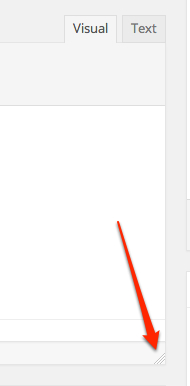
As I noted in the other thread, one idea that may be worth trying is to resize the editor window itself to see if that restores the scrollbar:
-
No, that doesn’t work either.
Everything was fine until the other day when WordPress.com started messing with the editor.
This did happen to someone else, too, as I stated in an earlier comment.
-
I saw the other thread, and replied there as well.
One more idea:
1) Log out of WordPress.com
2) Clear your browser cache in Firefox by using the key combination Ctrl + Shift + Del
3) Log back into WordPress.comLet me know if that helps. If not, for the moment I’m out of ideas and will need to keep an eye on this issue.
-
I’ve logged in and out and cleared cache/history several times over the past week. Did it again and still missing the scroll bar. I’ve restarted the computer, too and nothing changes.
But thanks for the suggestions.
-
I’m very sorry, but for the moment that’s all I’ve got. I apologize for the inconvenience. Please keep an eye on it and let me know if anything changes. I’ll also try to watch for other reports of the same issue, as a pattern can often help pinpoint the cause.
-
Off and on I have had an issue with the scroll bar with Firefox (what ever is current) – but clicking with the mouse in the editor window gave the vertical scroll bar back – not a clue if this is the issue here, but just in case
-
Thanks again for your attempts to fix this technical problem. Anyone else looking into it?
It is VERY inconvenient, especially since most of the blog posts are long and need some editing from the tool bar. I’m having to scroll up and down several times in a few minutes. It’s making me dizzy.
Add this to the fact that we cannot paste with formatting from Word and there is so much more editing to do for each blog post. I publish an average of 3 per day.
I added an add-on that takes the cursor to the top/bottom, but that doesn’t help because the huge amount of white space that is in the editor box now.
-
Thanks, auxclass. No, I’m clicking quite a bit inside the text box and the scroll bar doesn’t come back. I also tried this on Chrome as well as Firefox with same results.
-
We used to be able to set the number of lines for the text box in the editor, I think it was under Settings–Writing. It’s not available any longer. Right now the text box is 100 lines!
-
@dandelionsalad we’re still looking into this issue. However, we’re finding it difficult to pinpoint why it is happening for you and not for other users. I really appreciate your patience as we try to get to the bottom of it.
-
Thanks so much, jackiedana, I do appreciate you looking into this issue.
It did happen to at least one other person/blog.
-
Hi. I just wanted to make a quick note on this thread too – I work as a developer for a company on the WordPress platform (redtricycle.com) and at least one of our writers is having this exact same issue. We haven’t been able to fix it via the regular channels either. Let me know if screen shots from our editor would help. Thanks!
-
Hello again all. So, I heard back from a tech at WordPress VIP, who told me this:
“Several users have reported that the post editor is resizing to be too long for the screen, and that seems like a possible culprit here as well. Can you tell me whether your editors are able to resize the box and, if so, whether the setting persists?”
Re-sizing the text box fixed the issue for our editors. Maybe this will work for you as well?


- The topic ‘Scroll Bar Missing in Visual Editor’ is closed to new replies.
 WordPress.com Forums