Scroll Bar Missing in Visual Editor
-
Thanks for the additional info about the too long text box area for the blog editor. As a user I cannot resize the text box. I’ve tried resizing my browser’s screen but that doesn’t bring back the missing scroll bar or reduce the length of the text box.
-
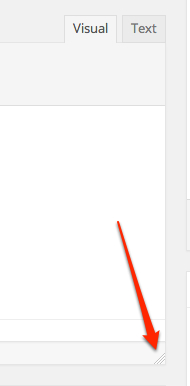
You can resize the box in the editor by dragging on the corner of the editor (not the browser) window: https://i.cloudup.com/C4saBeQq6B.jpg
-
I write quite long posts on a regular basis, and have resized my text box in the editor to accomodate that. Even with the very long text box, the scroll bar is funtioning properly.
-
It’s a very temporary fix. Once I click Save/Update it goes back to being 100 lines long. It’s also not fun resizing the 100 line text box. I do so much editing per post that resizing after every Save/Update isn’t going to work for me. Might as well scroll up and down with the browser’s scroll bar.
I also cleared the cache/history and tried it. No change. I’ll try logging in and out, too. Maybe a combination of all these things will bring it back.
Thanks for showing me how to resize the text box; didn’t realize we could do that. Never had a need to do that before.
-
-
@dandelionsalad – something’s strange, because once I re-sized my text box, it stayed that way. I’ve not had to re-size it for months.
-
The scroll bar was working just fine until last week when they made all the other changes to the editor. Not sure why my blog is having trouble and most everyone’s isn’t? Perplexing.
Good to know how to change the text box size IF I ever get the scroll bar back.
-
OK, I went to Blogger as I have an old blog there and made a new post and edited an older post, both had the scroll bar working fine. So, it’s something to do with WordPress.com and not my computer. I am using Firefox and it worked in Blogger, but on WordPress.com.
-
Well, to play devil’s advocate, just because something works on Blogger it doesn’t necessarily mean that it’s on our end and not your computer. They are running completely different code and it will function very differently. :)
I’m really just perplexed because you can’t get this to work, because other reports suggest resizing the text box has helped. It’s really just bizarre.
At any rate, I’m still on top of it – I’ve just run out of ideas for the moment.
-
True, good point. It could be my computer and WordPress not working like it should be working.
I can resize the text box, but it doesn’t stay fixed.
Thanks again for attempting to find a solution to this technical problem.
-
Heya @dandelionsalad! One of our developers said the scrollbar issue should be solved. Could you try logging out of WordPress.com, clearing cache, and then log back in, and see if the issue is resolved for you?
-
No, it didn’t come back. Thanks for letting me know that someone is trying to fix this technical problem.
-
-
Me, too. I was excited for a moment when I read your message.
Sometimes the scroll bar shows up but the length is still 100 lines long. So it doesn’t do anything.
-
Hey, it’s back now. Hope it is going to stay. But I sure am pleased that it is working again.
Thank you all so very much.
-
Hooray! I was hoping the fixes that they were working on would eventually catch up to you. :)
-
Thanks again, jackiedana. It’s so much easier to post and edit now with the scroll bar back again.
-
-
Hello, I’ve just read through the posts and I’m having an issue where the scroll bar is not appearing in the media browser when I wish to insert an image into a page. I attempted to do this in all browsers – the scroll bar reappeared in firefox for a few seconds and then disappeared again. Should I start a new thread? Thank you.
-
@louiseard please try the following:
1) Make sure your browsers are up to date. You can download current versions at http://browsehappy.com
2) Try logging out of WordPress.com, clearing your browser cache, and then logging back in to WordPress.com.
3) Try resizing the editor window by dragging in the corner like so:
https://i.cloudup.com/C4saBeQq6B.jpg4) If all else fails, the following JS can be run from the browser console when on the Edit Post screen:
setUserSetting( ‘ed_size’, 200 );
This page will show you how to access your console:


- The topic ‘Scroll Bar Missing in Visual Editor’ is closed to new replies.
 WordPress.com Forums