

Search Button Twenty Fourteen theme
-
Hi There,
I’m currently using the Twenty Fourteen theme. If you take a look at my blog you will see that only the corners of the search button are linkable. I’d like to change it to the whole area of the button, to make it idiot-proof ;) Does anyone know of a way to do this?
Cheers!
Marion
-
Hi Marion!
As you’re using the self-hosted version of WordPress, please ask your question in the Themes and Templates section of WordPress.org forum. Here’s the direct link for Twenty Fourteen theme: http://wordpress.org/support/theme/twentyfourteen
Good luck!
-
Hi hfzrhmn,
Unfortunately no one has gotten back to me in that forum, I was directed here from another Twenty Fourteen support page. It appears to link to an adjustment within the css style sheet. Is this anything you have heard of? I’m really not sure where to look to resolve this.
Cheers,
Marion
-
Marion, I have taken a look at your search, and the CSS associated with it and see no real differences. If you look at the Twenty Fourteen demo site here, the search box toggle works correctly. If I hide your slider at the top, your toggle again works correctly.
Disable your slider and see if that fixes the issue. If so, I would contact the slider author about it.
-
Forgot the link to the Twenty Fourteen demo site here: http://twentyfourteendemo.wordpress.com/
-
I used this theme, but i got a problem. In my my website very time i pick each posts i made, it opens another Tab. Any body knows how to stop this?
-
Hi @islandro, the site associated with your username here is using WordPress, but is not hosted here at WordPress.com. It is a self-hosted site using the software from WordPress.org. There is a forum for the self-hosted version of Twenty Fourteen at http://wordpress.org/support/theme/twentyfourteen .
I did take a quick look at your site and clicked on several post titles on your main page and each of them opens in the same browser tab, so this may be a preferences setting in your browser. I would look there first, as I see no code in your site that would force the posts to open in a new tab.
-
Thanks on the reply thesacredpath. I did tried opening my website in windows 7 and 8 , google chrome tablet, iPhone and on ipad.. all these, it opens in another tab. I’ll try to check on the forum you gave me.
my website is http://www.islandrover.net/ -
I tried your advise. I added the Menu “Canberra Deep Space” without a tick on the ‘open in a new tab/window’ however it still opens in another window. At this time, I still put the additional menu in my website for your review.
I don’t understand really what was going on. Last night I checked my website on my friend’s Mac and it doesn’t open in another window. While I check on my windows 8 – Internet Explorer 11, the problem was still there. Same problem on IE8, Firefox and on my iPhone.
(My apology on the original post here, I know this is out of the topic which you started) -
I’d ask around at wordpress.org and see what they have to say. I checked my site, which is running Twenty Fourteen and it does not do this.
-
Hi thesacredpath, is there any updates on my issue? If there are any ideas/suggestion you can give me, I would be happy to know.
-
Hi islandro! I think thesacredpath was recommending that you ask at http://wordpress.org/support/ since that is the best place for WordPress.org questions.
I did research this for you a little so I could give you a good start. I checked http://islandrover.net/ and looked in the page source. Here is what I see:
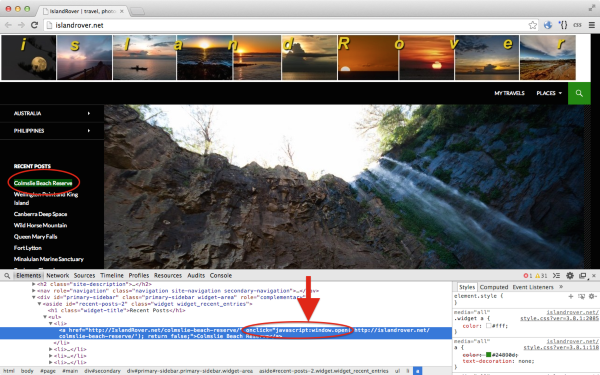
I noticed that every link has some JavaScript attached to it. That is not being added by the Twenty Fourteen theme. It looks like it might be coming from a plugin. If you want to test that theory, you can temporarily turn off all plugins except Akismet and re-test the links. If they behave normally, re-enable each plugin you were using before until the link behavior changes—then you’ll know if a plugin is the culprit and which one it is.
For further help, you should ask at http://wordpress.org/support/


- The topic ‘Search Button Twenty Fourteen theme’ is closed to new replies.
 WordPress.com Forums