

Search missing from WordPress Themes pages
-
The Themes page at http://theme.wordpress.com used to include a “Find a Theme” button at the top. When I load the page now, I see the button for a fraction of a second and then it disappears.
Did WordPress remove the search function from this page?
-
If you mean the search function that used to be at the top of this page http://en.wordpress.com/themes/ then yes it’s gone and it’s so annoying that it makes me want to scream.
I’ll tag this thread for a Staff follow-up so they read our feedback. Please subscribe to the thread so you are notified when they respond and please be patient while waiting.
-
You need to click on the blue “Find a theme” box, and then a drop-down menu appears with various filters and a search box.
-
There is no “Find a Theme” now.
WordPress Themes
Staff Picks| Trending| Photography| Portfolio| Magazine| Blog| All |More -
Tt: but the blue button appears on the page
http://theme.wordpress.com/ as @jackiedana said. -
Oh wow! So it does. Thanks so much for that link. http://theme.wordpress.com/
I have been clicking this link http://en.wordpress.com/themes/ found at the top of this page.
-
-
I think this might be a browser issue. When I look at either of those theme pages using Chrome, I don’t see any search feature… but I do see it in Firefox.
Can someone else try this to confirm? Thanks very much!
-
Using Safari, and when I go to this page
http://en.wordpress.com/themes/
the search function is found under the little magnifying glass at the right of the other theme categories.
-
@wpteach when you go to http://theme.wordpress.com/ do you not see this (I’m using Chrome)?

Clicking on the box where I indicated with the red box should open a drop-down menu where you can search for themes.
On the older page, like @ifmomsaysok said, there’s a magnifying glass:
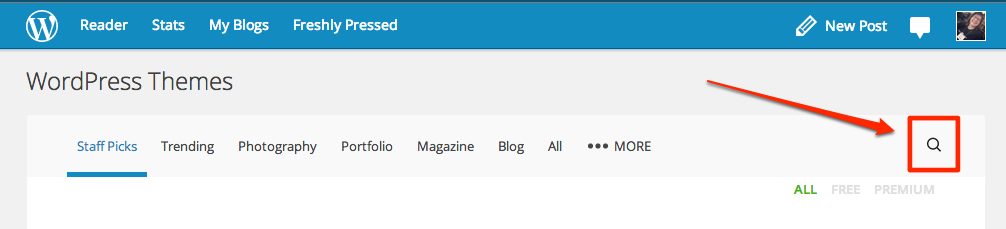
If you don’t see either of these, I’d really love to have a screenshot for what you do see. If this is the case, could you please take a screenshot and upload it to your media library?
-
This is strange: When I went to take the screenshots, the “Find a Theme” search button was back on the new page and the magnifying glass had returned to the other page!
Earlier, on the new Themes page, I saw the “Themes” headline at the top, without the button to the right of it. And the http://en.wordpress.com/themes page had the All, Free, and Premium links… but no magnifying glass.
Any idea what could have happened to make them re-appear?
-
I really can’t explain what happened other than that you may have viewed pages without all of the elements loading properly.
I’m glad they are working now. If they stop working in the future, please take a screenshot and let me know.
-
-


- The topic ‘Search missing from WordPress Themes pages’ is closed to new replies.
 WordPress.com Forums