

Sela: Change name of navigation menu on phone version without losing icon
-
I’m using the Sela theme. When I view the site on a phone, the navigation menu is called “Menu.” I wanted to change that because it’s a restaurant website, so “menu” is a confusing term– people expect that navigation menu link to go straight to the food menu.
I used the following CSS to replace the word “menu” with “navigation.” But this also hides the 3 horizontal bars icon that should appear to the left of the word. Any way to keep that icon, but replace just the text? Here’s what I used:
.menu-toggle {
visibility: hidden;
position: relative;
}.menu-toggle:after {
visibility: visible;
position: absolute;
top: 10;
left: 0;
right: 0;
content: “navigation”;
}Thanks very much,
VanessaThe blog I need help with is: (visible only to logged in users)
-
Hi Vanessa,
We should be able to work around this by re-adding the hamburger icon. Can you change out the code you’re using to this?
.menu-toggle {
	text-transform: lowercase;
	width: 100px;  /* Widens area so navigation doesn't wrap */
}

.menu-toggle {
	visibility: hidden;
	position: relative;
}

.menu-toggle:after {
visibility: visible;
position: absolute;
top: 10;
left: 0;
right: 0;
	font-family: genericons;
	content: "f419" " Navigation";
}
Let me know if that works!
-
Thanks so much, that’s way better! One persnickety thing: the bottom of the word “navigation” doesn’t line up with the bottom of the menu icon, the way the original did. Possible to tweak it?
-
Jeremey is away for the weekend, so wanted to check in here. :)
That alignment probably will never look perfectly centered because the icon has some transparent space around it and the bottom of “navigation” is aligned with the bottom of that transparent space.
The alignment is off in our demo theme too, except they’re aligned to the top because “Menu” is built in as a separate element in the theme’s CSS:
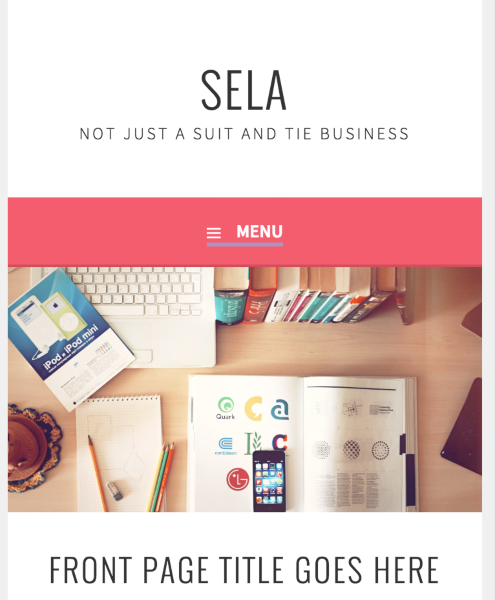
I tried out changing some properties of the ::after element so that I could use “vertical-align” to adjust this, but without a way of splitting the two elements that property won’t be useful.


- The topic ‘Sela: Change name of navigation menu on phone version without losing icon’ is closed to new replies.
 WordPress.com Forums