

sela theme
-
Hello,
I am trying to get more out of my current theme, Sela. I can not tell if the theme preview I see on my dashboard has a static image below the blog’s title and menu, or if a sliding image is possible? Either way, I am not sure how to create either.
Also, is it possible to change the color of my current menu, which houses home, info and press, to black?
Thanks!
The blog I need help with is: (visible only to logged in users)
-
Hi there!
I love Sela :)
First off, I wanted to give you the setup details for the theme:
https://wordpress.com/themes/sela/Toward the top of the information page, you’ll find how to setup your static homepage.
Also, is it possible to change the color of my current menu, which houses home, info and press, to black?
To change the color, click the link below to go to your customizer:
https://thechicstreetdotcom.wordpress.com/wp-admin/customize.php?url=https%3A%2F%2Fthechicstreetdotcom.wordpress.com%2FThen, click Colors. Where you see 4 circles, you’ll click the white circle (2nd from the left). Then you’ll be given the option of several colors to choose from.
You can also opt for a brand new palette, if you want to try a different color scheme.
I hope this helps! If you have any other concerns, drop me a note. Thanks much!
-
Thanks! I will take a look at both suggestions. Also, is there a way to change the “Older Post” tab at the bottom to numbers and take the black box around it or them away?
-
Hey there!
I’m not sure exactly what you mean by changing it to numbers. The button text must be the same on all your pages, so you cannot have a 1 on page one, for instance, and then a 2 on page two.
If you’d like to change the background color of the button, or the text, since you have the Premium upgrade, you can adjust your theme’s CSS to change the color of that object.
If you’d like to give this a try, go to your customizer by clicking the link below:
https://thechicstreetdotcom.wordpress.com/wp-admin/customize.php?return=%2Fwp-admin%2FThen, click CSS in your menu. In the CSS Revisions box, please paste the following underneath all existing text:
#infinite-handle span {
background-color: #eee;
color: #000;
}Then Save your changes. That should do the trick!
For more detailed instruction on how you can make CSS adjustments on your own, take a look at these two links:
https://dailypost.wordpress.com/2013/06/21/css-intro/
https://dailypost.wordpress.com/2013/07/25/css-selectors/If you don’t want the button at all, you can opt for infinite scroll, so new posts load as your visitor reaches the end of the page. More info here:
https://en.support.wordpress.com/infinite-scroll/Does that work better for you?
Thanks so much!
-
Thank you for all your help! I have one more question. Is it possible to place a few thumbnails at the top of my blog and then have the regular post show as they do after that?
Kind of like this:
http://www.portablepackage.com/Also, is it possible to feature related posts under each entry?
(also on the blog I listed as an example above)Thanks!
-
Hi there!
The exact layout in the website you provided isn’t possible with Sela. The areas that are available to “fill” in the homepage don’t provide that type of spacing. However, I do notice that your front page is displaying blog posts…should you prefer, you can set your blog posts on another page, and have more flexibility with what you place on your home page.
Those instructions are all listed on the initial links I provided. There are grid areas you can definitely fill, as seen here:
https://selademo.wordpress.com/You might also opt for a different theme, should you want a different layout. I can help, if this is the direction in which you want to go.
Let me know if you have any other questions. Cheers!
-
I was thinking of paying for the Moka theme? It looks like it provides a sliding banner and a few other options for other blog updates. I am clueless with these things though, so I will most likely have questions! :)
-
I already have a question, and I hope it is not a silly one, but I noticed that on the demo for Moka, it shows the first letter for aeach post as bold and large. Is this possible (attached pic)? If so, how do I create this for my blog?
Thanks!
-
It won’t let me attach the screenshot. I hope I gave enough detail to understand my question :)
-
Hey there!
If you want to send me a screenshot, you should upload it to your Media Library, just like you’d do with any other image. Then, let me know when there’s something I should take a look at!
The Moka demo uses a little trick to create that large first letter. It’s called a dropcap. I’ve created a draft post for you to look at:
https://wordpress.com/post/54690263/12541/?optinCheck out the preview of the draft and you’ll see the dropcap in action. Then, in your editor, look at how I’ve surrounded the first letter with HTML code. You can do the exact same thing in your own posts.
Give that a try and let me know how it works out! Thanks again :)
-
You are amazing!! Thank you! It worked great. Last question… promise. Is it possible to get rid of some of the extra space between each post?
-
Hi again! So glad I can help out!
I’ll give you some more CSS code to adjust the spacing:
.entry-footer {
padding-top: 10px;
}.site-content .post, .site-content .type-attachment, .search-results .site-content .page {
padding: 20px 0 0 0;
}Use the same instructions I’ve provided about how and where to enter that code.
Thanks so much!
-
-
-
Hello,
Can I ask one more question (hehe)? Is it possible to make the text on the side menu larger? Also, the website banner above it?
I am referring to the menu on the left side of my blog :)
Thanks!
-
Howdy!
I can help with this, but first off it appears you have some extra curly braces in your CSS editor:
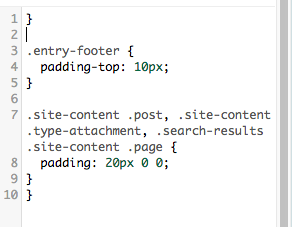
Deleting those extra } will help out a lot. :)
Next add this code to double your font size:
#site-nav ul li a{
	font-size: 1.75rem;
}
And play around with that 1.75 number to find the size you prefer. You’re currently at 0.875rem.
Also, the website banner above it?
This is as big as we can get the header image without changing the ratio of your sidebar and the content space:
#masthead, #site-header , #sidebar{
	padding: 0;
	width:100%;
}
-Alex G.
-
Thanks! That helped a lot. Also, is there any way to eliminate some of the white space between posts? I was able to get rid of some of it, but there is still quite a bit there.
And I was not sure if it is possible to change the look of the bottom of the blog where it says “Older Posts”? I would prefer a different way to click to older posts, but I am not sure if that is an area that I can customize?
Thanks for the help!!!
Miranda
-
So almost all that space between posts is from each post’s footer:
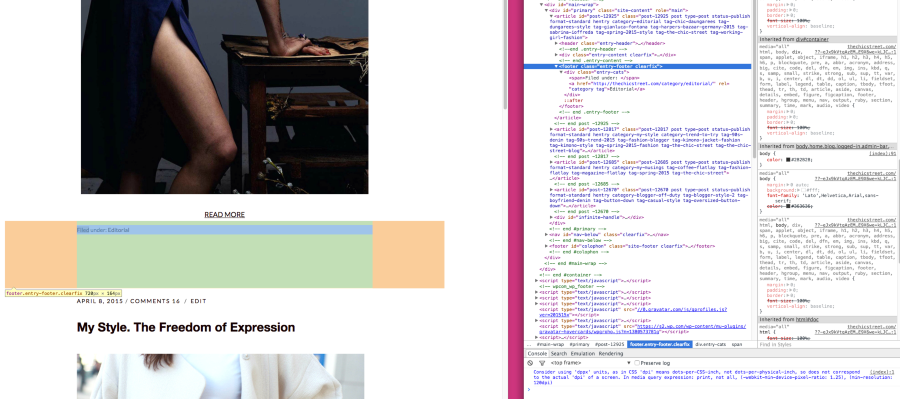
On mobile taking away that spacing can often lead to unintentional overlapping of text, so this will only affect tablets/desktops:
@media screen and (min-width:481px){
.post .entry-footer{
	margin-bottom: -100px;
	}
}
Play around with that ‘-100’ number though. :)
And I was not sure if it is possible to change the look of the bottom of the blog where it says “Older Posts”? I would prefer a different way to click to older posts, but I am not sure if that is an area that I can customize?
The only other option that comes to mind is enabling Infinite Scroll here:
https://thechicstreetdotcom.wordpress.com/wp-admin/options-reading.php
But in your theme, that’s only possible if you remove the widgets from the footer widget areas.
-
Awesome! I will wrap this up after this last two questions and then let you help others :)
However, the theme says there is a “Post Slider” option. Does that mean that I can display a widget that shows a slideshow of recent posts?
Also, the theme shows a black outline going around the posts. Is this possible with my blog? I am just trying to find a minimal way to break up the all white.
Thanks!!!
-
Hi again!
However, the theme says there is a “Post Slider” option. Does that mean that I can display a widget that shows a slideshow of recent posts?
The post slider is more like a featured content section, not a widget area. The top of this page has an example:
https://mokademo.wordpress.com/alternative-front-page/
The slider looks for any posts with a featured tag you can select in Theme Options. Unless you have tagged posts with that particular tag, they won’t be displayed in the slider.
There are full steps for setting up the post slider here:
https://wordpress.com/themes/moka/support/
Also, the theme shows a black outline going around the posts. Is this possible with my blog? I am just trying to find a minimal way to break up the all white.
I apologize, I’m not finding a black border around posts on the Moka theme demo:
https://mokademo.wordpress.com/
Were you possibly referring to the image here?

That dark border around the whole is just a marketing image from the theme designer, it’s not actually part of any sites using Moka.
-Alex G.


- The topic ‘sela theme’ is closed to new replies.
 WordPress.com Forums